NETGEAR is aware of a growing number of phone and online scams. To learn how to stay safe click here.
Forum Discussion

xXoldredXx
Apr 14, 2025Aspirant
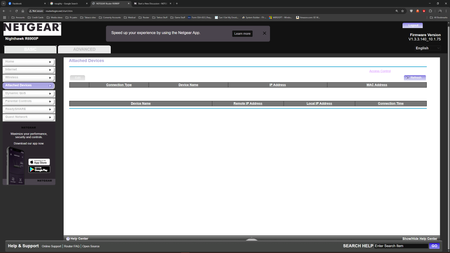
cant read word in bower app Nighthawk R6900P
font not showing or colors are messed up heres what the app page looks like
xXoldredXx
Apr 15, 2025Aspirant
thank , after going threw all off the dark modes , it was the experimental mode in chrome://flags
turned it off and it fixed, still have dark mode in themes going and everthing i can read now
thank you so much

FURRYe38
Apr 15, 2025Guru - Experienced User
Something I use as well.
It's just the routers web page is based off some older HTML code that using newer browsers and dark mode web pages, makes the older web pages appear incorrectly. Something you can try and see if it help some, set the flag for dark mode and set the mode to Enabled with selective inversion of non-imaged elements if you see that item there. Something I noticed years ago after dark mode was made available, web pages appeared dark however pictures, icons and gifs were inverted in negative display in the browser. I happened to stumble on this one item for this flag and after I enabled it, all items on the web page are now displayed correctly.
Can try this, however may not help. Just be aware of older router web pages with dark mode features enabled.
Enjoy.