NETGEAR is aware of a growing number of phone and online scams. To learn how to stay safe click here.
Forum Discussion

philostow
Dec 12, 2021Guide
http://192.168.1.1/USB_Folder_edit.htm?editFolderID=0
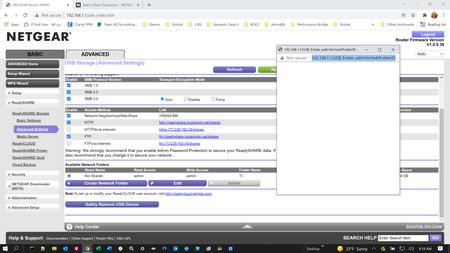
I recently has to reset my router. Everything is back in working ordeer except that I cannot configure my USB drives. When I clieck edit or create network folder I get a popup with no content! See...
philostow
Dec 12, 2021Guide
Tried all that. Thanks
philostow
Dec 13, 2021Guide
Sometimes when I click on the Readyshare advanced tab the screen shows up blanks! I've tried using Google, Edge, and Firefox. This all was working last week! This is very frustrating. I've even tried using different USB flash drives (sizes and brands).
- FURRYe38Dec 13, 2021Guru - Experienced User
Sounds like something in FW is broke.
You might downgrade back to what worked.
You also should try Voxels 3rd party FW for the R9000 he develops for.
- philostowDec 14, 2021Guide
Good idea, downgrading the firmware. I just tried that but no joy. Returned to latest FW and kept trying. Evenetually if I let the empty popup "stew" for awhile, I noticed that the shares worked. Bizarre. Maybe after doing some research I'll look into the 3rd party sw you recommended. I used to run ddwrt fw on my old netgrear 54G router! Thanks.
- FURRYe38Dec 14, 2021Guru - Experienced User
Wondering if there is some USB enumeration hang time happening. Is there any drive LED activity when this popup window appears?
Glad it started working.

