NETGEAR is aware of a growing number of phone and online scams. To learn how to stay safe click here.
Forum Discussion

Famous8
Jan 02, 2022Aspirant
Can't change web access port on my Nighthawk R6400v2
I'm trying to setup a server and have to change the port of my router's web interface page.
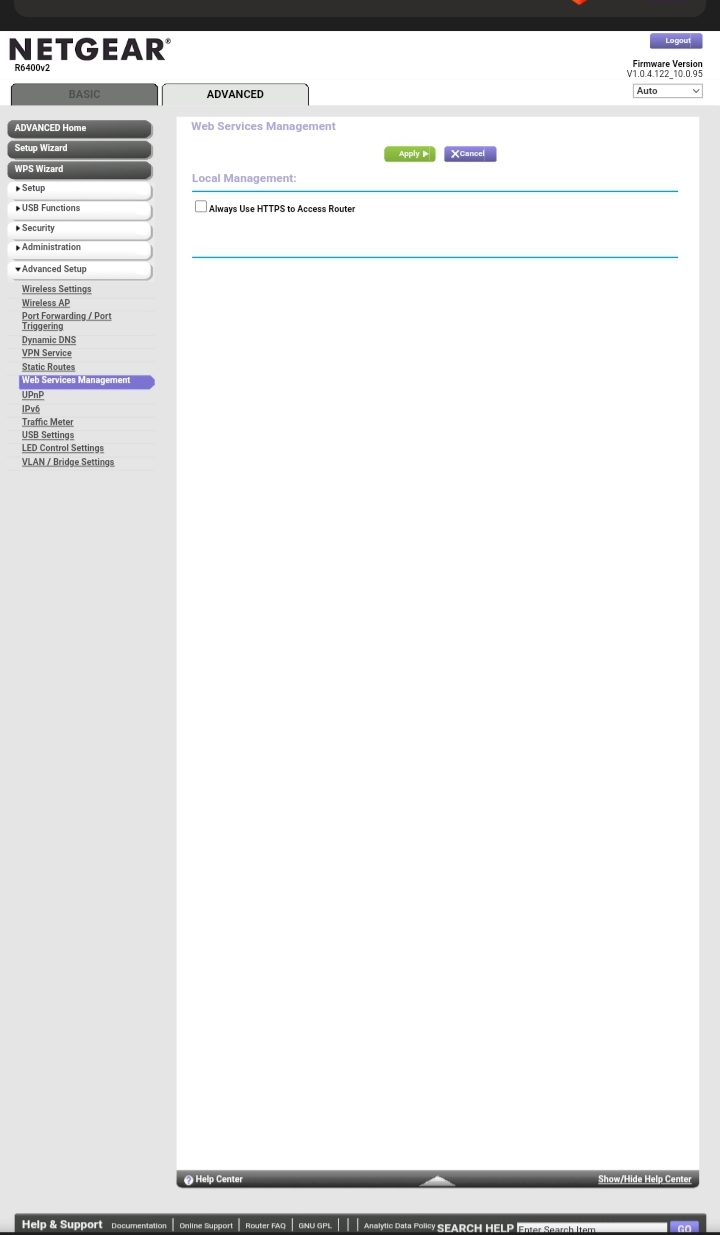
It is currently set to port 80 but I would prefer another port. But whenever I go into Advanced - Advanced Setup - Web Services Management, there is no option to change the port, Only an option to enable HTTPS. There's a picture of the page attached.
How can I change the port for the web UI.
Thanks in advance for your help!
It is currently set to port 80 but I would prefer another port. But whenever I go into Advanced - Advanced Setup - Web Services Management, there is no option to change the port, Only an option to enable HTTPS. There's a picture of the page attached.
How can I change the port for the web UI.
Thanks in advance for your help!
1 Reply
- michaelkenwardGuru - Experienced User
Famous8 wrote:
It is currently set to port 80 but I would prefer another port. But whenever I go into Advanced - Advanced Setup - Web Services Management, there is no option to change the port, Only an option to enable HTTPS. There's a picture of the page attached.That page is to set up Remote Management. It used to be called Remote Access in the menu structure.
If you are asking about setting that up – it should be there on that page – what firmware do you have on the router?
It probably doesn't make any difference, but your hardware doesn't qualify as one of the Nighthawk WiFi Routers covered here.
You might get more help, and find earlier questions and answers specific to your device, in the appropriate section for your hardware. That's probably here:
General WiFi Routers (Non-Nighthawk & Non-Orbi) - NETGEAR Communities
In the meantime you could visit the support pages:
Support | NETGEAR
Feed in your model number and check the documentation for your hardware. Look at the label on the device for the model number.
You may have done this already. I can't tell from your message.
I mention it because Netgear stopped supplying printed manuals and CD versions some years ago and people sometimes miss the downloads.