NETGEAR is aware of a growing number of phone and online scams. To learn how to stay safe click here.
Forum Discussion

FizzBuzz
Jan 20, 2020Aspirant
Nighthawk R6900P MU-MIMO degraded speed
I just upgraded my internet to Fiber Gigabit. I also bought the Nighthawk R6900P MU-MIMO from Amazon. I was super excited once the Fiber Gigabit internet was all hooked up and ready to go. But to my dismay, when I connect the Nighthawk to the ethernet cable from one of the ports from the ISP's modem/router, the download speed can't go over 180~ Mbps, but the upload speed is 840~ Mbps. I try plugging this same ethernet cable directly to my laptop, and I am getting close to gigabit speed as expected: 940~ Mbps download/840~ Mbps upload. I also try a few CAT 5e / CAT 6 cables from the Nighthawk to my laptop, none help. I even plug these cables to the ISP's modem/router port and still achive the gigabit speed. Bad cables theory all ruled out. Traffic meter, QoS, Guest WiFi all disabled on the Nighthawk.
I found this resolved post: https://community.netgear.com/t5/Nighthawk-WiFi-Routers/r6900P-Wired-Ethernet-Speed-is-extremely-slow/m-p/1718539/highlight/true#M123474
I'm a little unclear on the solution in that post: new router or reverting to older firmware. My current firmware version is 1.3.1.64_10.1.36, which is a few versions newer than the OP's reverted version.
Defective router? Bad firmware update? Any suggestions are greatly appreciated.
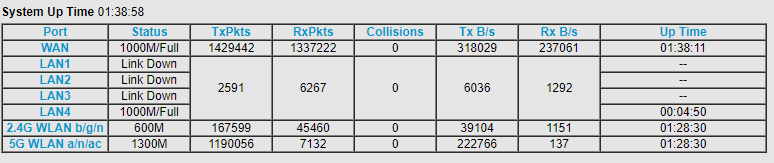
Edit: the internet port stats also show both WAN and LAN port as 1000M/Full (attached image).
Update: A replacement was delivered today. It was able to achieve gigabit speed right off the bat (see attached image - speedtest-wired-2020-01-27.png). The firmware version that came with the replacement was V1.3.0.20_10.1.1, which I left alone, didn't upgrade. So it seems the original router, which I already sent back, was defective, or the new firmware version or both.

3 Replies
> [...] I also bought the Nighthawk R6900P [...]
Why?
> [...] when I connect the Nighthawk to the ethernet cable from one of
> the ports from the ISP's modem/router, [...]Which port, exactly, of which device, did you connect to which port,
exactly, of the other device?Does your (unspecified) "the ISP's modem/router" have a maker and
model number?Cascading multiple routers can cause multiple problems. If the
purpose of adding the R6900P was to extend the wireless-network coverage
of your (unspecified) "the ISP's modem/router", then you might want to
configure the R6900P as a wireless access point.
Visit http://netgear.com/support , put in your model number, and look
for Documentation. Get the User Manual. Read. Look for "Use the
Router as a WiFi Access Point".- FizzBuzzAspirant
Thank you for your quick reply.
> Why?
Why did I buy the R6900P? I would like to use my own router with more functionalities than the ISP's provided router. Also, the R6900P has high review ratings on Amazon. That's why I bought it.
>Which port, exactly, of which device, did you connect to which port,
exactly, of the other device?I connect the R6900P's internet/WAN port to one of the ISP's modem/router LAN ports.
>Does your (unspecified) "the ISP's modem/router" have a maker and
model number?Not sure why this matters as I just connect my router to another modem/router which I have done before without problems. But here it is: ZYXEL C3000Z from CenturyLink.
>Cascading multiple routers can cause multiple problems. If the
purpose of adding the R6900P was to extend the wireless-network coverage
of your (unspecified) "the ISP's modem/router", then you might want to
configure the R6900P as a wireless access point.I understand the potential partial loss of connectivity connecting from one device to another. But "cascading" routers is not an issue. I have done it before with CenturyLink DSL modem/router to my own router without problems. Netgear also states the below in the router Setup Wizard, Router Mode is what I'm setting up the R6900P for.
[...] Router Mode: this mode allows you to take advantage of NETGER router functions. The NETGEAR router is setup as a normal WiFi router behind your existing router or gateway [...]
This is just reiterating what I'm seeing: I ran a speedtest with my laptop directly connected to the ISP's router via its LAN ports, I got over 900 Mbps download. I only achieved about 1/4th of this download speed on the R6900P. Upload speed is fine, which even confuses me more. Why isn't the upload speed impacted, only the download speed. I will try to flash older firmware version to see if that helps.
- FizzBuzzAspirant
Update: A replacement was delivered today. It was able to achieve gigabit speed right off the bat (see attached image - speedtest-wired-2020-01-27.png). The firmware version that came with the replacement was V1.3.0.20_10.1.1, which I left alone, didn't upgrade. So it seems the original router, which I already sent back, was defective, or the new firmware version or both.