NETGEAR is aware of a growing number of phone and online scams. To learn how to stay safe click here.
Forum Discussion

Digs
May 09, 2019Aspirant
R8000 has dramatically slower WiFi speeds than wired connection
Hi fourms! I wanted to about others expereinces with wifi speeds on 5GHz Wifi frequency with the R8000. I have a brand-new R8000 running firmware V1.0.4.28_10.1.54 and gigabit fibre to the home...
 May 11, 2019
So it looks like the firmware or router may have been the issue.
I returned the router and exchanged it for the same model. The firmware in the model I got is lower at version V1.0.4.12_10.1.46 rather than the later version I'd updated onto the other router I had.
I ran a few speed tests on this new R8000 - and the speed over wifi nearly matches that of the wired Ethernet now.
I'm happy! sometimes it is simply the hardware (or firmware... I can't say which - so I'll make sure not to update the firmware.)
Digs
May 12, 2019Aspirant
It only appears to be speeds over the LAN on Wifi to and from the NAS. The NAS is wired in - and when I wire in my laptop the speeds are what is expected (~100MB/s). When I connect via wireless... down to ~2-10MB/s.
Every firmware change I did, I reconfigured the router from the ground up manually. I reconfigred the VLAN, PPPoE, and LAN IP ranges. Again, same slow results on the current firmware.
I don't have much else to test this with as I only have the one laptop. I can say the speed to the outside world is fast with the current firmware - from what I can tell it's only internal transfers directly with a cable that have issues.
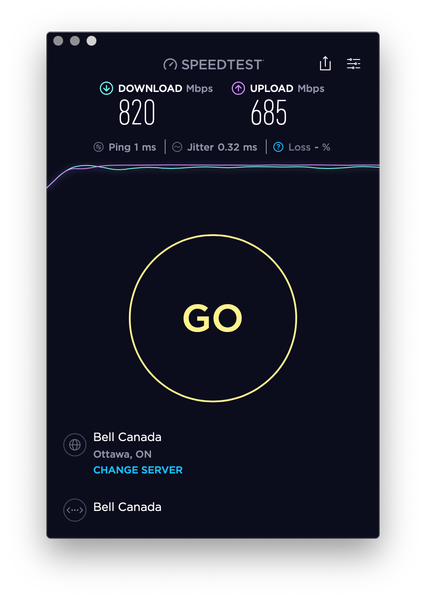
If I run the speed test in the QoS page - isn't that checking speeds to the outside world? Not local transfer rates? The speeds that speedtest reads are 500mpbs down and 600mbps up. Which is consistant with speed tests I do with speedtest.net
Interestingly if I run the same speed test on the current (up to date) firmware those speeds are faster - ~900mbps down and 700mbps up. I think this might have to do with the noted improvments to PPPoE over VLANs the release notes mentioned.
IrvSp
May 12, 2019Master
Not sure what to say? I surely will NOT defend NG and its support team creating the best trouble free stable firmware. I'm not sure they know how, nor regression test they didn't break something else?
I occasionally run LAN SPEED TEST between PC's and the USB drive attached to the R8000. The R8000 USB is of course slower, for a few reasons, mostly the USB drive usually on it is USB 2.0. Internal drives on both PC's are SATA III and much faster. Path to the USB drive on the router should be faster. Same path to get to the router from the sending PC, but once on the router, to get it to the other PC is sending out the packets and then having the PC 'handle' them. I'd think once the packets are on the router it would be faster to the USB drive. Differences were not that great though.
Here is a link to some LAN SPEED TESTS, https://www.raymond.cc/blog/network-benchmark-test-your-network-speed/. The first one is what I use.
Yes, the QoS test should be from the WAN via the Modem to the router. That should be the MAX speed you can get.
Maybe I'm missing something here, but you are basically saying if you bypass the router and wire the NAS directly to the Laptop you get better speed? It is f/w version related too? Is this correct or am I misreading something? What you really are saying file transfer to the NAS from a wireless Laptop via the router is slower no matter what firmware version?
Since the laptop has an ethernet port, can you test wired from the router to the Internet?
VLAN could even be a problem here. Do you really need it? Possible NG 'broke' that? I would think the NAS could be password protected and still be on the LAN but no one without the password could have access?
- DigsMay 12, 2019Aspirant
Maybe I'm missing something here, but you are basically saying if you bypass the router and wire the NAS directly to the Laptop you get better speed? It is f/w version related too? Is this correct or am I misreading something? What you really are saying file transfer to the NAS from a wireless Laptop via the router is slower no matter what firmware version?
This is partly what I'm saying.
It's firmware related for sure. If I wire the NAS directly to my laptop I get expected speeds. If I wire the laptop through the router to the NAS I get expected speeds - Regardless of the router firmware version.The issue occurs when I wire the NAS to the router, and connect the laptop to the NAS via Wifi through the router.
The reason I've conculded it's firmware related is because the connection locally to the NAS via Wifi changes dramtically depending on the firmware version the router is running. The latest firmware (1.0.4.28) slows local LAN traffic via Wifi to a halt (1-10MB/s). Where as previous versions of the firmware (1.0.4.18 and below) have expected LAN traffic speeds over wifi (90MB/s+).
Regardless of how I'm connecting my laptop to the internet the speeds are as expected. It's only connecting locally to my NAS over wifi (not wired) where the speeds slow to a crawl. It's quite strange.
I do need the VLAN on, as the ISP I use connects over VLAN 35. I have the router plugged into a SFP converter which converts the fibre line coming into my place to a 1Gbps ethernet port. - IrvSpMay 13, 2019Master
OK, I understand all that.
I am just an end--user like you with the latest f/w on the R8000. Right now, all my devices are connected wireless. I do NOT see this happening from my device to device, but that doesn't mean much as we're not identical.
Could be the VLAN for all I know?
You have 3 choices I guess?
- Further debug with the .28 version by dropping VLAN and testing PC to NAS speed.
- Use the .18 version and when the new version is release, try it and see what happens.
- The best since you now have a NEW router is contact Netgear Support via MY SUPPORT. It probably will not do much to fix the problem now if it is in the .28 f/w, but at least you'll know if they know about it, and it possibly might get into the next release if they don't.