NETGEAR is aware of a growing number of phone and online scams. To learn how to stay safe click here.
Forum Discussion

rusman
May 28, 2017Tutor
R9000 block ssl-vpn connection ( port 443)
Hi All, i have issue with connecting to SSL VPN on port 443, i have R9000 router, i use firmware v1.0.1.36 When i tryed to connect to my work with Cisco Anyconnect that use port 443 i get denied....
- Jun 02, 2017
Hi All,
Just to Update,
Reload the router and SSL VPN worked correctly.
May be was some issue with MTU like TheEther say...
Will continues to monitor if it will happen again will update.
Thanks for you all for trying to help.
Ruslan.

TheEther
May 30, 2017Guru
Well, the same thing is happening on the LAN side. The remote peer is not responding correctly to the TCP 3 way handshake. This seems to rule out the router. Perhaps you can capture the packet exchange without the router, since you claim things work.
rusman
May 30, 2017Tutor
thanks for trying to help investigate this stange issue,
Sure, please see picture below:
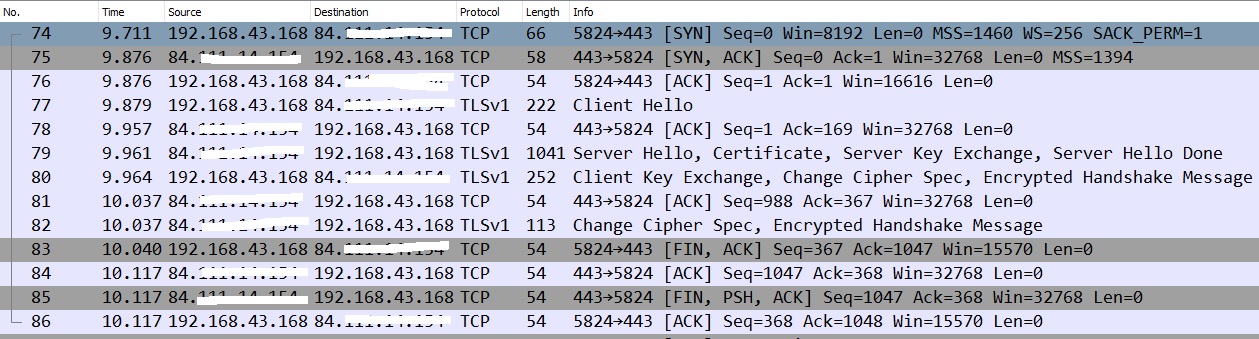
if you need more info please update me,
if course if needed i can give all pcaps files or other info.
Just update me what need.
Thanks,
Ruslan.
- TheEtherMay 31, 2017Guru
The latest capture looks like a healthy connection establishment. There is one odd thing. The source address is 192.168.43.168. With the router removed, I would have expected the source address to be 31.x.x.x, as before. Where is this private address coming from?
- rusmanMay 31, 2017Tutor
Hi TheEther,
i was using 4G connection from phone,
That why was address 192.168.43.168
if need i can do PPPoE directly and show you the results.
Ruslan.
- TheEtherMay 31, 2017Guru
Feel free to run it. If it looks the same as the last one, there's no need to post it. Do you have another router that you could test?
If you want to put the pcap files some place that I can access, I can take a look.
- rusmanJun 01, 2017Tutor
Hi TheEther,
yes it's look like the same one.
Yes i have the old Cisco 861W and i check with it and SSL VPN worked correctly.
when you will have time look at files and update me if you find something if not i will reboot the router probably all will work.the link to dropox i send you privately.
Thanks,
Ruslan. - rusmanJun 02, 2017Tutor
Hi All,
Just to Update,
Reload the router and SSL VPN worked correctly.
May be was some issue with MTU like TheEther say...
Will continues to monitor if it will happen again will update.
Thanks for you all for trying to help.
Ruslan.
