NETGEAR is aware of a growing number of phone and online scams. To learn how to stay safe click here.
Forum Discussion

derekcannady
Dec 23, 2021Guide
RAX120 V2 Constant Random Reboots
The router reboots frequently sometimes every 30 minutes. I have noticed that the router reboots under heavy system load of +50% on the processor. The only way I have been able to drastically lesse...
- Jun 11, 2022Installed beta firmware 1.2.3.33 on it and then turn fan on in debug.htm. Just check mark it , don’t click on apply.
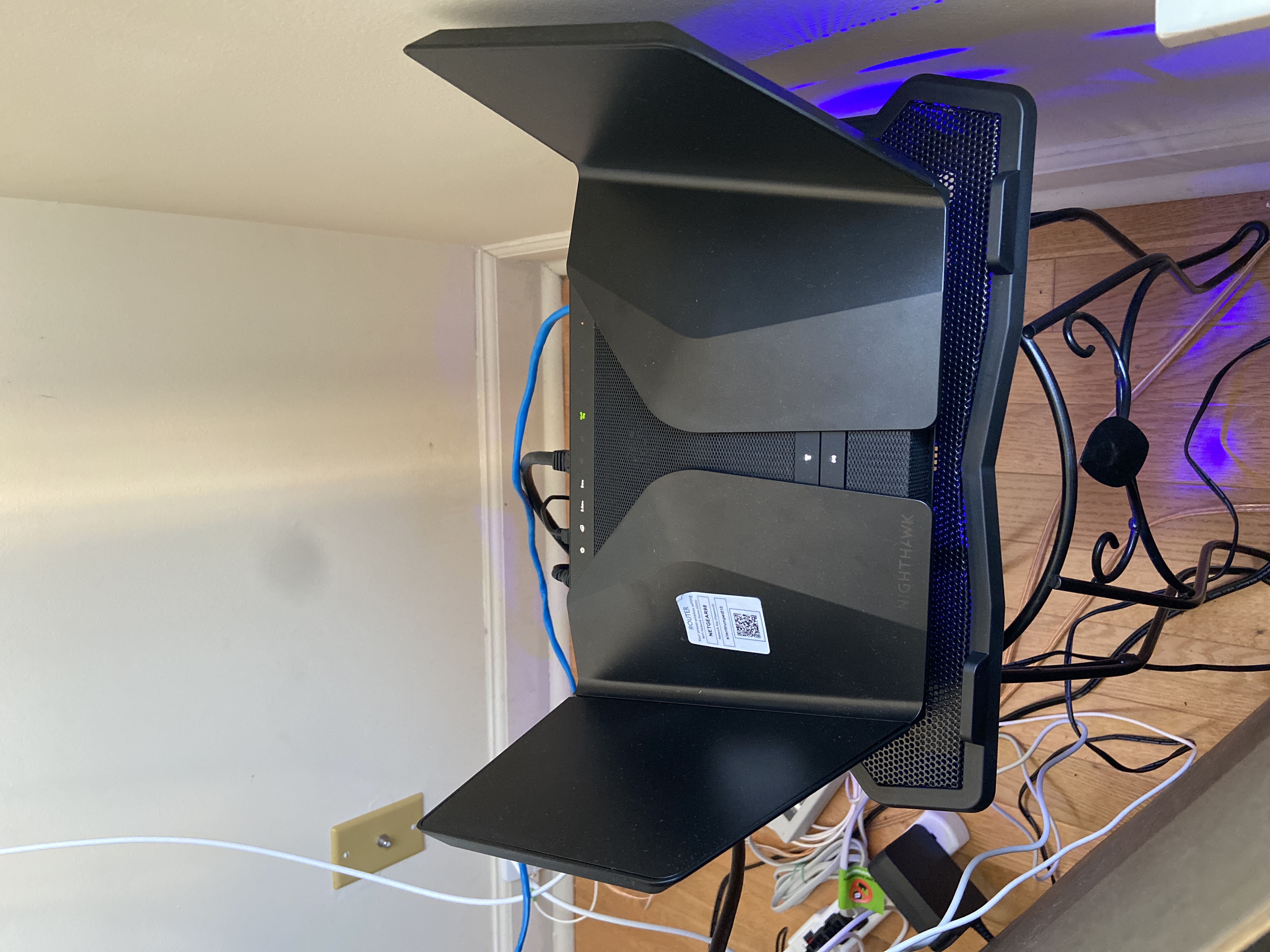
And bought a cool pad from amazon $10 . 4 days in a row no restart and router works perfect.
Laptop Cooling Pad,ESGAMING Laptop Cooling Stand Laptop Cooler 10-15.6 Inch 2 USB Ports 2 Fans with Blue LEDs https://a.co/d/dXVVnxw
ghristov
Oct 22, 2022Tutor
Thanks for the info. WiFi on the ISP router is disabled from the very beginning. The RAX120 and ISP are connected LAN to LAN. I've already asked my provider to bridge the port, without any success. Will try to contact him again. Anyway, I've already tried option 3 - NG router in AP mode, but RAX120 is still restarting itself.
FURRYe38 wrote:Your ISP Modem already has a built in router and wifi. This would be a double NAT (two router) condition which isn't recommended. This would be a double NAT condition which isn't recommended. https://kb.netgear.com/30186/What-is-Double-NAT
https://kb.netgear.com/30187/How-to-fix-issues-with-Double-NAT
Couple of options,
1. Configure the modem for transparent bridge or modem only mode. Then use the NG router in router mode. You'll need to contact the ISP for help and information in regards to the modem being bridged correctly.
2. If you can't bridge the modem, disable ALL wifi radios on the modem, configure the modems DMZ/ExposedHost or IP Pass-Through for the IP address the NG router gets from the modem. https://kb.netgear.com/25891/DMZ-on-NETGEAR-routers
https://kb.netgear.com/24086/How-do-I-set-up-a-default-DMZ-server-on-my-Nighthawk-router
3. Or disable all wifi radios on the modem and connect the NG router to the modem, LAN to LAN configure AP mode on the NG router.
Try option #2...
ghristov wrote:ISP - The Bonds SAM WiFi Router, P/N SAM-4F1F-TT-W-A1.FURRYe38 wrote:Thanks for the info.
What is the Mfr and model# of the Internet Service Providers modem/ONT the NG router is connected too?

FURRYe38
Oct 22, 2022Guru - Experienced User
Try option #2 with the ISP modem if they can't get it bridged.
ghristov wrote:
Thanks for the info. WiFi on the ISP router is disabled from the very beginning. The RAX120 and ISP are connected LAN to LAN. I've already asked my provider to bridge the port, without any success. Will try to contact him again. Anyway, I've already tried option 3 - NG router in AP mode, but RAX120 is still restarting itself.
FURRYe38 wrote:
Your ISP Modem already has a built in router and wifi. This would be a double NAT (two router) condition which isn't recommended. This would be a double NAT condition which isn't recommended. https://kb.netgear.com/30186/What-is-Double-NAT
https://kb.netgear.com/30187/How-to-fix-issues-with-Double-NAT
Couple of options,
1. Configure the modem for transparent bridge or modem only mode. Then use the NG router in router mode. You'll need to contact the ISP for help and information in regards to the modem being bridged correctly.
2. If you can't bridge the modem, disable ALL wifi radios on the modem, configure the modems DMZ/ExposedHost or IP Pass-Through for the IP address the NG router gets from the modem. https://kb.netgear.com/25891/DMZ-on-NETGEAR-routers
https://kb.netgear.com/24086/How-do-I-set-up-a-default-DMZ-server-on-my-Nighthawk-router
3. Or disable all wifi radios on the modem and connect the NG router to the modem, LAN to LAN configure AP mode on the NG router.
Try option #2...
ghristov wrote:
ISP - The Bonds SAM WiFi Router, P/N SAM-4F1F-TT-W-A1.FURRYe38 wrote:
Thanks for the info.
What is the Mfr and model# of the Internet Service Providers modem/ONT the NG router is connected too?
- ghristovOct 23, 2022Tutor
Final test before working from home next week. Put a cheap cool pad with 140mm fan under the RAX120 and even my old 2.4GHz b/g devices started working(streaming video) without any restart. Seems that the problem is more complex. Probably combination between 2.4 GHz band and heat issues. I can confirm temporary solution described here in the thread. You need to use additional cooling pad under the router. It doesn't have to be expensive one. Waiting for an official fix from NG, because I really need a stable router. The speed is great, the range is fantastic, but its stability issues drive me crazy.
- ghristovOct 23, 2022Tutor
Talked again with my ISP. Their device doesn't support option #1 (bridge mode), but they offered me a much better option #0 🙂 I detached ISP device and they set my RAX120 MAC address in their system. I updated router's IP, mask, gateway, DNS settings and bridged one of my LAN ports for IPTV. Currently my router is working as a standalone device connected directly to the internet.
FURRYe38 wrote:Try option #2 with the ISP modem if they can't get it bridged.
FURRYe38 wrote:Your ISP Modem already has a built in router and wifi. This would be a double NAT (two router) condition which isn't recommended. This would be a double NAT condition which isn't recommended. https://kb.netgear.com/30186/What-is-Double-NAT
https://kb.netgear.com/30187/How-to-fix-issues-with-Double-NAT
Couple of options,
1. Configure the modem for transparent bridge or modem only mode. Then use the NG router in router mode. You'll need to contact the ISP for help and information in regards to the modem being bridged correctly.
2. If you can't bridge the modem, disable ALL wifi radios on the modem, configure the modems DMZ/ExposedHost or IP Pass-Through for the IP address the NG router gets from the modem. https://kb.netgear.com/25891/DMZ-on-NETGEAR-routers
https://kb.netgear.com/24086/How-do-I-set-up-a-default-DMZ-server-on-my-Nighthawk-router
3. Or disable all wifi radios on the modem and connect the NG router to the modem, LAN to LAN configure AP mode on the NG router. - FURRYe38Oct 23, 2022Guru - Experienced User
Awesome. Lets give it 3 days or this coming week and see if you can get 3 days of solid uptime.
- _NDS_Oct 26, 2022Apprentice
Just bumping this thread up to see how the fix is being progressed at Netgear with this not fit for purpose creation of theirs - RAX120V2.
- muniz_riOct 26, 2022ApprenticeThey finally fixed it. Check with furrye. Router has been rock solid for one week.