NETGEAR is aware of a growing number of phone and online scams. To learn how to stay safe click here.
Forum Discussion

Yousef
May 16, 2023Guide
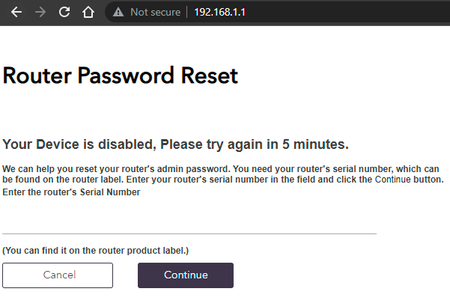
RAXE500 Your Device is disabled, Please try again in 5 minutes.
Hi, i have this issue but after reboot the router i can access normally, after 15 min its showing this message, the RAX200 not showing any issue at all, the problem from the new router itself. ...
- May 18, 2023
Glad you got it working. Please mark your thread as solved so others will know. Be sure to save off a back up configuration to file for safe keeping. Saves time if a reset is needed.
https://kb.netgear.com/24231/How-do-I-back-up-the-router-configuration-settings-on-my-Nighthawk-router
Enjoy. 📡

FURRYe38
May 17, 2023Guru - Experienced User
What browser are you using?
Can you try one more FR and use say Firefox or Opera browser to walk thru the setup wizard to get to the home page?
If you can get to this home page, I would manually reload the FW on to the router using same browser and see if doing this will help.
Also do you have a different PC that you can compare with? Wondering if a different PC see's the same issue.
Also you might try one last resort, do a 30-30-30 reset on the router and see if this helps clear this behavior.

Yousef
May 17, 2023Guide
i have to RF for 5th time and doing your instruction, the problem is i am avoid to do FR due the smart home system in my house i have RTI i need to add the ports etc any how is seems the bugs here only password with Special characters, required an updated for that, now all fine i will keep check all day and update if there is an issue with the login password or showing the same message, thanks a lot !
- FURRYe38May 18, 2023Guru - Experienced User
Glad you got it working. Please mark your thread as solved so others will know. Be sure to save off a back up configuration to file for safe keeping. Saves time if a reset is needed.
https://kb.netgear.com/24231/How-do-I-back-up-the-router-configuration-settings-on-my-Nighthawk-router
Enjoy. 📡