NETGEAR is aware of a growing number of phone and online scams. To learn how to stay safe click here.
Forum Discussion

martyr444
May 05, 2021Apprentice
RAXE500 cannot get speeds over 1G even though I have 1.2G Internet
My Xfinity speeds just went up from 1G to 1.2GB. If I test my speeds hooked up to the RAXE500 Router it still only gives me the 1G. If I go straight to my Netgear CM2000 Modem I get the 1.2G. Plus my...

Razor512
May 05, 2021Prodigy
At close range, speeds will consistently be above the 1.2Gbps mark, but there will be more variation in ping times due to certain activities of the WiFi radio that they will do once in a while. This article details it really well.
https://www.smallnetbuilder.com/wireless/wireless-features/33228-wi-fi-ping-spikes-causes-and-fixes
https://www.smallnetbuilder.com/wireless/wireless-features/33228-wi-fi-ping-spikes-causes-and-fixes
martyr444
May 29, 2021Apprentice
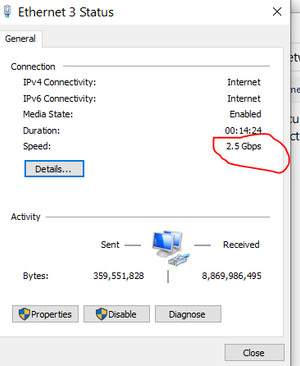
I tested the RAXE500 with my brand new Intel AX210 Wi-Fi 6G, so this is also my first test for the Intel AX210. Here are the issues I had with this. I have Windows 10 21H1 Pro. I first tried the driver Netgear gave me access to Version (22.45.1.1). After it did not work, I noticed the Intel Update Utility found new drivers for the Wi-Fi and Bluetooth. They were the same version but I let Intel reinstall them anyways. The Intel Status shows 2.4GBPS which is what should be seen at the Intel AX210 adaptor. The below issues stayed the same.
1. Could not connect at all with the RAXE500 being set to WPA3 Personal. You get an error saying you cannot connect to this Network.
2. So I changed the RAXE500 to Enhanced Open Security. The AX210 then connected. But the maximum speeds I could get were 929G down and 41G up. That is the same speed as my Lan when connected to the 1G RJ45 Jack built into the Laptop. So there is a bottleneck not letting it get to my 1.2G download speeds from Xfinity. If I use a 2.5G Lan Adaptor straight from my Netgear CM2000 to the 2.5G USB Jack I get my full speed around 1.3GBPS. I know many have had issues on Windows 10 and WPA3, but I am not sure why my speeds are bottlenecked. All of my test equipment is within 6ft of each other.
- Razor512May 29, 2021Prodigy
It seems like you still are not using the the 2.5GbE port on the router as the WAN port.
Iif you use the Yellow 1GbE WAN port on the RAXE500 then even with the AX210 it will not go over gigabit speeds because the WAN port is the bottleneck. if ou want the AX210 to give over 1 gigabit throughput, then you need to do the following.
- Head to the router web UI ( often 192.168.1.1 ).
- Click on the advanced tab.
- Go to Setup > Internet Setup.
- Set WAN preference to " Multi-Gig Port (2.5/1Gbps).
- Click on Apply.
- Connect an Ethernet cable from the Ethernet port of the cable modem, to the 2.5GbE port of the router.
- Once you have established internet connectivity, test the speeds, again, and it should offer speeds over 1Gbps.
- martyr444May 29, 2021Apprentice
That got my Intel AX210 to get a range from 600 and up to 1127MBPS. That's with everything within about 6ft of each other. Those speeds are not very consistent. I can only do this for testing purposes because it still cannot connect to the WPA3 Security. I have the 21H1 version of Windows 10. That part must be a Microsoft/Intel issue that may never get resolved.
- Razor512May 29, 2021Prodigy
Try usng the 5GHz band instead of the 6GHz band, and see if the speeds remain the same.
- martyr444May 30, 2021Apprentice
The 2.5G Port on the RAXE500 has been problematic since day one. It always disconnects. We woke up this morning with it disconnected again. The 1G Port never has these issues, so I think it's the hardware itself that is defective. I may do quick change back to the 2.5G for a test, but know that I cannot keep it on the 2.5G. Between that and the WPA3 issue it looks to be a no go. Thanks for your input.
- Razor512May 30, 2021Prodigy
For the 2.5GbE port, if using a longer Cat 5e cable, then in your Ethernet adapter settings in device manager, and disable options such as "Green Ethernet", energy efficient Ethernet, and other similar functions.
or if you have any reliability issues, then disable those options, which will improve SNR on the Ethernet cable.
Most of those green functions attempt to save extremely tiny amounts of power by using timings to estimate the length of the Ethernet cable, and then reducing the output to lower levels to save power. The issue is that if any aspect of the cable is not up to standard for 2.5 GbE, or if it is a cable that advertises a spec but lacks proper shielding, will end up with a bad SNR which can cause reliability issues.
- martyr444May 30, 2021Apprentice
All of my Cables are Cat 7 and 6ft or less. I always set my settings to max power and disable all power save modes. That 2.5G Port is just defective.
- Razor512May 30, 2021Prodigy
The standard power saving mode in terms of windows power management for the adapter is different from functions such as EEE, Green Ethernet and other 802.3az type functionality. Basically when below a certain length, (usually 50 meters), they go into their short reach mode and start cutting back on the power used to send frames. Sadly many switches and newer routers also support these functions and in turn will use it if enabled.
PS when terminating Cat7, make sure the braided outer shielding has some length left in tact for the grounding, and make sure the untwisted segment of the cable from the termination process is kept as short as possible, this is especially important if any green functions are on, since it bases everything on estimated length and simply assumes a near perfect conductor.
Also with solid core copper wire, if frequently moving them around, they will start to fail and cause many frame issues as compared to a cable with more flexible stranded copper.