NETGEAR is aware of a growing number of phone and online scams. To learn how to stay safe click here.
Forum Discussion

cuke2u
Aug 19, 2023Aspirant
Random Loss of Connections..
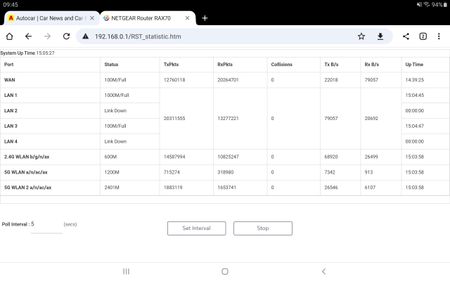
My router is randomly and intermittently turning off it's wired and WiFi connections, which means every device connected loses it's connection. It occurred several times yesterday and sometimes occu...
- Aug 20, 2023
The modem is a tp link TD-W9970 in bridge mode, but it has been 100% stable since I setup the netgear with it until recently, we're talking months if not years.
Anyway I took a look at the netgear settings and it looks like these disconnects might have coincided with some settings I put into the ipv6 page. So I've reset it to off for the moment and will test.
My bad if this issue was self inflicted...

Kitsap
Aug 20, 2023Master
cuke2u wrote:The modem is a tp link TD-W9970 in bridge mode, but it has been 100% stable since I setup the netgear with it until recently, we're talking months if not years.
Anyway I took a look at the netgear settings and it looks like these disconnects might have coincided with some settings I put into the ipv6 page. So I've reset it to off for the moment and will test.
My bad if this issue was self inflicted...
Did you confirm whether or not your ISP supports IPv6?

michaelkenward
Aug 20, 2023Guru - Experienced User
Kitsap wrote:
cuke2u wrote:
The modem is a tp link TD-W9970 in bridge mode, but it has been 100% stable since I setup the netgear with it until recently, we're talking months if not years.
Anyway I took a look at the netgear settings and it looks like these disconnects might have coincided with some settings I put into the ipv6 page. So I've reset it to off for the moment and will test.
My bad if this issue was self inflicted...
Did you confirm whether or not your ISP supports IPv6?
And if the router supports the ISP's implementation of IPv6?
- cuke2uAug 21, 2023Aspirant
So far no disconnects 🙂
Yes my isp does support ipv6 and I've been looking at a way of implementing it with the RAX70. I thought I'd found some settings that would work, as posted in the Sky community, however it seems they might not and it maybe that the RAX70 will not support the credentials that Sky uses, as you've stated.
With regards to the modem and the WAN speed, I have only a connection of around 35mbps anyway, thus a faster port is not required.
- michaelkenwardAug 21, 2023Guru - Experienced User
cuke2u wrote:
I thought I'd found some settings that would work, as posted in the Sky community, however it seems they might not and it maybe that the RAX70 will not support the credentials that Sky uses, as you've stated.
Does the browser graphical user interface (GUI) on the RAX70 have an "autodetect" option for IPv6?
- Advanced
- Advanced Setup
- IPv6
My router, a different model, managed to find BT's "6to4 Tunnel" implementation.
With regards to the modem and the WAN speed, I have only a connection of around 35mbps anyway, thus a faster port is not required.
Another one stuck in DSL country. This may indicate that Sky (your ISP?) is one of the many that hitch a ride on the Openreach network. If so, it may have the same IPv6 settings and those are beyond the capabilities of some Netgear routers, including my aging R7800.
- cuke2uAug 22, 2023Aspirant
Indeed it does so I'll set it to that and give it a whirl, not sure though if the RAX70 supports the 6to4 Tunnel, how would I tell?
Yes stuck in DSL, thing is I had signed up for our village FTTP voucher scheme over a year ago and OR have been around to commence the preliminaries, so it's happening this year. However in the meantime we've decided to move a few hundred miles north and the village we're moving to is not so on the ball with technology. That's next week so I've cancelled the voucher for this current property.
I think where we are moving to is going to be even slower as Sky have stated we can only have Superfast 35, which is a maximum of 35Mbps
- michaelkenwardAug 22, 2023Guru - Experienced User
cuke2u wrote:
Indeed it does so I'll set it to that and give it a whirl, not sure though if the RAX70 supports the 6to4 Tunnel, how would I tell?
See if the automated process finds it?
Does your ISP have a user group where you can compare notes on the RAX70?
If not there may be something on the BT community.
Welcome to BT’s official support community.
As I said, many ISPs hitch a ride on Openreach.
- cuke2uAug 23, 2023Aspirant
Well I had another random router reboot yesterday afternoon after setting ipv6 to auto so I've disabled it again to see if things settle down.
Sky do definitely use OR wholesale equipment.
- michaelkenwardAug 23, 2023Guru - Experienced User
cuke2u wrote:
Well I had another random router reboot yesterday afternoon after setting ipv6 to auto so I've disabled it again to see if things settle down.
In my case, and on a very different router, the "auto" thing is not something you enable and leave.
It begins a process that goes out and looks for the correct IPv6 configuration.
It is the same sort of process that the Internet wizard goes through.
You may just have to forget about IPv6. Out of interest, why are you trying to use it?
- cuke2uAug 24, 2023Aspirant
I guess I thought that as the SkyQ hub supports ipv6 then I should try to turn it on with the RAX70 as there are some benefits but yeah I might as well give up really as the constant rebooting of the router affects my network far greater than any positives.
We're moving house shortly and we are transferring our SkyQ setup, plus my internal wired/WiFi network, NAS drive, file server and all the CCTV camera's, across. The Sky move will be 'interesting' and I'll have to go back to using the Sky hub anyway for a while until the line settles down.
I'm not a novice in setting up SkyQ systems, or networks, anyway so between myself and the Sky technician we should be ok.
Last famous words 😅
Then I'll have a few more challenges and projects to make life interesting, such as linking the electronic gates to my WiFi then setting up my car to open and close them with voice commands.
I like doing this kind of stuff and it stops me from getting bored in my retirement..
- michaelkenwardAug 24, 2023Guru - Experienced User
cuke2u wrote:
I guess I thought that as the SkyQ hub supports ipv6 then I should try to turn it on with the RAX70 as there are some benefits but yeah I might as well give up really as the constant rebooting of the router affects my network far greater than any positives.
Where did the SkyQ hub come from? I thought that your modem was the TD-W9970 in modem only (bridge) mode.
I don't think the modem is involved in this process. My router supports BT's IPv6. The modem is not involved in the router's IP management process.
If you really want to use IPv6, you could use the Sky hub in modem/router mode and put the RAX70 into AP mode. You then hit this:
Disabled Features on the Router when set to AP Mode | Answer | NETGEAR Support
So you will have to balance the benefits of IPv6 against the losses of AP mode.
- cuke2uAug 25, 2023Aspirant
As I have SkyQ and Sky broadband then they supplied the hub but I decided to replace the hub as I had many WiFi devices and as there is no way the sky hub can be used in modem only mode.
I'm not trying to setup the tp-link modem for ipv6, as it is running in modem only bridge mode, just the netgear. To use the netgear in ap mode is just of no benefit and a waste of money.
The method I'm using is very commonly used and as advised by Sky community users for dsl.
- michaelkenwardAug 25, 2023Guru - Experienced User
cuke2u wrote:
As I have SkyQ and Sky broadband then they supplied the hub but I decided to replace the hub as I had many WiFi devices and as there is no way the sky hub can be used in modem only mode.
Just like BT and its execrable HomeHub.
To use the netgear in ap mode is just of no benefit and a waste of money.
The method I'm using is very commonly used and as advised by Sky community users for dsl.
I agree on the waste of money bit, but I have no idea why you say "no benefit". You said that you needed something to handle more wifi devices.
Another widely advised suggestion on the wifi front, especially with Mesh networks, is to put the second router into AP mode.
Pity you have a router that doesn't seem to support Sky's IPv6. But I still don't know why that is so important to you.
I forget, did you ever check if the TD-W9970 can support Sky's IPv6?