NETGEAR is aware of a growing number of phone and online scams. To learn how to stay safe click here.
Forum Discussion

KevinLiT
Aug 22, 2022NETGEAR Moderator
New - RBR850/RBS850 Firmware Version 4.6.9.11 Released
RBR850/RBS850 Firmware Version 4.6.9.11 Released
New Features:
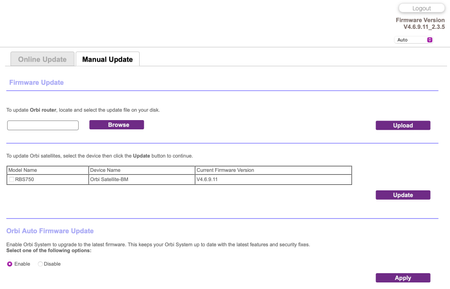
Adds an auto-firmware upgrade enable/disable option <Long awaited feature is FINALLY HERE!
https://kb.netgear.com/...

FURRYe38
Aug 23, 2022Guru - Experienced User
Be sure you update the RBS FIRST before updating the RBS.
Glad you got it working. Be sure to save off a back up configuration to file for safe keeping. Saves time if a reset is needed.
https://kb.netgear.com/000062080/How-do-I-back-up-the-configuration-settings-on-my-Orbi-WiFi-System
Enjoy. 📡
spewak wrote:
I had updated my RBR flawlessly but the Satellite fought me. I couldn't log in. Taking Furry's advice, I reset the RBR and even then, I was met with resistance, on both Router and sat. Finally, I did the 30-30-30 reset and was able to reconfigure and update firmware to both units. I did select to disable the auto-firmware upgrade feature. It is a much appreciated add back in my opinion.

NGSvensk
Aug 24, 2022Apprentice
Where is the box to shut off auto update?
Thanks
- GarwoofooAug 25, 2022Apprentice
Updated to 4.6.9.11, the upgrade went smoothly and the system is running well.
I have again noticed the "LAN port reset" issue that I saw on the previous firmware. The Statistics screen currently shows an uptime of 16 hours for the system as a whole, but just under two hours for the LAN ports. This means they must have reset at about 6:30 AM this morning UK time when no-one was using the network so again this appears random rather than triggered by specific devices (unless caused by background activity).
As before though this doesn't appear to have any impact on the performance of the network at all so it remains a curiosity rather than an issue.
- FURRYe38Aug 25, 2022Guru - Experienced User
Wondering if something connected on your system is causing your LAN stats to reset...
Garwoofoo wrote:
Updated to 4.6.9.11, the upgrade went smoothly and the system is running well.
I have again noticed the "LAN port reset" issue that I saw on the previous firmware. The Statistics screen currently shows an uptime of 16 hours for the system as a whole, but just under two hours for the LAN ports. This means they must have reset at about 6:30 AM this morning UK time when no-one was using the network so again this appears random rather than triggered by specific devices (unless caused by background activity).
As before though this doesn't appear to have any impact on the performance of the network at all so it remains a curiosity rather than an issue.
- GarwoofooAug 25, 2022Apprentice
FURRYe38 wrote:Wondering if something connected on your system is causing your LAN stats to reset...
Yes, that was my first thought too. But:
- The issue is really unpredictable, sometimes I'll see it twice in 24 hours and other times it can go for weeks without triggering
- It's happened several times in the middle of the night when no-one's been using the network at all
- All the devices I have connected are used on a daily basis, so it's hard to see any of them being the cause given how unpredictable the issue is.
I'm just curious really, and thought it would be worth mentioning that it was still happening on this firmware in case it's connected to anything that anyone else is seeing.
- FURRYe38Aug 25, 2022Guru - Experienced User
Since your seeing this across multiple FW version, I would begin by disconnecting devices and see if the RBR stops resetting the LAN stats, then begin by adding one device at a time and monitor the stats to see if that gets resets, graduate by adding devices until something happens.
- houcatdadAug 25, 2022Star
Is anyone seeing performance issues?
I updated the devices (1 RBR, 2 RBS) (RBK752 + 1 added Satellite). I have rebooted the router once.
A wireless printer sitting right next to the RBR, got a "weak signal" error on it. Not sure how that could even be possible.
Various items are dropping internet connections... my phone wireless had the ! like the internet was down... but other devices were all fine..
Some streaming boxes (FireTV) are buffering now...
I will say that I have NOT powered off/on (other than a reboot) the satellites. Everything is connected... but just, slow. In fact one satellite for about 5 minutes, was showing it was "Wired" to the RBR across the house.... which is not true. After about 5 minutes it changed to 5Ghz Wireless connected.
thoughts?
- FURRYe38Aug 25, 2022Guru - Experienced User
When you power OFF the RBR after the FW update, it's best to power OFF the RBS as well. Even the ISP modem. Then back on with the ISP modem first, RBR then RBS.