NETGEAR is aware of a growing number of phone and online scams. To learn how to stay safe click here.
Forum Discussion

KevinLiT
Aug 22, 2022NETGEAR Moderator
New - RBR850/RBS850 Firmware Version 4.6.9.11 Released
RBR850/RBS850 Firmware Version 4.6.9.11 Released
New Features:
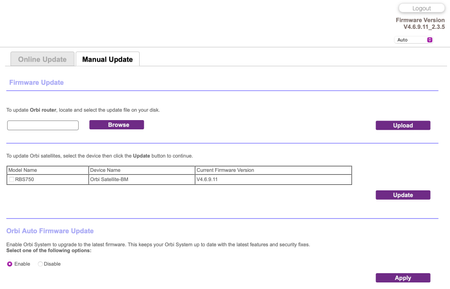
Adds an auto-firmware upgrade enable/disable option <Long awaited feature is FINALLY HERE!
https://kb.netgear.com/...

AndyKH
Aug 26, 2022Tutor
Hi,
I have Windows 10 PC (and 2nd with Win 10)
When I download both firmware and extract the files the firmware files are seen as "Recovered File Fragments" as file type.
When I tried to load this the upload failed (orbi login , com)
I will try direct IP access next week and see what happens.
I mention this in case its a known issue or a known work round exists.
Thank you
Andy.

FURRYe38
Aug 26, 2022Guru - Experienced User
What browser are you using to download the FW files? MS Edge, Firefox or Opera will work.
After you unpack the .zip files, do not attempt to open the .chk files with in the extracted FW file folder. They are not usable by Windows. They can only be used and sent thru the RBS and RBRs web pages there.
- AndyKHAug 26, 2022Tutor
I've tried Chrome, Edge, and just now Firefox (as Chrome not on your list I won't try that again)
Once downloaded and extracted I don't try and open the file,
I view file in file manager - Windows 10 calls the extracted file as file type "Recovered file fragments"
Any browser the extracted file is RBS 33,796 kb and RBR 51,332 kb could you confirm those are correct file sizes, (How Windows describes the files may have no relevance)
the suffix is .chk
- FURRYe38Aug 26, 2022Guru - Experienced User
Again DO NOT attempt to open or view the .chk file in any file manager in Windows.
Launch a browser and go into the RBS web page and under Firmware Upgrade, select the browse button. Navigate to the folder where the RBS .chk file is located. Select it the select OK. This should file in the Select FW file. Then select the upgrade button.
- CrimpOnAug 26, 2022Guru - Experienced User
AndyKH wrote:
I view file in file manager - Windows 10 calls the extracted file as file type "Recovered file fragments"
(How Windows describes the files may have no relevance)
the suffix is .chk
This is correct. In trying to be helpful, the Windows File Manager has created confusion.
*.chk is used for several file types: https://fileinfo.com/extension/chk
- JoshDiAug 27, 2022Apprentice
ignore, I fixed the problem that I thought was a bug.
I've noticed in this build that NAT Loopback isnt working properly (it worked in all previous builds). e.g. I have a port forward for ssh into one of my devices. If I am connected to the lan and try to connect via the public internet address and port, I cannot connect - i.e. no loopback. Is there a fix for this? Is anyone else experiencing this in this build?
I've just confirmed this is only happening because the port forward for the external port is different from the internal port. After enabling that external port as well for SSH on my device, I can connect via the WAN address and loopback works. I hope netgear fixes this issue in a later build back to how it was working previously.
- JoshDiAug 28, 2022ApprenticeCan someone explain what the Intranet IP option is for and where that new setting is? I cannot find it
Also, what is PCCW IGMP proxy support?
Finally, should
Support Automatic Priviate IP Addressing (APIPA) be enabled? - FURRYe38Aug 29, 2022Guru - Experienced User
We are waiting for feedback from NG on those new items.
JoshDi wrote:
Can someone explain what the Intranet IP option is for and where that new setting is? I cannot find it
Also, what is PCCW IGMP proxy support?
Finally, should
Support Automatic Priviate IP Addressing (APIPA) be enabled? - bullm00nAug 29, 2022Virtuoso
Update went smoothly here. So far no drama.

