NETGEAR is aware of a growing number of phone and online scams. To learn how to stay safe click here.
Forum Discussion

theguptas
Mar 31, 2021Guide
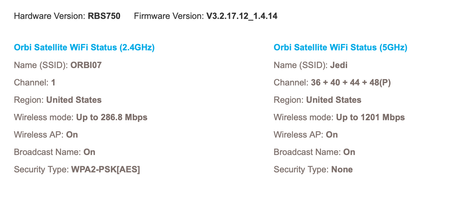
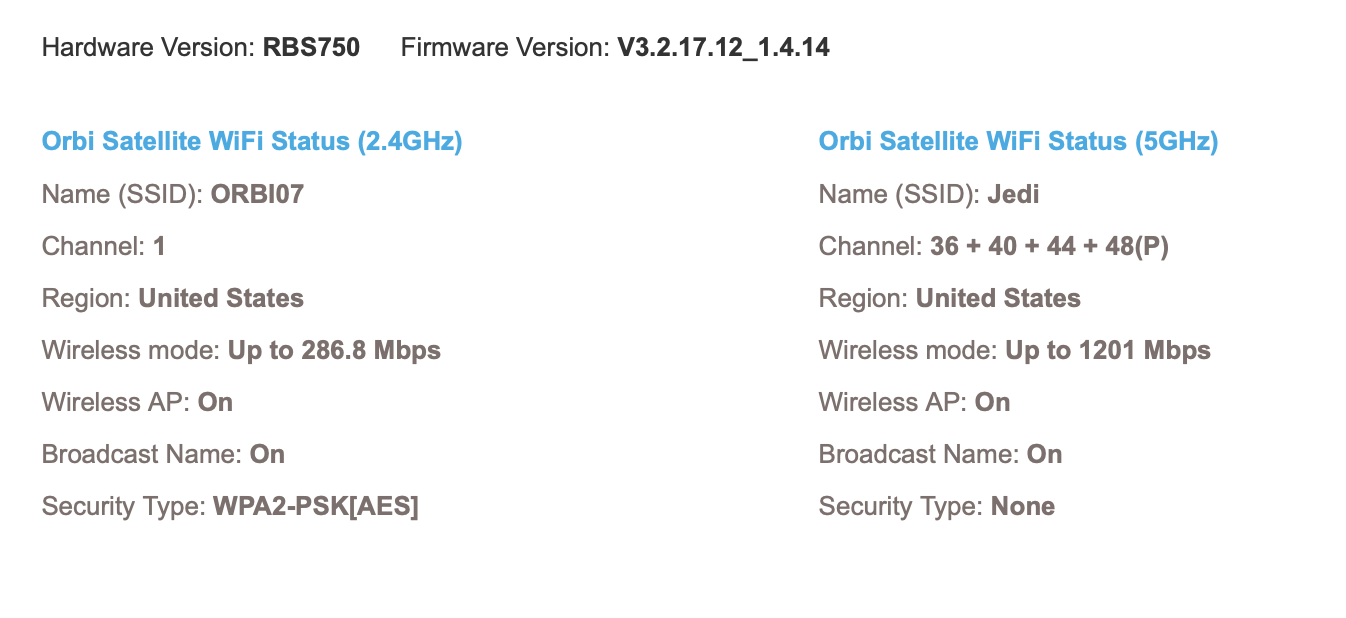
Orbi 753 unencrypted 5ghz network even though WPA2 security is turned on
Hi Everyone, I have searched through the forum and seen other people have similar issues but briefly 1) RBK753, satellites setup with ethernet backhaul, router running in AP mode 2) from day 1...

FURRYe38
Apr 05, 2021Guru - Experienced User
Glad you were able to get the RBS to sync correctly after turning off IGMP protocols on the switches.
Please mark your thread as solved so others will know.
I would recommend making a backup configuratino to file for safe keeping. Saves time if a reset is needed.
Enjoy. :smileywink:
gerald732
Apr 06, 2021Tutor
Hi, I faced a similar issue as well. In my case, I'm using RBR750 and RBS750. For some reason, the 5GHZ network security type is None while the 2.4GHZ wifi security is in sync with the Router. I am using DGS-1210-20 managed switch, and I have verified that IGMP snooping has been switched off.
I'm running AP mode for both Router and Satellite. Firmware has been updated to the latest for both:
- V3.2.17.12_1.4.14
Not sure what else am I missing here. Any ideas?
- FURRYe38Apr 06, 2021Guru - Experienced User
Does the RBS connect and sync correctly when wirelessly connected to the RBR?
Test the RBS near the RBR after syncing wirelessly first, then connect a LAN patch cable in between the RBR and RBS. Check the sync and status.
- theguptasApr 06, 2021GuideHere is what I have seen by trial and experience Click over to say wpa3 and then click back on wpa2 or whatever setting you are using and hit the apply button. What I am seeing is the security settings seem to fall out of synchronized but when you re push it out via the router then It seems to fix the lack of security in the 5ghz band in the satellite. It is on my list one day to test if all along that was issue with my original AP mode setup with wired Ethernet backhaul. Maybe all I had to do was repush out the security settings via the router if that makes sense.
- gerald732Apr 06, 2021TutorI can’t seem to sync wirelessly in AP mode. It’s doable if the Router isn’t in AP mode. Since, I cannot run my ISP modem/router in bridge mode, I’ll need to run the Orbi in AP mode.
I’ve tried resetting both the devices to factory setting as well, but to no avail.
Let me try pushing the security settings out with the toggle between wpa3 and wpa2 - FURRYe38Apr 06, 2021Guru - Experienced User
How is the RBR connected to the ISP modem/router? WAN or LAN port on the RBR to the ISP modem?
Seems like the RBS isn't getting an IP address from the ISP Modem correctly or the modem isn't giving an IP address to the RBS.
gerald732 wrote:
I can’t seem to sync wirelessly in AP mode. It’s doable if the Router isn’t in AP mode. Since, I cannot run my ISP modem/router in bridge mode, I’ll need to run the Orbi in AP mode.
I’ve tried resetting both the devices to factory setting as well, but to no avail.
Let me try pushing the security settings out with the toggle between wpa3 and wpa2 - theguptasApr 06, 2021Guide
FURRYe38 is spot on. Once you put the Router in AP mode, you have to change your ISP internet connection cable from WAN port (yellow) to one of the other LAN ports.
That was my original setup, although I had jumped straight ethernet backhaul for the sateliites where the satellites were able to sync right away to the Router, each one of them having obtained a DHCP address from the ISP cable model/Router box
- FURRYe38Apr 06, 2021Guru - Experienced User
I took my Orbi 850 series and put it into AP Mode. I let the RBS850 wirelessly connect first then Ethernet connected them behind the RBR. RBR850 is connected to a NetDuma R2 router.
For a short period, say 5-10 seconds I did see on 1 RBS850s web page reported Security Type as NONE. However after refreshing the page afterwards, the Security Type did change to WPA2/AES.
One thing I'm curious about, both RBS are reporting Up to 800/2167 for there Wireless Mode. I beleive there supposed to be 1200/2400 on there front haul radios as per the data sheet:
• Orbi AX6000 Router and AX6000 Satellites
(2400 + 2400 + 1200Mbps)†The RBR is reporting 1147/2400:
Any one else see this on there RBS?
- FURRYe38Apr 06, 2021Guru - Experienced User
Ok, this is the same issue as seen on the 7 series. :smileyembarrassed: Will be fixed on next FW update.
- gerald732Apr 06, 2021TutorThe RBR is connected to the ISP modem/router via the LAN port once I’ve switched it to AP mode.
This is the workaround I did: I got them to sync in Router mode. Switched off the RBS. Switched the RBR to AP mode. Remove the Satellite entry from the RBR next . Switch on the RBS, then insert an ethernet backhaul on the RBS. The RBR does not recognise the RBS as a satellite now, but as another wired device.
This way, the RBS retains the wifi settings from the RBR previously when it was in Router mode. I did not sync them, but it works.
This is disappointing considering how costly the hardware is. - FURRYe38Apr 06, 2021Guru - Experienced User
I believe the way your trying to sync your RBS is incorrect. In router or AP mode, RBS is best to sync first in wireless mode. Once they are fully synced and working correctly and status reports correct modes, then connect the Ethernet cable from the RBS to the RBR. The Ethernet cables needs to be connected to the back of the RBR, router or AP mode.

Just tested this today and this does work.
- gerald732Apr 06, 2021Tutor
I believe the way your trying to sync your RBS is incorrect. In router or AP mode, RBS is best to sync first in wireless mode. Once they are fully synced and working correctly and status reports correct modes, then connect the Ethernet cable from the RBS to the RBR. The Ethernet cables needs to be connected to the back of the RBR, router or AP mode. Just tested this today and this does work.
The thing is, the RBS isn't able to sync with the wireless mode. I have tried to sync them in wireless mode for at least 6 to 7 times while the RBR is in the AP mode. This is with the ethernet cable plugged into the LAN port of the RBR instead of the WAN port. The RBS always ends up in the Magenta LED state.
- FURRYe38Apr 06, 2021Guru - Experienced User
So theres your problem. The RBR, in ROUTER or AP mode, requires the WAN port to be connected on the RBR to the modem in router mode or host router when in AP Mode. If your connecting the LAN port on the RBR then the RBS can't get correctly synced or an IP address from the host router when in AP mode.
- FURRYe38Apr 06, 2021Guru - Experienced User
- gerald732Apr 06, 2021Tutor
Right, that makes sense now. I'll have a try. I think that's because my assumption was that we typically plug ethernet cables to the LAN port for any APs. Thanks for the advice!
- FURRYe38Apr 06, 2021Guru - Experienced User
Yes for other AP that is probably true. However for ALL Orbi systems the WAN port needs to be used. :smileywink:
- fangruoyuanApr 06, 2021Guide
This open wifi thing is a firmware bug. It will happen again until NG fix it. If you do AP mode(via lan port), no open wifi problem for previous orbi system(RBK 50) I found this bug one year ago, and it still exists.
BTW, if you do AP mode via lan port, other devices will show in the RBR page, and if you changed anything in the wifi setting, it will sync perfectly( if you do wan port, it will not)
- gerald732Apr 06, 2021Tutor
I tried plugging the ethernet cable from the ISP model to the RBR WAN port. I was able to get the RBS and RBR to sync up in wireless mode. However, the wifi network that is broadcasted does not provide Internet connection. This is weird :/
- gerald732Apr 06, 2021Tutor
My bad, actually the wifi is working on the RBR. I think it was an issue with the ios device i'm using to connect to it. I've sync the RBS with the RBR in wireless mode in close proximty. Afterwards, I powered off the RBS, brought it to the further end of the house. Plugged in the ethernet cable coming from the switch to the LAN port.
The RBS is not detected as a recognised satellite device in the list of attached device in the RBR.
- gerald732Apr 07, 2021Tutor
I decided to bypass the switch and connect the RBS to the RBR. It syncs, but same issue. 5ghz is running with security type none. I did what was suggested: switch to WPA3 and sync again. With this, the RBR and RBS has the same wifi security settings. However, when I toggle it back to WPA2, the same issue occurs.
This is definitely a FW bug. It's easily reproducible.
- FURRYe38Apr 07, 2021Guru - Experienced User
SO the RBS is wirelessly connected to the RBR when you have the WPA setting? How long are you waiting to refresh the RBS page when you check the status here?
Do you have 1 or 2 RBS?
- gerald732Apr 07, 2021Tutor
I have 1 RBS. I checked it after 1 or 2 minutes. But the RBS has been running for some time now, 30mins, with ethernet backhaul directly connected to the RBR Lan port. It's still reporting no security on 5GHZ.
- FURRYe38Apr 07, 2021Guru - Experienced User
Ok, Lets get this right...RBR is in AP Mode with it's WAN Port connected to host router:
So ethernet at the remote locaiton is no security on RBS.
Ethernet near by RBR with a patch cable is with good security on RBS?
Wirleess RBS connected to RBR is good security on RBS?
- gerald732Apr 07, 2021Tutor
Ok, Lets get this right...RBR is in AP Mode with it's WAN Port connected to host router:
Yup.
So ethernet at the remote locaiton is no security on RBS. True.

Ethernet near by RBR with a patch cable is with good security on RBS? Have not tried this.
Wirleess RBS connected to RBR is good security on RBS?
Used to be true. Not true anymore. When I tried syncing in wireless mode, the satellite ended up with a green pulse ring light. I tried doing a factory reset on the Router and Satellite. Right now, the router cannot even detect the satellite in wireless mode. The syncrhonisation just isn't working.
I think it might be a faulty satellite device. Is the satellite supposed to go into a state with non blinking white pulse light? Mine is forever blinking.
- FURRYe38Apr 07, 2021Guru - Experienced User
gerald732 wrote:Ok, Lets get this right...RBR is in AP Mode with it's WAN Port connected to host router:
Yup.
So ethernet at the remote locaiton is no security on RBS. True.

Ethernet near by RBR with a patch cable is with good security on RBS? Have not tried this.
Had hoped you would have tried this. However seem that this may not work at this time....
Wirleess RBS connected to RBR is good security on RBS?
Used to be true. Not true anymore. When I tried syncing in wireless mode, the satellite ended up with a green pulse ring light. I tried doing a factory reset on the Router and Satellite. Right now, the router cannot even detect the satellite in wireless mode. The syncrhonisation just isn't working.
Can you factory reset the RBS and connect 1 wired PC to the back of the RBS and wait 5 minutes and see if you can access the RBSs web page at 192.168.1.250? If so, Try sending the RBS FW file here.
I think it might be a faulty satellite device. Is the satellite supposed to go into a state with non blinking white pulse light? Mine is forever blinking.
Ya I'm thinking you have a bad RBS unit. I would make contact with NG support and ask them for a RMA for a RBS unit or the entire system, both RBR and RBS. You can ask for a cross shipping RMA as well. This will allow you keep your current system while they ship you a new unit out. If you can, Test the new RBS to the old RBR to see if the problem appears, would be telling. If the problem continues, then of course, install the new RBR and RBS and test. I would recommend testing the RBS near the RBR initally with wireless, then if status is good after say 5 minutes, then connec the RBS via ethernet cable and check again.
- gerald732Apr 07, 2021Tutor
Okay, I actually powered off and on the RBS after factory reset, and i'm able to sync it up successfully in wireless mode. I did the wireless sync up, then cable patch in Router mode. Subsequently, I switched it to AP mode. I did not remove the RBS as a device in the attached list. It was able to sync in wireless mode. I then did a cable patch between the RBR and RBS beside each other. The sync worked.
Now when I placed RBS at the other end of the house with direct connection to the lan port of the RBR, it's able to sync as well. The security settings is correct.
Oh my god, I think this device and its firmware is clearly not a finished product. But I'm glad that it's working now. Though, I still wonder if this was because of a defect in either the RBS or RBR.
This time round, I did the setup on the ios mobile app except for when changing the region to Singapore and switching to AP mode from Router mode.
Hope this helps anyone else that's facing the same issue.
- FURRYe38Apr 07, 2021Guru - Experienced User
Ok, when I configured my RBR and RBS, I used the RBRs web page and setup the RBR for AP mode and configured it all using a web browser. Not the Orbi app. Wondering if there is something in the app causing problems. Not the first time it could be blamed.
I'd take a backup configuration to file on the RBR for safe keeping.
Let us know how it goes in next couple of days. Hoping it should be ok now.