NETGEAR is aware of a growing number of phone and online scams. To learn how to stay safe click here.
Forum Discussion

FURRYe38
Dec 30, 2021Guru - Experienced User
RBK 8 Series Only - Unofficial v4.6.6.11 Firmware Experiences
So since NG is giving out some unofficial FW to those who have called in to NG support and users have posted links to this version of FW, I figured I'd try it myself.
https://community.netgear.com...

raven_au
Dec 31, 2021Virtuoso
Thought I'd re-instate my RBK853 system to try this new beta.
I had quite a few problems so I factory reset the devices.
It's now nearly 4 hours and I'm still having problems.
The DHCP server problems persist, it stops giving out IP addresses to certain devices.
And I have a new problem, my VoIP device that has its IP addresses reserved in DHCP, has its address manually configured and is wired to the RBR850 is now constantly disconnecting.
I can't comment on the constant wireless disconnection problem because I can't get the router working properly, perhaps in another 4 hours or so ...
Unbelievable !!!
raven_au
Dec 31, 2021Virtuoso
raven_au wrote:Thought I'd re-instate my RBK853 system to try this new beta.
I had quite a few problems so I factory reset the devices.
It's now nearly 4 hours and I'm still having problems.
The DHCP server problems persist, it stops giving out IP addresses to certain devices.
And I have a new problem, my VoIP device that has its IP addresses reserved in DHCP, has its address manually configured and is wired to the RBR850 is now constantly disconnecting.
I can't comment on the constant wireless disconnection problem because I can't get the router working properly, perhaps in another 4 hours or so ...
Unbelievable !!!
After a few more hours the router has started to work.
I see that changes to device names made in the web interface are no longer reflected in the Orbi app so I've got 20 to 30 devices I need to update in TWO places now.
Job well done Netgear!
- FURRYe38Jan 01, 2022Guru - Experienced User
After resetting the system did you setup from scratch or did you load a saved backup from file after the reset?
raven_au wrote:
raven_au wrote:
Thought I'd re-instate my RBK853 system to try this new beta.
I had quite a few problems so I factory reset the devices.
It's now nearly 4 hours and I'm still having problems.
The DHCP server problems persist, it stops giving out IP addresses to certain devices.
And I have a new problem, my VoIP device that has its IP addresses reserved in DHCP, has its address manually configured and is wired to the RBR850 is now constantly disconnecting.
I can't comment on the constant wireless disconnection problem because I can't get the router working properly, perhaps in another 4 hours or so ...
Unbelievable !!!
After a few more hours the router has started to work.
I see that changes to device names made in the web interface are no longer reflected in the Orbi app so I've got 20 to 30 devices I need to update in TWO places now.
Job well done Netgear!
- raven_auJan 01, 2022Virtuoso
FURRYe38 wrote:After resetting the system did you setup from scratch or did you load a saved backup from file after the reset?
raven_au wrote:
raven_au wrote:Thought I'd re-instate my RBK853 system to try this new beta.
I had quite a few problems so I factory reset the devices.
It's now nearly 4 hours and I'm still having problems.
The DHCP server problems persist, it stops giving out IP addresses to certain devices.
And I have a new problem, my VoIP device that has its IP addresses reserved in DHCP, has its address manually configured and is wired to the RBR850 is now constantly disconnecting.
I can't comment on the constant wireless disconnection problem because I can't get the router working properly, perhaps in another 4 hours or so ...
Unbelievable !!!
After a few more hours the router has started to work.
I see that changes to device names made in the web interface are no longer reflected in the Orbi app so I've got 20 to 30 devices I need to update in TWO places now.
Job well done Netgear!
I always setup from scratch after a firmware reset, I never use backup configurations.
And AFAICS so far the wireless disconnection problem still exists with this firmware.
- FURRYe38Jan 02, 2022Guru - Experienced User
Did you happen to try prior un-released FW? v4.6.5.14?
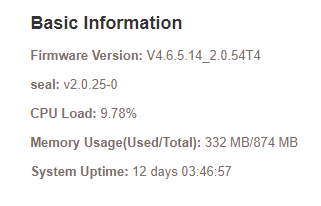
Mine ran 12 days with no problems. So far not seeing any thing on this version either. Though my RBS are ethernet connected...
I'm going to try them wireless...
raven_au wrote:
I always setup from scratch after a firmware reset, I never use backup configurations.
And AFAICS so far the wireless disconnection problem still exists with this firmware.
