NETGEAR is aware of a growing number of phone and online scams. To learn how to stay safe click here.
Forum Discussion

StevieDo
Sep 16, 2023Guide
Router Updated to 7.2, Satellite not
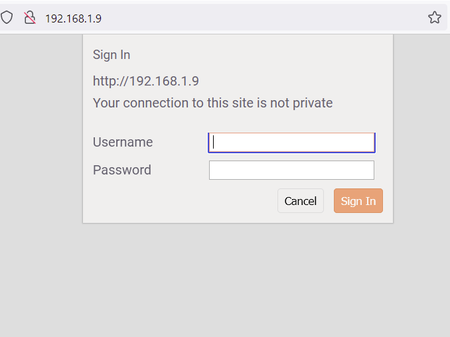
I updated my Orbi RBR750 to 7.2.6.21_5.0.20 manually after downloading ZIP. When I tried to update the satellite, it asks me to sign in and when I put in the admin credentials, the same screen keeps ...
- Sep 26, 2023
You sure you tried admin and "password"
Sounds like the RBS hasn't fully sync with the RBRs log in info which it should.
Couple of options,
Remove the RBS by factory resetting the RBS, then remove it from the RBRs web page. Select Generate for new backhaul password under advanced tab/advaced/wireless settings. Then try a re-sync with the RBS and RBRs add satellite feature.
Downgrade the RBR back to last v4 version of FW and see if the RBS will sync and you can log in long enough to send the v7 RBS FW file.
Or try the mentioned factory reset on the RBS with a wired PC connected to the back. Might turn OFF the RBR during this as to make sure the RBS doesn't connect.

FURRYe38
Sep 17, 2023Guru - Experienced User
The browser should allow you to pass thru and allow for a not private connection. Browser should give you the option to by pass this.
Try and use the RBRs web page to check for FW update for the RBS and see if it find it, if it does, then select Update All.
StevieDo
Sep 17, 2023Guide
I agree, but I can't seem to get these browsers to do it. The RBR page does not indicate any firmware available for either, nor does the orbi app. Is this a normal delayed roll out, or is this process broken?
- FURRYe38Sep 17, 2023Guru - Experienced User
Delayed. I know NG rolls new FW out in batches.
Does using HTTPS:// at the front of the IP address of the RBS help any?
What platform are you using? Windows or Mac
- StevieDoSep 26, 2023Guide
Still cannot get past this warning to update the satellite. Have tried a lot of browser settings and multiple browsers. Tried turning off anti virus as well. I can't be the only one with this issue.
- FURRYe38Sep 26, 2023Guru - Experienced User
Try admin and password for the password?
Does the RBS appear as connected and synced to the RBR on the RBRs web page?
Can try this to get the RBS updated:
You need to update the RBS before updating the RBR. Keep this in mind for future updates.
What you need to do is factory reset the RBS. Wire connect a PC to the 1st satellite📡. Already have the most current FW version files downloaded on to this PC.
Wire connect 1 PC to the back of the RBS. Factory reset the RBS, wait about 5 minutes. The PC will get a IP address from the satellite📡. The RBS will be 192.168.1.250. Or Set a static IP address of 192.168.1.49 on your PCs ethernet configuration. Use this IP address in a web browser to log in to the satellites web page. Log in as admin and password. Use the satellites 📡 web page FW update feature to select the FW update file that was unpacked from the .zip file. Then factory reset and then re-sync the satellites 📡 to the RBR.
Seems your the only one at this point in time. Others have posted there systems and RBS updated properly.