NETGEAR is aware of a growing number of phone and online scams. To learn how to stay safe click here.
Forum Discussion

RonV42
Dec 19, 2016Luminary
Access control page always shows one deviced blocked
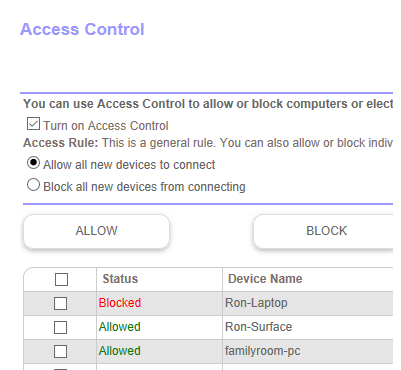
On my access control page in the router one device always shows Blocked even though it's not blocked. I never set it to be blocked. If I remove the device the next one on the list shows blocked. I...
dethier1958
Jan 04, 2017Guide
I updated and while it did correct those pesky problems, my router went solid Magenta after the update. I had to do a factory reset and set everything up again. This also happened when I did my initial set up. Why does this happen? The router should not require a factory reset after a firmware update.
RonV42
Jan 04, 2017Luminary
I did the firmware update today to V1.4.0.34 and the issue for device status showing blocked looks like it's been resolved. Really smooth update today. Clicked on the notification on the top of the Orib web page in the router went right to the firmware update page and the router and two satelliites showed the newer version ready to be installed. Just hit the install button and within 5 minutes everything was updated all deivces rebooted and reconnected and working just fine.
- RJG69Jan 04, 2017Guide
...Well.....I did the update to V1.4.0.34...and it was really simple, fast and seamless....but even after the update, if my Samsung Galaxy S5 is connected to my network via one of the 2 satellites, it shows as BLOCKED, the Mac Address is simply an "s", and the device type shows as "phone<"....it works at lightning speeds.....178+Mbps...but all the same unexplained anomolies are still there...
- tsutazJan 05, 2017GuideAdd +1 here too, still see the "blocked" status on my Lorex DVR device. ***Note: this device is hardwired to the Satellite. Before the update to .34 Orbi showed the correct mac address, now the mac address reads /OrbiDevName1> Do I need to manually reboot the ORBI after the firmware update or does ORBI do that automatically. BTW, the update went smooth and everything came back up good so far. Thanks
- aguaschJan 07, 2017Guide
I have had the same problem with my Samsung S7 showing a MAC of "/OrbiDevName1\>" it also shows the device as wired. I updated to the .34 firmware and the problem continues. The S7 connect fine as others have noted in this thread.
I tried reserving the IP address for the S7 which requires the entry of a correct MAC address. The blocked device went away and showed the correct MAC address. However, a few hours later I checked again and the MAC address is back to "/OrbiDevName1\>".
I can also confirm that the problem only occurs when the S7 is connected to the Sattelite.
Strange problem!