NETGEAR is aware of a growing number of phone and online scams. To learn how to stay safe click here.
Forum Discussion

RonV42
Dec 19, 2016Luminary
Access control page always shows one deviced blocked
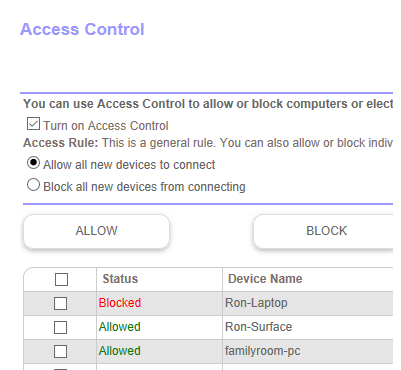
On my access control page in the router one device always shows Blocked even though it's not blocked. I never set it to be blocked. If I remove the device the next one on the list shows blocked. I...
aguasch
Jan 07, 2017Guide
I have had the same problem with my Samsung S7 showing a MAC of "/OrbiDevName1\>" it also shows the device as wired. I updated to the .34 firmware and the problem continues. The S7 connect fine as others have noted in this thread.
I tried reserving the IP address for the S7 which requires the entry of a correct MAC address. The blocked device went away and showed the correct MAC address. However, a few hours later I checked again and the MAC address is back to "/OrbiDevName1\>".
I can also confirm that the problem only occurs when the S7 is connected to the Sattelite.
Strange problem!
aguasch
Jan 07, 2017Guide
Update to my previous post...
All the sudden it started getting worse and some other wireless devices started showing up with the odd MAC address. I decided to power cycle both the router and the satellite. After all were up, I pressed the Sync button on the satellite. All devices are now showing the correct MAC address.
However, not out of the woods...
When I connect to the satellites' web site, it does not show any of the previously offending devices as connected to it. So maybe all the devices are connecting with the router and masking the problem :(
I shut off the S7 WiFi and then on again. After connecting to the network again the S7 has the odd MAC address again. The other problem is that when I now connect to the satellites' web site, it no longer diaplys any of the connected devices all you get is "please wait". The conclusion is this issue has other consequences and is not just cosmetic.