NETGEAR is aware of a growing number of phone and online scams. To learn how to stay safe click here.
Forum Discussion

RonV42
Dec 19, 2016Luminary
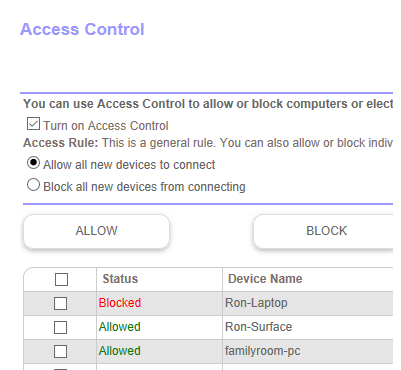
Access control page always shows one deviced blocked
On my access control page in the router one device always shows Blocked even though it's not blocked. I never set it to be blocked. If I remove the device the next one on the list shows blocked. I...
tsutaz
Feb 02, 2017Guide
Has anyone had trouble with more than 1 device being *REALLY* blocked? I have a Linux desktop downstairs and it is hardwired via a netgear powerline ethernet adapter, and the other adapter is upstairs on the main floor, from there I plug into my switch. Orbi, not matter how many times I unblock the device, will not let the linux box get to the outside world. Only if I turn off Access Control, then everything is fine? I use this Linux box in my woodworking shop, well, to watch youtube stuff, frustrating I can't do that now until I figure this out.
aguasch
Feb 02, 2017Guide
The devices are not really blocked. The problem occurs to certain devices connected through the satellite. For me it always happens to one of the Samsung S7 that I own. When it is connected to the satellite is shows the bogus MAC address. If I walk to the main router the problem goes away. It also happens to one of my Amazon Echo Dots which always connects to the satellite. However, the problem on the Echo Dot goes away when the S7 reconnects to the satellite. Then once again the S7 gets the funcky MAC and the Echo Dot shows it's correct MAC. Strange problem which v.34 did not fix!