NETGEAR is aware of a growing number of phone and online scams. To learn how to stay safe click here.
Forum Discussion

meanjeanslo
Oct 17, 2023Guide
After firmware update - satellite disconnected and unable to reconnect
Hello, I have an Orbi RBK20 set with a router RBR20 and 1 satellite RBS20. I downloaded and installed the most recent firmware V2.7.4.24. The router updated fine and still works/connects. I am cu...
- Oct 28, 2023
Just wanted to make my final post on this. I truly appreciate all of the feedback I received which helped me troubleshoot!
After all of the troubleshooting and not being able to get this to connect, I finally decided to quit trying with it. It was a great system as long as I had it and I'm sure glad I ordered a newer model for my house. I was able to give my neighbors the router to use in AB mode and it's cleared up their cable TV issues so I think it's still a win.
Thanks again!

FURRYe38
Oct 19, 2023Guru - Experienced User
If you press the reset button for 15 seconds then release, the POWER LED in back should come back ON as RED for a few seconds then turn GREEN.
meanjeanslo
Oct 19, 2023Guide
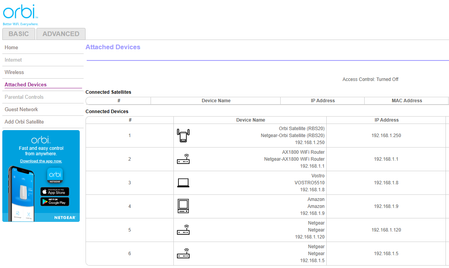
It's not resetting properly I guess. I let it blink amber for more than 30 seconds (after trying 15 or 20) and as soon as I released the button, the power light is off, never comes back on unless I press the power button off and turn it back on again. I'm letting it sit right now for a while to see if the power light will turn back on. It's been a few minutes so far. The ring light is still that slow pulsing white. I can still ping it with a command prompt again no loss of packets. Included are both pages of firmware update. Interesting that the router doesn't show up on the manual page, either.
- FURRYe38Oct 19, 2023Guru - Experienced User
Sounds like RBS maybe broke. Last resort you can try is a 30-30-30 reset on the RBS:
https://www.lifewire.com/hard-reset-rule-for-routers-3971318
- meanjeansloOct 20, 2023Guide
I tried the 30-30-30 reset. It didn't solve the problem but I'm going to try it one more time in case I did something wrong. After the final 30 seconds, it just continued to have a red blinking power light and a white fast blinking ring light. I powered it off and back on. It's still connected with an ethernet cable and, strangely, it always has the IP address of .250 which doesn't make sense to me. The router should have handed out a new address by now, I would think. While I gave the router a static IP, I never gave one to the satellites.
Anyway, I will try one more time this weekend. I need a break before I throw it in the trash. lol. After this last attempt, if it still doesn't work, I'm just going to assume it is broken beyond repair.
Thanks again for everyone's input on this problem!
- FURRYe38Oct 20, 2023Guru - Experienced User
👍
- meanjeansloOct 28, 2023Guide
Just wanted to make my final post on this. I truly appreciate all of the feedback I received which helped me troubleshoot!
After all of the troubleshooting and not being able to get this to connect, I finally decided to quit trying with it. It was a great system as long as I had it and I'm sure glad I ordered a newer model for my house. I was able to give my neighbors the router to use in AB mode and it's cleared up their cable TV issues so I think it's still a win.
Thanks again!
- FURRYe38Oct 29, 2023Guru - Experienced User
AB mode?
- CrimpOnOct 29, 2023Guru - Experienced User
Might be a typo for Access Point (AP) mode.
- meanjeansloOct 29, 2023Guide
Yes, sorry, that's what I meant! AP mode.
