NETGEAR is aware of a growing number of phone and online scams. To learn how to stay safe click here.
Forum Discussion

GinaFitz
Aug 13, 2017Aspirant
Connecting Orbi to iAquaLink pool system
I am unable to connect my iAquaLink system to the Orbi network. I get as far as selecting the network and putting in my password. It just drops the network. I understand that the iAquaLink can only wo...

FURRYe38
Feb 13, 2019Guru - Experienced User
Try the DMZ+ mode for the Orbi.
Please reivew the links about DMZ and NAT.
http://www.dslreports.com/shownews/Networking-101-The-DMZ-137550
http://computer.howstuffworks.com/nat.htm
http://www.practicallynetworked.com/networking/fixing_double_nat.htm
Double NAT can cuase connection problems with internet services and recourses. Remote connections from remote place to your home will be a problem as well. Viewing cameras if you have cameras, controlling IoT devices will be problematic when in a double NAT condition.
silver123 wrote:
Here's the att router settings, the wifi is completely turned off already
The orbi is already in router mode
Not sure how to bridge the modem nor set up DMZ (nor what DMZ means)
What problems would someone be having by leaving it the way it is, what are the symptoms of a double NAT?

silver123
Feb 13, 2019Aspirant
Thanks for the input so far, I have to get back to work this is really helpful but I gotta get my work done so I will revisit this after work hours.
For what its worth, I'm currently operating
Lutron
Roomba
Rainbird
Chamberlain garage doors
Nest
2 Pioneer receivers
Sonos system
5 rokus
I have no issues every operating any of these items inside the house or while away from home, I have no issues accessing any websites, there's not a single hint that anything is amiss besides the iaqualink, but that being said, I do want to re-configure it to continue with experimenting at the very least if I can get it stable on the orbi I can report back to the Jandy company so they can learn this for future customers, as I'm not the only one with this exact same issue there are probably half a dozen customers with the same exact symptoms...kind of interesting that that's all I was able to find, but that's what makes the resolution more difficult to achieve and hopefully I'll be the person who brings the answer to the other customers with y'alls help.
- ekhalilFeb 13, 2019Master
silver123 wrote:
.......
For what its worth, I'm currently operating
Lutron
Roomba
Rainbird
Chamberlain garage doors
Nest
2 Pioneer receivers
Sonos system
5 rokus
......
If all these device work correctly and -specially- that you can control them remotely then I guess that your ISP router -most probably- is already set to DMZ mode, and this can be just an integration issue with the iAquaLink.
Please try the WPS suggestion above and see if that helps.
- FURRYe38Feb 13, 2019Guru - Experienced User
Let us know how it goes later on. Hope this helps.
silver123 wrote:
Thanks for the input so far, I have to get back to work this is really helpful but I gotta get my work done so I will revisit this after work hours.
For what its worth, I'm currently operating
Lutron
Roomba
Rainbird
Chamberlain garage doors
Nest
2 Pioneer receivers
Sonos system
5 rokus
I have no issues every operating any of these items inside the house or while away from home, I have no issues accessing any websites, there's not a single hint that anything is amiss besides the iaqualink, but that being said, I do want to re-configure it to continue with experimenting at the very least if I can get it stable on the orbi I can report back to the Jandy company so they can learn this for future customers, as I'm not the only one with this exact same issue there are probably half a dozen customers with the same exact symptoms...kind of interesting that that's all I was able to find, but that's what makes the resolution more difficult to achieve and hopefully I'll be the person who brings the answer to the other customers with y'alls help.
- silver123Feb 13, 2019Aspirant
I followed the directions on this youtube link to move the att router into dmz
https://www.youtube.com/watch?v=3Q0Q2alkzcY
after doing that I unplugged the nighthawk so the only wifi is the orbi, I re-established connection from the iaqualink to the orbi, which it connected, then the very second I accessed the app it dropped just like before, no improvement.
- silver123Feb 13, 2019Aspirant
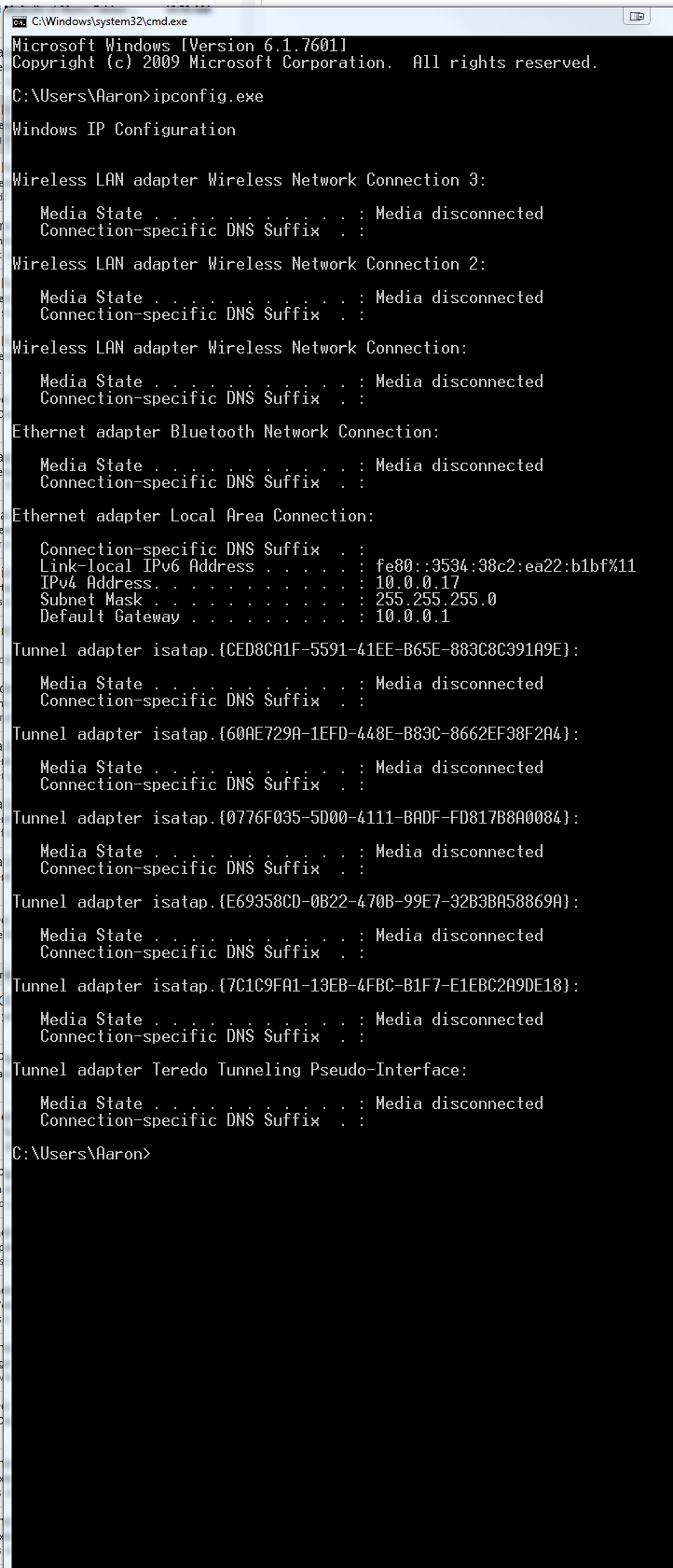
at the end of his video he shows his IPconfig and it's not the same as mine, I don't know if this indicates an issue but it's not the same formatting so just going to post both, his is named Glasscock (his last name)
Please see the attachments and let me know if this is an indicator of an issue or not.
- silver123Feb 13, 2019Aspirant
guess you can't poste 2 attachments on one post
- ekhalilFeb 13, 2019MasterI watched this video: https://youtu.be/UWey8qOOW-U
- Which one of the ipconfig’s is yours, the 10.0.0.x or 192.168.1.x?
- After the setup, instead of using the app- will you be able to reach your device by logging in to iaqualink.com?
- Seems that the iaqualink cloud needs to establishe a vpn to your device, and the issue might actually be there. - silver123Feb 13, 2019Aspirant
ekhalil mine is the 10.0.0.x and he's showing his is 192.168, why is mine 2 digit format rather then the normal 192.168
Accessing the system via the computer was possible before and it kicked the antenna offline before I made any changes to the system, not sure if it will do the same now.
It's been 20 min or so since it kicked offline so it's back online, I can access with the iphone app / computer website but it's only a matter of time before it kicks off again based on experience thus far.
- ekhalilFeb 13, 2019MasterSo when you can reach to the device will you be able to do any settings or config changes before you get kicked off?
- silver123Feb 13, 2019Aspirant
ekhalil it seems that as soon as you connect the antenna to the router, and access the app, it kicks off instantly, then after 30 min when it re-establishes connection, you can reopen the app, and make changes to the configuration, turn things on and off/ play in the app for a while then it will at some point disconnect again. it's been stable for about 10 minutes or so thus far.
- ekhalilFeb 13, 2019MasterIs your ISP supporting IPv6? If not then please disable IPv6 in Orbi and -if possible- in the ISP router.
- ekhalilFeb 13, 2019Master
silver123 wrote:
ekhalil it just went offline while accessing from the website, not iphone, so it lasted less then 1 hour before losing connection
The fact that you -sometimes- can reach the device makes me think nothing is wrong with routing.
One thing I would like to check is the IPv6 settings in Orbi and the ISP router, do both routers have IPv6 enabled or disabled?
- silver123Feb 13, 2019Aspirant
If you can explain why the ipv6 would matter I would go check it, just a quick google search shows that there's lots of reasons not to turn off ipv6, and yes, any reccomendations I'm receiving here I'm researching before implementing them.
If it's not the orbi at fault, then why would the iaqualink be 100% stable connection to the nighthawk and the uverse(temporariliy turned on wifi for those devices to test it out)
- Chuck_MFeb 13, 2019Mentor
At this stage, I think checking V6 would be a normal and reasonable part of troubleshooting by this voluntary community who helps people who need assistance outside of NG tech support...
Seems like other settings have already been checked which could effect your network.
I dont think he was advocating leaving it off, but perhaps that would indicate where the issue is or is not.
Since you are the person with the issue, your willingness to participate in troubleshooting is up to you.
If I were in your situation, I would give it a shot.
- ekhalilFeb 13, 2019Master
silver123 wrote:
If you can explain why the ipv6 would matter I would go check it, just a quick google search shows that there's lots of reasons not to turn off ipv6, and yes, any reccomendations I'm receiving here I'm researching before implementing them.
If it's not the orbi at fault, then why would the iaqualink be 100% stable connection to the nighthawk and the uverse(temporariliy turned on wifi for those devices to test it out)
I'm not asking to turn IPv6 off. I'm just asking to check that both Orbi and the ISP router have the same IPv6 settings. If Orbi has IPv6 enabled then I would like to see that the ISP router also has IPv6 enabled. The same if disabled.
Do you know if your ISP supports IPv6?
- Chuck_MFeb 13, 2019Mentor
can you access the web interface of your equipment without it dropping off line? According to your owners manual,
Web Browser Interface
Using your personal computer or laptop, you can use
the iAquaLink web interface to program, customize,
control, and configure every device and feature
available with your AquaLink control systems.
NOTE: The Web Browser Interface is not available for use
with the AquaLink Z4 controller.
How to Access the Web Browser Interface:
▪ Go to www.iAquaLink.com and login to enter the
"Welcome to iAquaLink Owner's Center".
▪ Select the "Locations" tab to display the iAquaLink
Owner's Center. If your device is not listed, click "Add
Location" and follow the online instructions.
▪ Once your device is added, click on it to access the
HOME screen of your iAquaLink Web Interface - Chuck_MFeb 13, 2019Mentor
that is helpful to know in the diagnosing process... that it is regardless of how the controller is accessed.
- ekhalilFeb 13, 2019Master
silver123 wrote:
IPV6 on att
LAN Status Up Link Local Address fe80::de7f:a4ff:fe67:291 Delegated Address/Subnet 2600:1700:e640:23f0::1/64
IPV 6 on orbi disabled
I googled whether att uverse supports ipv6 but I cannot find a clear answer.
- Can you please make sure that both routers are aligned in IPv6 settings. Both ON or both OFF, depending on if your ISP supports IPv6 or not.
- To reach to your iagualink device your iaqualink cloud needs to be connected to your device through internet and then through your ISP router and then Orbi to reach to the iaqualink device. I'm suspecting that something happens during the connection that disturbs this "long" connection. One of the things that I think of is the iPv6 settings.
- One more thing worths checking. The Orbi app uses the same approach to connect to Orbi. Can you connect to the Orbi app and keep connected without being "kicked off"?
- Can you please make sure that both routers are aligned in IPv6 settings. Both ON or both OFF, depending on if your ISP supports IPv6 or not.
- silver123Feb 13, 2019Aspirant
From what I could find by googling there are a bunch of threads on ipv6 for Uverse and based on the content it appears it is supported.
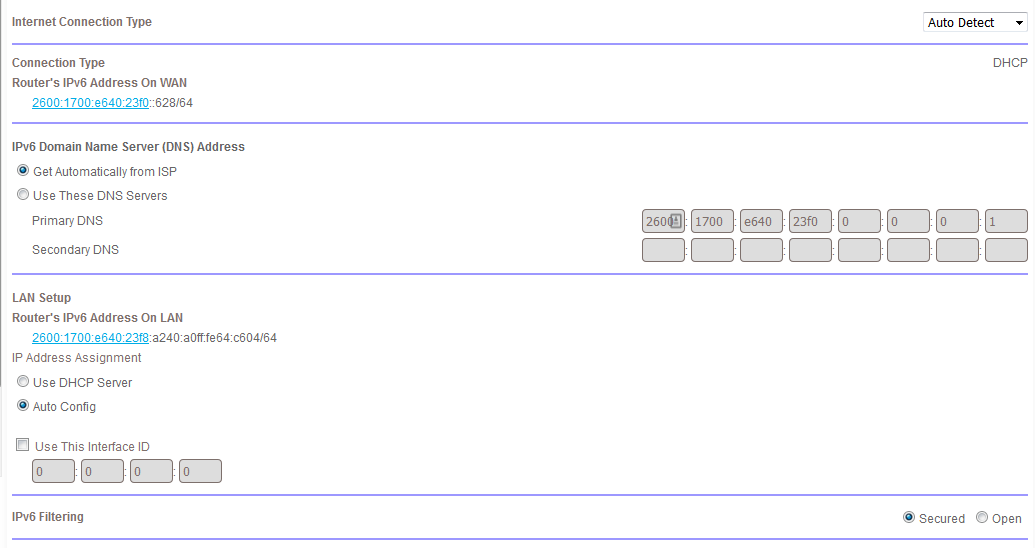
I have enabled ipv6 on the orbi (set to auto) not sure if it should be changed from there or left alone
Attached the screenshot
Yes I can access the orbi app from the phone and it never kicks anything offline except the aqualink.
- ekhalilFeb 13, 2019Master
This looks good. I think you should have it enabled if both your ISP supports it and the ISP router has it enabled.
Any change on the behavior of the connection to the iaqualink after this change? :)
Have you also checked your Orbi app access and if it really has the same behavior?
- silver123Feb 13, 2019Aspirant
Using the orbi app I can see my roomba is connected to the sattelite 2.4ghz and it shows 52Mbps with the same signal strength indicated as the iaqualink also connected to the sattelite it's only at 2Mbps even though when I speed test it outside by the iaqualink I'm seeing 25Mbps....My maximum bandwidth is 25 so I'm not sure how the "link rate" in the orbi app exceeds that