NETGEAR is aware of a growing number of phone and online scams. To learn how to stay safe click here.
Forum Discussion

GinaFitz
Aug 13, 2017Aspirant
Connecting Orbi to iAquaLink pool system
I am unable to connect my iAquaLink system to the Orbi network. I get as far as selecting the network and putting in my password. It just drops the network. I understand that the iAquaLink can only wo...

ekhalil
Feb 13, 2019Master
silver123 wrote:
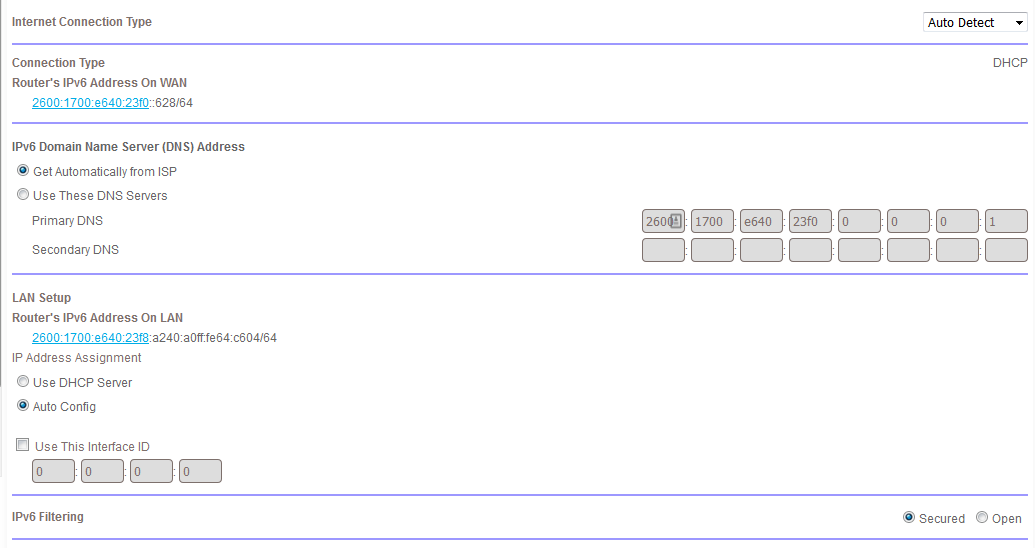
IPV6 on att
LAN Status Up Link Local Address fe80::de7f:a4ff:fe67:291 Delegated Address/Subnet 2600:1700:e640:23f0::1/64
IPV 6 on orbi disabled
I googled whether att uverse supports ipv6 but I cannot find a clear answer.
- Can you please make sure that both routers are aligned in IPv6 settings. Both ON or both OFF, depending on if your ISP supports IPv6 or not.
- To reach to your iagualink device your iaqualink cloud needs to be connected to your device through internet and then through your ISP router and then Orbi to reach to the iaqualink device. I'm suspecting that something happens during the connection that disturbs this "long" connection. One of the things that I think of is the iPv6 settings.
- One more thing worths checking. The Orbi app uses the same approach to connect to Orbi. Can you connect to the Orbi app and keep connected without being "kicked off"?

silver123
Feb 13, 2019Aspirant
From what I could find by googling there are a bunch of threads on ipv6 for Uverse and based on the content it appears it is supported.
I have enabled ipv6 on the orbi (set to auto) not sure if it should be changed from there or left alone
Attached the screenshot
Yes I can access the orbi app from the phone and it never kicks anything offline except the aqualink.
- ekhalilFeb 13, 2019Master
This looks good. I think you should have it enabled if both your ISP supports it and the ISP router has it enabled.
Any change on the behavior of the connection to the iaqualink after this change? :)
Have you also checked your Orbi app access and if it really has the same behavior?
- silver123Feb 13, 2019Aspirant
Using the orbi app I can see my roomba is connected to the sattelite 2.4ghz and it shows 52Mbps with the same signal strength indicated as the iaqualink also connected to the sattelite it's only at 2Mbps even though when I speed test it outside by the iaqualink I'm seeing 25Mbps....My maximum bandwidth is 25 so I'm not sure how the "link rate" in the orbi app exceeds that
- silver123Feb 13, 2019Aspirant
ekhalil I edited the response as you posted, yes I can access the orbi app always it's stable, and then I posted another response just about some info I noticed on the app.
Due to the nature of the disconnect it may take an hour or more for me to know if it get's kicked off, sometimes it happens immediately.
- ekhalilFeb 13, 2019Master
silver123 wrote:
Using the orbi app I can see my roomba is connected to the sattelite 2.4ghz and it shows 52Mbps with the same signal strength indicated as the iaqualink also connected to the sattelite it's only at 2Mbps even though when I speed test it outside by the iaqualink I'm seeing 25Mbps....My maximum bandwidth is 25 so I'm not sure how the "link rate" in the orbi app exceeds that
The link rate shown by Orbi has nothing to do with your maximum internet speed. It just gives you an indication of:
- The link quality between Orbi and the device
- The capability of the device
- Chuck_MFeb 13, 2019Mentor
Hey silly question... have you rebooted your pool network gear lately?
- silver123Feb 13, 2019Aspirant
It's been rebooted several times today as I change the connection from the nighthawk back to the orbi and what not.
The pool controller manufacturer said up front they have issues with orbi and other mesh systems because their product only works on 2.4Ghz and only on 802.11b, I'm not sure if I have mentioned that specifically but not sure if that really points you in any direction.
Also just to re-itterate, when I plugged my nighthawk into the orbi, (nighthawk set to 2.4Ghz only, it was stable, this before changing the uverse router into the dmz+ before turning on ipv6, and at that point it was Router (att) ON router (orbi) on router (nighthawk) yet even with all those things that are not really "correct" it was a stable connection.
Again not sure if that helps
- ekhalilFeb 13, 2019Master
silver123 wrote:
........
Also just to re-itterate, when I plugged my nighthawk into the orbi, (nighthawk set to 2.4Ghz only, it was stable, this before changing the uverse router into the dmz+ before turning on ipv6, and at that point it was Router (att) ON router (orbi) on router (nighthawk) yet even with all those things that are not really "correct" it was a stable connection.
.......
Ok, let's test if it's the common SSID that causes the issue. Let's -temporarly- switch off the 5 GHz band and see if the iaqualink will feel better then. :)
Please follow the following procedure to turn the 5 GHz band off:
- From browser go to the router's debug page (http://192.168.1.1/debug.htm). Use your router's IP address or http://orbilogin.com/debug.htm
- Enter admin as user name and your router’s management password
- Tick "Enable Telnet" option
- Use Telnet from your computer to connect to your Router telnet 192.168.1.1 and enter admin and the same password as above
- Enter the command:
- root@RBR50:/# ip link set down dev ath1
- Now you should only have 2.4 GHz band in the router. Is the iaqualink close to the router? if not then you need to repeat the procedure in the satellite to which the iaqualink is connected to or otherwise switch off the satellites during your testing.
- When you want to turn on the 5 GHz band again please use the follwong command:
-
root@RBR50:/# ip link set up dev ath1
-
- silver123Feb 13, 2019Aspirant
***edit*** did a better job googling and got it to work, but not sure how to get the IP address of the sattelite
- silver123Feb 13, 2019Aspirant
Also the aqualink is connected to my sattelite so I'm not sure how I would telnet to the sattelite versus the main router (maybe by typing in it's ip address? ) I don't know it's ip address so how do I find it?
- ekhalilFeb 13, 2019Master
To enable telnet in Windows follow the steps here: http://www.techerator.com/2010/07/how-to-enable-the-telnet-client-in-windows-7/
Maybe you have done that already! :)
- silver123Feb 13, 2019Aspirant
I did: when I type in root@RBR50:/# ip link set down dev ath1 it says
root@RBR50:/# not found
- ekhalilFeb 13, 2019Master
silver123 wrote:
Also the aqualink is connected to my sattelite so I'm not sure how I would telnet to the sattelite versus the main router (maybe by typing in it's ip address? ) I don't know it's ip address so how do I find it?
Please login to the web GUI (orbilogin.com) and go to Attached Devices where you will see the satellites and their IP addresses, please see below:
You can also get the same information from the Orbi app.
- ekhalilFeb 13, 2019Master
Sorry, it's after midnight here and I need to wake up early tomorrow. Please try those things and let's continue discussion tomorrow.
Good night :)
- silver123Feb 13, 2019Aspirant
I did the command but nothing changed.
I was wathcing someone's directions on how to seperate the SSID and he said you have to type config commit after so I tried that, then I typed reboot
when it came back online there's still 5g running per the attached devices so i'm not sure what that command did but it didn't turn off the 5g radio
- silver123Feb 13, 2019Aspirant
I found this script to enter I changed it to 30,000 which is 8 hours, ( I disconnedted the sattelite first) and so when I went to connect the iaqualink....the Main orbi doesn't reach there so I am powering on the sattelite again and will try to telnet to it, last time I tried it didn't work, but maybe it's because I did not activate the telnet on the correct ip....anyways will continue to try
seconds=300; x=0; while [ $x -lt $seconds ]; do ip link set down dev $(config get wl5g_NORMAL_AP); x=$(( x + 1 )); echo "down $x"; sleep 1; done - silver123Feb 13, 2019Aspirant
OK with 30,000 seconds on the clock (LOL) I have the orbi and sattelite operating with 2.4Ghz only, the Iaqualink gave me trouble connecting initially (kept saying cannot connect to the iaquaink network) but finally it worked and it's connected to the satelite again, now to see if it kicks off over the next 8 hours (I'll be sleeping in 4 hours probably)
- silver123Feb 13, 2019Aspirant
31:30 from when I started the timer it disconnected, considering it took me (maybe 1.5 min) to walk outside and re-connect the iaqualink to the orbi) does anyone know if there's some subroutine that occurs every 30 minutes that could be the source of the disconnect?
- silver123Feb 13, 2019Aspirant
I googled orbi disconnects every 30 min and found another thread on here, the user made these changes which resolved their problem and it's been 45 minutes since I made the changes and it has not yet disconnected.................yet lol
See attachment
 raven_auFeb 13, 2019Virtuoso
silver123 wrote:
The pool controller manufacturer said up front they have issues with orbi and other mesh systems because their product only works on 2.4Ghz and only on 802.11b, I'm not sure if I have mentioned that specifically but not sure if that really points you in any direction.
I still think it's worth checking if setting the Orbi wireless security to "WPA-PSK [TKIP] + WPA2-PSK [AES]" helps.
Particularly since the device can only use 802.11b, that's so old now it wouldn't surprise me if all your seeing is device incompatibility with the Qualcomm wireless drivers on the Orbi.
The wireless on the Nighthawk that worked ok is probably a different vendor chipset, possibly Broadcomm, so it will use different wireless drivers that probably have better compatibility with older wireless protocols.
Anyway, try the wireless security setting change, it's not hard to do and shouldn't cause problems for other network devices.
It's been quite a while since but I have sometimes seen erratic behaviour from devices where this security setting was needed for them to work ok.
- ekhalilFeb 14, 2019Master
To recap, what we have tried so far with no luck is the following:
- Set the ISP router to DMZ+
- Enable IPv6 in Orbi as it was enabled on ISP router
- Disable 5 GHz band in Orbi
- Change security settings to WPA-PSK [TKIP] + WPA2-PSK [AES]
More things to check/test:
- Change Orbi to AP Mode and make ISP router as main router (remove DMZ+ settings from ISP router).
- Check the ISP lease time and see if this is related to the periodic dosconnections. As the iaqualink app establishes a VPN through both routers, it can be good to check this:
- Can you please check the ISP lesse time (Lease Obtained)under >> ADVANCED >> ADVANCED Home >> INTERNET PORT >> CONNECTION STATUS
- Monitor also the Lease Expire and see if this has to do with the disconnections.
- silver123Feb 14, 2019Aspirant
Lease obtained 10 min
Lease expires 5 minutes
Can this be changed?
- ekhalilFeb 14, 2019Master
silver123 wrote:
Lease obtained 10 min
Lease expires 5 minutes
Can this be changed?
Orbi is getting the lease from the ATT router. You should be able to change it in the ATT router. If your router is 5268AC then this is how you can change this time according to the router's manual: