NETGEAR is aware of a growing number of phone and online scams. To learn how to stay safe click here.
Forum Discussion

SW_
Apr 18, 2019Prodigy
New Orbi RBR50/RBS50 Firmware Version 2.3.1.48
Netgear just pushes out another firmware version, 2.3.1.48.
Please share your experience!


LoboTommy
Apr 20, 2019Luminary
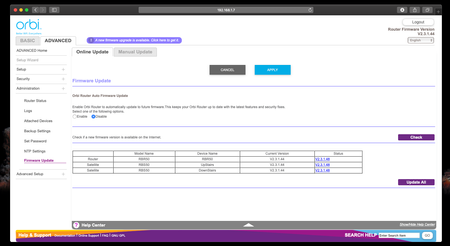
at the moment, noone has produced the file. It only shows up in the menu for firmaware update. you push the automatic update manually (mark the router you want to upgrade, an klick "update now")

rammer91
Apr 20, 2019Tutor
That's my beef. They've pushed an upgrade, but haven't released a file. I was able to upgrade my router to .48, but for any number of unknown reasons my satellite doesn't show that it's available to push, it says "waiting to connect" yet I know it's connected. So that's why I have to update it manually, which I can't do without the file. At this point I'm spending more time on the chat boards and power cycling my network setup and tweaking setting to try to get it to work than I am enjoying it. Probably going to go in the scrap heap. Terrible that it's so difficult to configure, and based on the comments here I'm not the only one. I'm not a pro, but I'm fairly adept at network engineering and I just can't figure it out.
- psmedleyApr 20, 2019Tutor
I'm seeing the prompt when I login to update, however, only the router is listing the new firmware, the satellite is saying 'Update Failed'.
The 'Update All' button is greyed out (presumably as the satellite isn't picking up the new version.
Any ideas? Other than waiting for the manual file?
 tagteamApr 20, 2019Virtuoso
I guess wait for the manual file. I just noticed that it is NOT available for download, which is pretty poor form for Netgear.
Releasing a firmware update that is only available via the GUI? Not good!
- psmedleyApr 20, 2019Tutor
Looks like updating the router using the app has worked, wonder if that will update the satellite too?
Edit:nope, router is now on the .48 firmware, satellite still on .44
- csm2000Apr 20, 2019Tutor
Great job NetGear! Thanks for not making the Firmware file available. Pure BS!!
- LoboTommyApr 20, 2019LuminaryLike i said, under firmware menu, manual update you can choose the satelite and push the file through, even if it's not downloaded. Pick the satelites one by one. Of you don't succeed, u can always borrow my sledgehammer...
- jweiseApr 20, 2019ApprenticeUsed update all and it worked fine.
- Damit1Apr 20, 2019ApprenticeLOL.
Upgraded to latest ver, WIFI speeds dropped by 100Mbps.
Downgraded to .44 ver, WIFI speeds back to nornal.