NETGEAR is aware of a growing number of phone and online scams. To learn how to stay safe click here.
Forum Discussion

Stinky_W_Teats
May 25, 2023Aspirant
Orbi AC3000 generally unhappy
hi, I am struggling with a few issues with wifi on my Orbis: I have six Phorus PR5 receivers (these are hard-wired to an amp which is connected to wired ceiling speakers around the house and al...
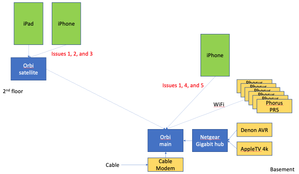
- Jun 14, 2023
Final update: I bought the Nintendo Ethernet adapter (above) for all the PR5s and they have been rock solid since.
Given that the MBP does not always appear in the list of AirPlay devices, plus the iPad issue when connected to the Orbi satellite, plus the drop outs on signal on the Orbis, I will lay the blame on the Orbis, but it is not 100% proven.
Done messing with this, and shame i had to throw money at the issues.
Stinky_W_Teats
May 31, 2023Aspirant
Thanks for the reply Kevin, much appreciated! Great to see Netgear helping
To the broadcast point: I considered that as well as possible multicast issue yesterday, so enabled IGMP (the setting is only on the WAN side, so should not affect local traffic on WiFi). The box was checked, so it was disabled. I unchecked it so is now enabled. No difference in the last ~20 hours.
I have been limiting testing to music stored locally on my iPhone and using the Music app on the phone, so no WAN involved. Also, even before i try to stream music, the issue is in connecting to the devices. so absolutely no WAN involved with that.
But even if we have eliminated possible multicast issues, there may be a broadcast issue:
- I don't know how often the PR5s broadcast their presence as AirPlay devices
- I don't expect that the Orbi would store AirPlay broadcast information (but that is a question for Netgear, i.e., depending on the protocol AirPlay uses such as if it involves routes (admittedly a longshot))
- Theoretically, the iPhone refreshes the list of AirPlay devices when you pull down on the screen. That may be some sort of broadcast that says something like "where my AirPlay peeps at?"
- I don't know how the Orbi handles that broadcast. It SHOULD send it to all WiFi devices if it is a standard broadcast, but again, a question for Netgear if the Orbi somehow limits broadcasts in an attempt to optimize bandwidth
- Ditto for the PR5 broadcasts - the Orbi could be limiting those such as if it thinks it is seeing too many of those and quits repeating the broadcasts to WiFi. Are there any settings related to broadcast on the Orbi?
Stinky_W_Teats
May 31, 2023Aspirant
>If they were disconnecting and reconnecting, then the Orbi log file would show them being assigned IPs over and over.
I have been checking the log and it does not show any re-assignment of IPs. So when the PR5s switch from 5 to 2.4 they are not getting new IPs.
And speaking of addresses, one thing i learned early on in this troubleshooting is that Apple devices use private WiFi addresses (which IMHO should be called private MACs) so the MAC address on the iPhone and iPad can change. I disabled that on both a few days ago, and everything has been rebooted multiple times since then, so I highly doubt that could be the problem.
I wrote down the IPs and MACs of the PR5s and those are not changing for the last 2+ days since i started checking.
- Stinky_W_TeatsMay 31, 2023Aspirant
heh. the MBP is back again and it is on 2.4. Kids' bath PR5 is still visible and on 5.
As Charlie Brown would say: AAAAAAAAAAAAAAAAAAAARGH!
Wish I had a Sniffer.
- Stinky_W_TeatsMay 31, 2023Aspirant
My MBP has disappeared from the list of AirPlay devices and is still on 2.4. Given that this is iPhone to MacBook Pro and both are connected to the main Orbi, if anything should work it is this (i.e., both "native" AirPlay devices). Kinda makes me think Orbi....
This might be the use case to continue troubleshooting - all Apple devices and only the main Orbi. If I can make that work, it may resolve the PR5 issues.
Also, the iPad issues are still there - when it moves to the satellite Orbi, it still losses WiFi and reconnects multiple times when I am surfing upstairs. and even after that stabilizes it is dirt slow. (No PR5s involved in that.)
Double AAAAAAAAAAAAAAAAARGH!
- Stinky_W_TeatsMay 31, 2023Aspirant
Unofficial AirPlay spec:
Wondering if it could be an mDNS issue? Going to see if the Orbi has a setting for that...
- Stinky_W_TeatsMay 31, 2023Aspirant
Question for Netgear, going back to my earlier thought of moving to separate 5 and 2.4 SSIDs (and therefore VLANs):
Is the traffic coming in from the 2 different hardware interfaces on separate VLANs that are bridged together at lower protocol levels, or is it done in hardware?
If the HW interfaces are on bridged VLANs, that could be the root cause
- Stinky_W_TeatsMay 31, 2023Aspirant
One thing mentioned in the AirPlay spec is that it will send a wake-up broadcast for devices that have a sleep mode. I checked the PR5 configs and they are all set to No Sleep. So that is not it.
- Stinky_W_TeatsMay 31, 2023Aspirant
my MBP is back in the list of AirPlay devices on my iPhone. Still on the main Orbi at 2.4. iPhone still on main Orbi at 5G.
WiFi connection does not appear to have changed but something obviously did maybe at upper levels of the stack.
- Stinky_W_TeatsMay 31, 2023Aspirant
MBP is gone again but nothing changed from what i can see.
The only AirPlay device that has consistently shown up since yesterday afternoon is the PR5 that is connected at 5G (kids' bath). It's still there through all the ups and downs of the MBP and other PR5s.
- Stinky_W_TeatsMay 31, 2023Aspirant
Found an old thread on setting up a grill that required 2.4G that said turning off on 20/40 coexistence fixed an issue (but it didn't mention AirPlay). Given it popped up in a search for 2.4 vs 5 connectivity, it might be worth a shot
Will give it a whirl at lunch since it may cause the Orbi to reboot and don't want to blow the rest of the family off the network.
- Stinky_W_TeatsMay 31, 2023Aspirant
ok, family gave me the green light to reboot it, and i unchecked the 20/40 coexistence box.
After the Orbi rebooted, i can once again see the MBP and all of the PR5s. will see how long that lasts...
- FURRYe38May 31, 2023Guru - Experienced User
Which Orbi model system do you have? The 20 or 50 series?
What FW version is currently loaded?
What iOS and OSX versions are loaded on the Mac Book, phones and pads?
What model is your Mac Book Pro?
- Stinky_W_TeatsMay 31, 2023Aspirant
HAH! Not long. i went upstairs to the master bath, and all the PR5s disappeared. the MBP is still there. My iPhone switched to the satellite per the Orbi console screen, and is connected at 5G.
I am pretty convinced that one issue with the Orbis are that when you move from the main to the satellite, something goes wrong with the way they handle broadcasts / mDNS. Or that after a few minutes (or a reboot), the Orbis stop allowing that.
Going back upstairs to grab my phone.
OK, back at my desk. I turned the iPhone's wifi off and hit refresh on the Orbi console but even after several minutes and several refreshes, the iPhone is still showing up as an Attached Device on the satellite at 5G. Wondering if there is a cache that is not being cleared on the Orbi? What exactly is being refreshed if not the list of devices that are actually attached to wifi?
After a couple of minutes, I gave up and turned the phone's wifi back on. the console now shows it connected 5G to the main Orbi. But only the MBP is still the only device showing in the AirPlay list.
- Stinky_W_TeatsMay 31, 2023Aspirant
hi FURRYe38,
Hardware Version RBR50 Firmware Version V2.7.4.24 MBP is a 2019 16-inch running 13.3.1 (a)
iPhone is a 12 running 16.4.1 (a)
- FURRYe38May 31, 2023Guru - Experienced User
I would update FW and see:
Factory reset and setup from scratch afterwards. Recommend setting the default DHCP IP address pool range to the following after applying and a factory reset: 192.168.#.100 to 192.168.#.200.
https://kb.netgear.com/24089/How-do-I-specify-the-pool-of-IP-addresses-assigned-by-my-Nighthawk-router
I would power OFF the ISP modem for 1 minute. Factory reset the Orbi router and power it off. Power ON the ISP modem and let it sync. Then power ON the Orbi router and walk thru the setup wizard again using a wired PC and a web browser.
Press the back reset button for 15 seconds then release.
https://kb.netgear.com/31486/How-do-I-reset-my-Orbi-system-to-factory-default-settings
https://kb.netgear.com/000062081/How-do-I-erase-the-configuration-settings-on-my-Orbi-WiFi-SystemSet manual channel 1 and 40. 40Mhz channel with only.
Don't enable any Armor, Circle, SPC or Traffic meter after getting setup.
Then you might test with the RBS turned OFF to see of all devices can connect properly to the RBR alone. Rule out any RBS issues here first. Test. Then graduate using one RBS.
I have a 2018 MBP with OSX 13.5 beta loaded and dual booting with OSX 12.x I'll set up my RBR 50 and check which radio it connects too. Been a while since I have used my 50 series. 🙄
iPhone 12 pro max is at same as well, 16.4.1.
- Stinky_W_TeatsMay 31, 2023Aspirant
thx. yeah, a factory reset was my next step. I already did one on the satellite.
Or just go with a different brand - kind of getting tired of the Netgear stuff TBH. I was having issues with my previous Netgear WiFi router so upgraded to the Orbi maybe 4 - 5 years ago, and it's been a bit flakey since the start. And had an expensive UTM which they administratively bricked to force us to upgrade to another piece of their HW - still a bit miffed about that... And the plug on the Gigabit switch is very sensitive where it goes into the back of the box - if i unplug and re-plug to reboot it, it is 50/50 if I need to fiddle with it to get it to turn on. Maybe after 20+ years of Netgear devices it's time for a different brand
- Stinky_W_TeatsMay 31, 2023Aspirant
Why use the 192.168.*.100 - 200 block of IPs?
It looks like the cable modem uses the 192.168.0.x network
Also, the neighbors are on the other 2.4 channels so i moved mine to 11. 48 is clear for 5G.
- Stinky_W_TeatsMay 31, 2023Aspirant
So I fired up NetSpot on the MBP again to verify what channels the neighbors are using, and one of them appears to have moved to 11 for 2.4G as well. I think this is the same router that previously had a conflict when I moved mine to 11. So I moved mine to 6 just now.
I only see the MBP and two PR5s after the reboot to make channel 6 take effect.
Scratch that, one of the PR5s dropped while i was watching the iPhone.
I am not sure if i need to go power cycle the PR5s to force them use the new channel. I would think if a device lost connectivity that it would scan the channels and automatically reconnect if it found the SSID and was able to authenticate. But who knows? Since 2 of them were visible, i kinda think they do this automatically.
- CrimpOnMay 31, 2023Guru - Experienced User
Stinky_W_Teats wrote:
the iPhone is still showing up as an Attached Device on the satellite at 5G. Wondering if there is a cache that is not being cleared on the Orbi? What exactly is being refreshed if not the list of devices that are actually attached to wifi?
This phenomenon is just "one of those things". Refreshing the web page goes through the router table of attached devices , assembles the information to be displayed, and draws the web page. Things like the Device Name, Device Model, and Device Type are stored in separate tables. There appears to be a separate process which goes through the router connections and updates where things are attached. I have never found documentation for how often this process runs.
But, as you have found, Attached Devices will continue to display a device with obsolete connection information for a number of minutes. Annoying that computers do not behave as we want them to.
- FURRYe38May 31, 2023Guru - Experienced User
Stinky_W_Teats wrote:
Why use the 192.168.*.100 - 200 block of IPs?
I've found that having a smaller IP address pool is less the router has to deal with.
I got this from a different branded router mfr I used to use years ago. Always worked well. So just something I've used for NG and mention for uses who wanna try it. Not required of course. Not everyone has 250 devices on online and at most average is maybe 30-40. Why have a such a large pool size when it wouldn't be utilized fully.
It looks like the cable modem uses the 192.168.0.x network
What is the brand and model of this modem?
If your modem already has a built in router, you'd be in a double NAT condition. I would utilize the modems DMZ for the RBRs IP address it gets from the modem.Also, the neighbors are on the other 2.4 channels so i moved mine to 11. 48 is clear for 5G.
Good.
- Stinky_W_TeatsMay 31, 2023Aspirant
hmmmm, this is interesting. In NetSpot, I see my SSID showing as:
My first question was why is it showing 6, +1 as the channel after I set it to 6? What does the +1 mean? Maybe channel 1 is used as a sort of backup? Or maybe it means channel 6 +/- 1 channel (i.e., some flexibility in case not all devices are EXACTLY on channel 6, maybe a few Mhz off)? (i don't think that really makes sense tho)
Second question is why does the vendor (i.e., first 6 of the MAC) not show as NETGEAR for 2.4G?
So I did a search for the vendor using MAC starting with A2:3D:CF and the mac.lc site says "No company is registered as the vendor for mac address prefix A23DCF."
Not sure there is anything there but adding it here in case it means anything to someone else.
Anyway, I was wondering if the 4 MACs correspond to 4 WiFi antennas. But the AC3000 specs say: Orbi Router (AC3000) : Six (6) high performance internal antennas with high-powered amplifiers. Implicit & Explicit Beamforming for 2.4GHz & 5GHz bands. MU-MIMO capable for simultaneous data streaming to multiple devices. Powerful Quad-Core 710MHz processor.
- FURRYe38May 31, 2023Guru - Experienced User
Yes, Primary channel 6 + 1 is the sub channel the wifi systems uses, something 2,3,4,7,8,9 or 10. Probably 7 maybe. Would need a different wifi scanner to see what channels the Orbi is actually using for the sub channel. Primary channels are 1, 6 and 11.
What are the MAC addresses for the RBR and RBS, same as what you see in the scan app?
Ya, seems like those MAC addresses maybe a Private address that doesn't give actual vendor name.
I would edit out MAC addresses before posting in public forums for security reasons.
- Stinky_W_TeatsMay 31, 2023Aspirant
>>It looks like the cable modem uses the 192.168.0.x network
>What is the brand and model of this modem?
>If your modem already has a built in router, you'd be in a double NAT condition. I would utilize the modems DMZ for the >RBRs IP address it gets from the modem.It is an ARRIS DG3450.
I was going to say I turned its WiFi off for security reasons, but after looking at NetSpot again I see it is on. Now remembering the cable co. had me turn it on for troubleshooting speed issues a few months* ago. Given that it is also on top of the racks within a few feet of the Orbi and the PR5s, it is possible there is radio interference (even if it is on different channels). I will turn that back off to eliminate the possibility. Here is its info:
In terms of double NATting, it isn't unusual in larger networks (but it may be the Orbi's SW is not written to deal with it). It might slow down performance, but not sure it would affect things solely on the local WiFI network. i.e., iPhone to Orbi to PR5 all on the same IP subnet (only local addresses, no WAN traffic)
* the PR5 issues have been going on for a longer than that.
- Stinky_W_TeatsMay 31, 2023Aspirant
> What are the MAC addresses for the RBR and RBS, same as what you see in the scan app?
Very good question. Short answer is yes, but...
Both the satellite and main Orbis show MACs on 2.4G whereas the connection says it is 5G.
I have seen that general behavior with UNIX systems with multiple physical interfaces, where a network scanning tool picks one MAC to represent the entire machine, so this may not be a big deal if the Orbi console is doing the same thing.
But interesting that the console shows it that way since it knows both endpoints handling the backhaul are on 5G
- Stinky_W_TeatsMay 31, 2023Aspirant
OK, radios on the ARRIS are disabled but no change - seeing only two random PR5s but no MBP. Both are on 2.4 and on the satellite Orbi
Wait the MBP is back. I think the MBP blip may have been it switching to the Orbi satellite, since that is what it is now connected to at 2.4. So the things that are visible to AirPlay are al on the satellite. I don't think this means anything - so tired of trying to find rhyme or reason to this...
iPhone is on main Orbi at 5G
- Stinky_W_TeatsMay 31, 2023Aspirant
Including this just for reference: AirPlay uses TCP and port 7000 for discovery
https://openairplay.github.io/airplay-spec/service_discovery.html
- Stinky_W_TeatsMay 31, 2023Aspirant
If I have a cable modem, should the main Orbi be configured as a WAP vs a router? It is set to router currently.
My previous setup was:
modem ---> UTM ---> older Netgear WiFi router ---> Netgear hub
This was so i could isolate WiFi traffic from wired gear such as a home server I didn't want exposed.
After Netgear kindly admninistratively bricked the UTM and I upgraded to the Orbi, ot looks like this:
modem ---> main Orbi ---> hub
Looking at the diagram on the console where you can select router vs WAP mode, it looks like i am truing to use the Orbi more as a WAP. I suppose I could just connect the hub to the modem's Ethernet port and only use the Orbi for WiFi.

