NETGEAR is aware of a growing number of phone and online scams. To learn how to stay safe click here.
Forum Discussion

Stinky_W_Teats
May 25, 2023Aspirant
Orbi AC3000 generally unhappy
hi, I am struggling with a few issues with wifi on my Orbis: I have six Phorus PR5 receivers (these are hard-wired to an amp which is connected to wired ceiling speakers around the house and al...
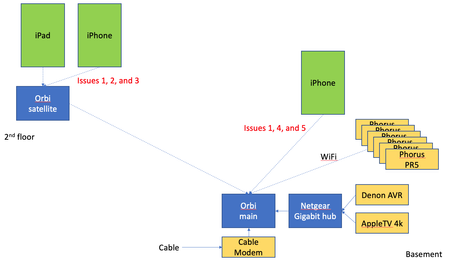
- Jun 14, 2023
Final update: I bought the Nintendo Ethernet adapter (above) for all the PR5s and they have been rock solid since.
Given that the MBP does not always appear in the list of AirPlay devices, plus the iPad issue when connected to the Orbi satellite, plus the drop outs on signal on the Orbis, I will lay the blame on the Orbis, but it is not 100% proven.
Done messing with this, and shame i had to throw money at the issues.
Stinky_W_Teats
May 31, 2023Aspirant
So I fired up NetSpot on the MBP again to verify what channels the neighbors are using, and one of them appears to have moved to 11 for 2.4G as well. I think this is the same router that previously had a conflict when I moved mine to 11. So I moved mine to 6 just now.
I only see the MBP and two PR5s after the reboot to make channel 6 take effect.
Scratch that, one of the PR5s dropped while i was watching the iPhone.
I am not sure if i need to go power cycle the PR5s to force them use the new channel. I would think if a device lost connectivity that it would scan the channels and automatically reconnect if it found the SSID and was able to authenticate. But who knows? Since 2 of them were visible, i kinda think they do this automatically.
Stinky_W_Teats
May 31, 2023Aspirant
hmmmm, this is interesting. In NetSpot, I see my SSID showing as:
My first question was why is it showing 6, +1 as the channel after I set it to 6? What does the +1 mean? Maybe channel 1 is used as a sort of backup? Or maybe it means channel 6 +/- 1 channel (i.e., some flexibility in case not all devices are EXACTLY on channel 6, maybe a few Mhz off)? (i don't think that really makes sense tho)
Second question is why does the vendor (i.e., first 6 of the MAC) not show as NETGEAR for 2.4G?
So I did a search for the vendor using MAC starting with A2:3D:CF and the mac.lc site says "No company is registered as the vendor for mac address prefix A23DCF."
Not sure there is anything there but adding it here in case it means anything to someone else.
Anyway, I was wondering if the 4 MACs correspond to 4 WiFi antennas. But the AC3000 specs say: Orbi Router (AC3000) : Six (6) high performance internal antennas with high-powered amplifiers. Implicit & Explicit Beamforming for 2.4GHz & 5GHz bands. MU-MIMO capable for simultaneous data streaming to multiple devices. Powerful Quad-Core 710MHz processor.
- FURRYe38May 31, 2023Guru - Experienced User
Yes, Primary channel 6 + 1 is the sub channel the wifi systems uses, something 2,3,4,7,8,9 or 10. Probably 7 maybe. Would need a different wifi scanner to see what channels the Orbi is actually using for the sub channel. Primary channels are 1, 6 and 11.
What are the MAC addresses for the RBR and RBS, same as what you see in the scan app?
Ya, seems like those MAC addresses maybe a Private address that doesn't give actual vendor name.
I would edit out MAC addresses before posting in public forums for security reasons.
- Stinky_W_TeatsMay 31, 2023Aspirant
>>It looks like the cable modem uses the 192.168.0.x network
>What is the brand and model of this modem?
>If your modem already has a built in router, you'd be in a double NAT condition. I would utilize the modems DMZ for the >RBRs IP address it gets from the modem.It is an ARRIS DG3450.
I was going to say I turned its WiFi off for security reasons, but after looking at NetSpot again I see it is on. Now remembering the cable co. had me turn it on for troubleshooting speed issues a few months* ago. Given that it is also on top of the racks within a few feet of the Orbi and the PR5s, it is possible there is radio interference (even if it is on different channels). I will turn that back off to eliminate the possibility. Here is its info:
In terms of double NATting, it isn't unusual in larger networks (but it may be the Orbi's SW is not written to deal with it). It might slow down performance, but not sure it would affect things solely on the local WiFI network. i.e., iPhone to Orbi to PR5 all on the same IP subnet (only local addresses, no WAN traffic)
* the PR5 issues have been going on for a longer than that.
- Stinky_W_TeatsMay 31, 2023Aspirant
> What are the MAC addresses for the RBR and RBS, same as what you see in the scan app?
Very good question. Short answer is yes, but...
Both the satellite and main Orbis show MACs on 2.4G whereas the connection says it is 5G.
I have seen that general behavior with UNIX systems with multiple physical interfaces, where a network scanning tool picks one MAC to represent the entire machine, so this may not be a big deal if the Orbi console is doing the same thing.
But interesting that the console shows it that way since it knows both endpoints handling the backhaul are on 5G
- Stinky_W_TeatsMay 31, 2023Aspirant
OK, radios on the ARRIS are disabled but no change - seeing only two random PR5s but no MBP. Both are on 2.4 and on the satellite Orbi
Wait the MBP is back. I think the MBP blip may have been it switching to the Orbi satellite, since that is what it is now connected to at 2.4. So the things that are visible to AirPlay are al on the satellite. I don't think this means anything - so tired of trying to find rhyme or reason to this...
iPhone is on main Orbi at 5G
- Stinky_W_TeatsMay 31, 2023Aspirant
Including this just for reference: AirPlay uses TCP and port 7000 for discovery
https://openairplay.github.io/airplay-spec/service_discovery.html
- Stinky_W_TeatsMay 31, 2023Aspirant
If I have a cable modem, should the main Orbi be configured as a WAP vs a router? It is set to router currently.
My previous setup was:
modem ---> UTM ---> older Netgear WiFi router ---> Netgear hub
This was so i could isolate WiFi traffic from wired gear such as a home server I didn't want exposed.
After Netgear kindly admninistratively bricked the UTM and I upgraded to the Orbi, ot looks like this:
modem ---> main Orbi ---> hub
Looking at the diagram on the console where you can select router vs WAP mode, it looks like i am truing to use the Orbi more as a WAP. I suppose I could just connect the hub to the modem's Ethernet port and only use the Orbi for WiFi.
- Stinky_W_TeatsMay 31, 2023Aspirant
Like I said above, I come at this from a large network standpoint and the way the consumer gear works is kinda foreign.
- CrimpOnMay 31, 2023Guru - Experienced User
Stinky_W_Teats wrote:
Including this just for reference: AirPlay uses TCP and port 7000 for discovery
This may be in terms of Apple TV. Apple's RAOP protocol appears to use UDP MDNS and port 5353.
I have had the PR5 on the network for some time now and notice it responding to MDNS queries for both Spotify and Raop.
I names the PR5 "Office" (because it is in the office). Here's a sample response:
Frame 444: 385 bytes on wire (3080 bits), 385 bytes captured (3080 bits) on interface \Device\NPF_{F233B6E4-BE24-4723-AA85-49E87A7B1E81}, id 0 Ethernet II, Src: Phorus_01:90:d8 (60:b6:06:01:90:d8), Dst: IPv4mcast_fb (01:00:5e:00:00:fb) Internet Protocol Version 4, Src: Office.local (192.168.1.77), Dst: 224.0.0.251 (224.0.0.251) User Datagram Protocol, Src Port: 5353, Dst Port: 5353 Multicast Domain Name System (response) Transaction ID: 0x0000 Flags: 0x8400 Standard query response, No error 1... .... .... .... = Response: Message is a response .000 0... .... .... = Opcode: Standard query (0) .... .1.. .... .... = Authoritative: Server is an authority for domain .... ..0. .... .... = Truncated: Message is not truncated .... ...0 .... .... = Recursion desired: Don't do query recursively .... .... 0... .... = Recursion available: Server can't do recursive queries .... .... .0.. .... = Z: reserved (0) .... .... ..0. .... = Answer authenticated: Answer/authority portion was not authenticated by the server .... .... ...0 .... = Non-authenticated data: Unacceptable .... .... .... 0000 = Reply code: No error (0) Questions: 0 Answer RRs: 1 Authority RRs: 0 Additional RRs: 7 Answers _raop._tcp.local: type PTR, class IN, 60B6060190D8@Office._raop._tcp.local Name: _raop._tcp.local Type: PTR (domain name PoinTeR) (12) .000 0000 0000 0001 = Class: IN (0x0001) 0... .... .... .... = Cache flush: False Time to live: 4500 (1 hour, 15 minutes) Data length: 22 Domain Name: 60B6060190D8@Office._raop._tcp.local Additional records Office.local: type A, class IN, cache flush, addr 192.168.1.77 Name: Office.local Type: A (Host Address) (1) .000 0000 0000 0001 = Class: IN (0x0001) 1... .... .... .... = Cache flush: True Time to live: 120 (2 minutes) Data length: 4 Address: Office.local (192.168.1.77) Office.local: type AAAA, class IN, cache flush, addr 2603:8000:403:bd7c:62b6:6ff:fe01:90d8 Name: Office.local Type: AAAA (IPv6 Address) (28) .000 0000 0000 0001 = Class: IN (0x0001) 1... .... .... .... = Cache flush: True Time to live: 120 (2 minutes) Data length: 16 AAAA Address: Office.local (2603:8000:403:bd7c:62b6:6ff:fe01:90d8) Office.local: type AAAA, class IN, cache flush, addr fe80::62b6:6ff:fe01:90d8 Name: Office.local Type: AAAA (IPv6 Address) (28) .000 0000 0000 0001 = Class: IN (0x0001) 1... .... .... .... = Cache flush: True Time to live: 120 (2 minutes) Data length: 16 AAAA Address: Office.local (fe80::62b6:6ff:fe01:90d8) 60B6060190D8@Office._raop._tcp.local: type TXT, class IN, cache flush Name: 60B6060190D8@Office._raop._tcp.local Type: TXT (Text strings) (16) .000 0000 0000 0001 = Class: IN (0x0001) 1... .... .... .... = Cache flush: True Time to live: 4500 (1 hour, 15 minutes) Data length: 129 TXT Length: 6 TXT: tp=UDP TXT Length: 8 TXT: sm=false TXT Length: 8 TXT: sv=false TXT Length: 4 TXT: ek=1 TXT Length: 6 TXT: et=0,1 TXT Length: 6 TXT: cn=0,1 TXT Length: 4 TXT: ch=2 TXT Length: 14 TXT: am=Device1,2,3 TXT Length: 5 TXT: ss=16 TXT Length: 8 TXT: sr=44100 TXT Length: 8 TXT: pw=false TXT Length: 7 TXT: da=true TXT Length: 9 TXT: txtvers=1 TXT Length: 13 TXT: ft=0x00DC0A00 TXT Length: 8 TXT: vn=65537 60B6060190D8@Office._raop._tcp.local: type SRV, class IN, cache flush, priority 0, weight 0, port 5002, target Office.local Service: 60B6060190D8@Office Protocol: _raop Name: _tcp.local Type: SRV (Server Selection) (33) .000 0000 0000 0001 = Class: IN (0x0001) 1... .... .... .... = Cache flush: True Time to live: 120 (2 minutes) Data length: 8 Priority: 0 Weight: 0 Port: 5002 Target: Office.local Office.local: type NSEC, class IN, cache flush, next domain name Office.local Name: Office.local Type: NSEC (Next Secure) (47) .000 0000 0000 0001 = Class: IN (0x0001) 1... .... .... .... = Cache flush: True Time to live: 120 (2 minutes) Data length: 8 Next Domain Name: Office.local RR type in bit map: A (Host Address) RR type in bit map: AAAA (IPv6 Address) 60B6060190D8@Office._raop._tcp.local: type NSEC, class IN, cache flush, next domain name 60B6060190D8@Office._raop._tcp.local Name: 60B6060190D8@Office._raop._tcp.local Type: NSEC (Next Secure) (47) .000 0000 0000 0001 = Class: IN (0x0001) 1... .... .... .... = Cache flush: True Time to live: 4500 (1 hour, 15 minutes) Data length: 9 Next Domain Name: 60B6060190D8@Office._raop._tcp.local RR type in bit map: TXT (Text strings) RR type in bit map: SRV (Server Selection) [Unsolicited: True] - Stinky_W_TeatsMay 31, 2023Aspirant
OK, here is something that finally may be pointing to the root cause. It appears like all signal is lost somewhat frequently, as seen from NetSpot running on my MBP.
The MBP is less than 20' from the main Orbi, 1 floor above (construction is wood with oak flooring). MBP is my primary computer and works very well for anything including zoom and webex conference calls with video, so I would say it has no network issues.
Given the frequent loss of signal, particularly in 2.4G, the AirPlay devices may not be able to re-establish themselves on the network, or they may miss the discovery request, or the iPhone discovery request may be happening during a blip, or etc.
Not sure that would cause that other than maybe an Orbi hardware issue (assuming the neighbors don't hate me and are EMPing the house, but they are super nice so even if they hate me they aren't the EMPing types 😂)
- Stinky_W_TeatsMay 31, 2023Aspirant
Here's the next few minutes - more 2.4G loss of signal.
Given many of the PR5s are on 2.4G, this could explain it.
hi Netgear: if I could give the 2.4G and 5G separate SSIDs I could fix this by connecting the PR5s all to 5G and wouldn't have these frequent blips to deal with.
- Stinky_W_TeatsMay 31, 2023Aspirant
Caught him (main 2.4G) in the act!
- Stinky_W_TeatsMay 31, 2023Aspirant
Why would the satellite's 2.4G signal strength suddenly spike in a good direction?
I have looked at all the usual 2.4G interference suspects like microwave, baby monitors, BT, ec., and nothing unusual is going on when the signal drops to zero
- CrimpOnMay 31, 2023Guru - Experienced User
I am having more 'memory issues'. With all six PR5s located just a few feet from the router, all of them should be connected to the Orbi WiFi at 5G.
Also, the MacBook Pro obviously is capable of 5G. Why is it not connected at 5G?
I'm also not used to seeing signal levels that low.
- Stinky_W_TeatsMay 31, 2023Aspirant
Yeah, the non-5G connections are baffling. My guess is that when there is a complete loss of signal across all 2.4 and 5 the devices reconnect to whatever comes back first, which could be 2.4. Then they stay there until 2.4G drops again, at which point they may try to reconnect to the last frequency/channel, and if 2.4 is back by then they stay there.
I don't believe the devices constantly look for better connections and switch. So they might just be "content" to stay on 2.4 .
If I reboot the Orbis, everyone is happy for a few minutes, until the signal drops out, at which point things randomly reconnect to whatever they can. That may be what is causing them to not be visible for AirPlay.
However, since AirPlay does a broadcast for devices, I don't know why it wouldn't find them if I retry on the Music app.
Might be related to something like the MAC address table on the Orbi getting messed up, even though the MACs stay the same on the devices. Again, a reboot would clear this if it is happening.
- Stinky_W_TeatsMay 31, 2023Aspirant
And related to that possible MAC problem, the console screen for Attached Devices is showing a speed mismatch of device's Connection Type to the MAC to which the device on the satellite or main Orbi.
i.e., only the 2.4G MAC is showing in the Connected Orbi column, regardless of whether the Connection Type is 2.4 or 5G:
- Stinky_W_TeatsMay 31, 2023Aspirant
Just for grins, here is my neighbor's 2.4G (in green) overlaid on my 2.4G (in pink). I was wondering if there was some massive RF interference affecting the local area, but nope, their blips are not at the same time as mine.
- Stinky_W_TeatsMay 31, 2023Aspirant
Also on the "why don't the PR5s connect 5G to the main Orbi since is literally a couple of feet away" question, i see two of the PR5s connected to the satellite Orbi now!!!
- CrimpOnMay 31, 2023Guru - Experienced User
sorry this problem remains unresolved (still trying)
could you please check your private messages? (click envelop in upper right of screen)
- Stinky_W_TeatsJun 01, 2023Aspirant
Update from overnight. I looked at the NetSpot signal readings overnight, thinking if there was interference from BT, microwaves, or other things that can cause interference that those would go away or be greatly reduced overnight. but the drops in 2.4G seemed to be more or less as frequent.
One interesting thing is there was a complete loss for 2.4 on the main Orbi that lasted about 10 minutes. 5G stayed rock solid.
This time it looks like the neighbors also lost 2.4 at exactly the same time. I looked at another neighbor too, and they lost at exactly the same times. There were 4 other blips where both they and us lost 2.4 for a minute at exactly the same time. This happened between about 1:40 - 2:30am. After that we went back to having different times for the drops.
Wondering if maybe the local power company was doing something that caused the power to fluctuate, and the 2.4 radios are more sensitive to that.
Or not saying it's aliens, but it's aliens.
Here's the 2.4 readings from that time, us in pink and one neighbor in green. (Adding all the 2.4 radios I can see gives the same result but the graph is harder to see.). Having the same drops at the same time seems significant.
- Stinky_W_TeatsJun 01, 2023Aspirant
LOL i think figured out why one of the neighbor's WiFi router keeps following me to the new 2.4 channel I change to, every time I change. I am pretty sure it is my Netgear Arlo base station. The SSID begins with "NTGR_VMB_" and the model of Arlo base station I have is the VMB4000.
That SSID is one of the "neighbors" WiFi that is dropping out at the same time as everyone else's. But I still see 2 other neighbors dropping at exactly the same time overnight.
My guess is that even though my Arlo base station is plugged in ethernet to my Netgear gigabit hub and I do not see it in the Attached Devices screen on my Orbi, the Netgear engineers programmed it to look for the same channel for WiFi as other Netgear routers are using.
I found an article that says that the older Arlos like I have use RF from the cameras to the base station, but it is not WiFi, just plain old RF. I was planning to move the base station farther away from the main Orbi (it is like 2' away now) since the 2.4 RF signals may have been interfering with 2.4 WiFi, but given the neighbors on what I am guessing are both sides are also having the issue, i kind of doubt it. Still, won't hurt to test this so i will move the base station when i get a break later this AM.
- Stinky_W_TeatsJun 01, 2023Aspirant
I think the drop in signal may be the cause. It has been stable for the last hour and all the PR5s and MBP show up. The complete drops stopped around 10:30AM and now at 11:46AM everything is in the AirPlay list.
I ordered one of these since if there are minor voltage fluctuations it would help (such as for the momentary blips in signal loss). Our town didn't invest anything in infrastructure for decades and now is doing a lot of power work, so if the root cause here is power stability, it would explain it.
The voltage data loggers all seem to be like $250 and up and require Windows, and while i could borrow a Windows laptop, for a single use it's too much money.
https://www.amazon.com/gp/product/B00009RA60
For ~$60 it will eliminate one variable, and potentially save me from spending a few hundreds on a new mesh WiFi setup
(Note: everything is already plugged into APC PDUs which do surge suppression, but this one will smooth out the voltage. A UPS is probably overkill)
- Stinky_W_TeatsJun 01, 2023Aspirant
Ordered one USB to Ethernet adapter for the Phorus PR5, to test. I saw the same guidance as CrimpOn did, to get an official Nintendo Switch or Wii one. Nintendo lists this one on their site so assuming this is officially supported:
https://www.nintendo.com/store/products/wired-internet-lan-adapter/
It's also available on Amazon, and with same day shipping I couldn't resist:
https://www.amazon.com/Nintendo-Internet-Officially-Licensed-wii-u/dp/B01N6S068R
- Stinky_W_TeatsJun 02, 2023Aspirant
Another overnight graph - looks like all 2.4 and 5 went down for almost exactly 25 minutes. Then it went back to the usual frequent cut-outs of 2.4.
Do the Orbis go to sleep if they see no WiFi traffic? Or was this more likely a power outage? Or aliens?
I see 2 PR5s at present and they are both on the Orbi satellite (despite all 6 of them physically being less than 2' from the main Orbi). I was going to say that maybe the main Orbi has a HW issue, but during that 25 min outage, the satellite was gone too (all 4 lines dropped to nothing).
- CrimpOnJun 02, 2023Guru - Experienced User
I see generally the same phenomenon of Net Spot reporting "no signal" for a short period. (Never for 25 minutes.) In using similar tools to observe WiFi signals, I have seen similar patterns.
Net Spot has a user support forum. However, the most recent entries in the forum are dated over five years ago. This gives the appearance that either the product has gone dormant or that non-paying users are active on the forum.
When I observe WiFi packets directly, there is a constant chatter of devices broadcasting and responding to discoveries of all sorts. It's hard to imagine the actual WiFi signal "going away" for 25 minutes. When my WiFi signals disappear temporarily as a result of simply changing Orbi parameters, my alarm system base unit almost instantly sends out a notice "lost WiFi".
In other words, how do we know whether:
- It's the WiFi system, or
- It's the tool?
- Stinky_W_TeatsJun 02, 2023Aspirant
Good points. I was wondering if there is a possibility of the MBP having some sort of issue, but it stays connected all the time and never seems to have a network hang such as during long conference calls.
It's possible the NetSpot SW is having its own issue, such as being swapped out of memory. However, my MBP has a good amount of memory plus I don;t do anything really heavy on it at all, so doubtful.
It looks like the APC voltage regulator didn't make any difference. I was really excited when I first hooked it up, moved the modem, main Orbi, and switch to it, and only saw one cut-out of 2.4G in the first 45 minutes. All 6 PR5s were visible in AirPlay.
But after coming back a couple of hours later, I am now seeing a lot of cut outs again.
Oh well, I will put my home theater AVR on it instead since I was meaning to get one for it anyway.
FWIW I still see five PR5s and they are still on the main Orbi. The one that is missing is still on the main Orbi per the console, but i can't see it from the iPhone. They are connected randomly on either 2.4 or 5.
MBP switched to 2.4G on the satellite. The satellite is like 3x (like 4' away) farther past the main Orbi (10 - 15' away). SMFH!
It looks like a reboot of the Orbi fixes everything but then it starts to gradually lose the plot and things move around.
I am running out of ideas so might buy a new mesh WiFi system and ditch the Orbis.
Here is what the 2.4 looks like on the main Orbi - still dropping a lot. 5G was solid the whole time, so not showing it:

