NETGEAR is aware of a growing number of phone and online scams. To learn how to stay safe click here.
Forum Discussion

jeffbr26
Dec 15, 2018Follower
Orbi Blocking Websites - Solved
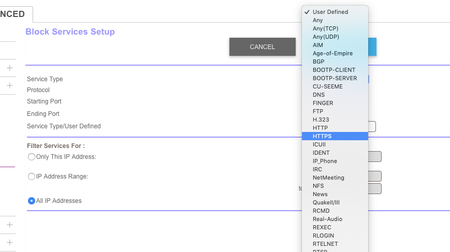
ORBI is blocking HTTPS websites that are not explicitly defined in URL.
To unblock any https website, do the following:
Log into to your router admin console (https://orbilogin.net)
Cli...
MossyBoots
May 01, 2020Aspirant
ARGH!
Brand new to Orbi and it's working great for all of the phones in the house - not so for my laptop/iPad. Same "connection not secure" situation. So I took someone's advice about traceroute on my Mac and found this:
traceroute to 8.8.8.8 (8.8.8.8), 64 hops max, 52 byte packets
1 10.0.0.1 (10.0.0.1) 4.757 ms 7.031 ms 4.356 ms
2 192.168.1.1 (192.168.1.1) 4.367 ms 5.982 ms 6.424 ms
What now? It's been a long time since I was semi-computer literate. As someone else said, I bought an Orbi because it was "simple and easy to use"!
This RBK50 said it was updated to the latest firmware on install (3 days ago).
I have no problem using the phone app and I really wish there was a way to fix this issue there.
I'm using the "performance two-pack". The route & the satellite.
MossyBoots
May 01, 2020Aspirant
After a fruitless 50minute phone call with NetGear (40min hold time), I was simply told to call Verizon.
I think my Verizon G1100 router is competing with my Orbi RBK50v2.
Is there any way to designate proper roles to each and move on?
This seems like such a rampant issue but I've yet to find a clear solution via multiple forum readings.
- MossyBootsMay 01, 2020Aspirant
Another point of inquiry:
Can't I simply remove my Verizon G1100 router and just go straight into my Verizon BIGBOX that's wired up to the brick walls of my basement?
- FURRYe38Jun 18, 2020Guru - Experienced User
This would be a double NAT (two router) condition which isn't recommended. https://kb.netgear.com/30186/What-is-Double-NAT
https://kb.netgear.com/30187/How-to-fix-issues-with-Double-NAT
Couple of options,
1. Configure the modem for transparent bridge or modem only mode. Then use the Orbi router in router mode. You'll need to contact the ISP for help and information in regards to the modem being bridged correctly.
2. If you can't bridge the modem, disable ALL wifi radios on the modem, configure the modems DMZ/ExposedHost or IP Pass-Through for the IP address the Orbi router gets from the modem. Then you can use the Orbi router in Router mode.
3. Or disable all wifi radios on the modem and connect the Orbi router to the modem, configure AP mode on the Orbi router. https://kb.netgear.com/31218/How-do-I-configure-my-Orbi-router-to-act-as-an-access-point and https://www.youtube.com/watch?v=H7LOcJ8GdDo&app=desktop
MossyBoots wrote:Another point of inquiry:
Can't I simply remove my Verizon G1100 router and just go straight into my Verizon BIGBOX that's wired up to the brick walls of my basement?
