NETGEAR is aware of a growing number of phone and online scams. To learn how to stay safe click here.
Forum Discussion

Mont999
Mar 31, 2021Tutor
Orbi RBR50 dropping WiFi only since Sunday 28/3/21
Hello, Any help would be much appreciated. My RBR50 has started dropping the Wifi only since Sunday everyday at roughly the same 12hour intervals srangley enough, around 06:50 & 18:50 everyday. The...
- Mar 31, 2021
alanbruno wrote:I've been having this same problem, however I haven't seen anyone mention that this WiFi connection dropout has been happening since updating the Orbi's firmware, as is my case. I received an email from Netgear on Sunday (the 28th) telling me "We've Enhanced Your Product's Security. Please Update to the Latest Firmware." I did so--up to version 2.7.2.104--and ever since then we've lost WiFi connection at least twice a day.
I am at a loss as to what to do. Needless to say, WiFi dropouts are untenable with us working from home. Is it possible to go back to the previous firmware? We had no such problems before this "update."
thx
Mac OS 11.2.3

alanbruno
Mar 31, 2021Guide
Okay, well that didn’t work. In fact it’s exponentially worse. Our WiFi has dropped out four times in the four-odd hours since I’d deactivated it. As soon as I get this cat off my lap I will be returning to my computer and reactivating it in hopes of reducing the dropout rate back to once a day or so...until
Netgear decides to help us.
ab
Netgear decides to help us.
ab
- FURRYe38Mar 31, 2021Guru - Experienced User
Has a factory reset and setup from scratch been performed since last FW update?
What is the distance between the router and satellite(s)? 30 feet or more is recommended in between RBR and RBS to begin with depending upon building materials when wirelessly connected.
https://kb.netgear.com/31029/Where-should-I-place-my-Orbi-satelliteWhat channels are you using? Auto? Try setting manual channel 1, 6 or 11 on 2.4Ghz and any unused channel on 5Ghz.
Any Wifi Neighbors near by? If so, how many?One User Experience/Configuration:
https://community.netgear.com/t5/Orbi/Most-Stable-Orbi-Configuration/m-p/1941087/highlight/true#M97026
You can find other speed diagnosis steps in the community faq: https://community.netgear.com/t5/Orbi-AX/Community-FAQ-My-Orbi-speeds-are-slow-inconsistent-and-don-t-my/m-p/1982974/highlight/true#M7849
alanbruno wrote:
Okay, well that didn’t work. In fact it’s exponentially worse. Our WiFi has dropped out four times in the four-odd hours since I’d deactivated it. As soon as I get this cat off my lap I will be returning to my computer and reactivating it in hopes of reducing the dropout rate back to once a day or so...until
Netgear decides to help us.
ab- alanbrunoMar 31, 2021Guide
Hi--
So many questions! First off, I apologize for that last post of mine. I wasn't finished with it but somehow it was sent. Secondly, I was off looking into the traffic meter again when it was sent. In that time the WiFi dropped out twice! BUT, when I finally got back to the traffic meter I found it still activated! All I can tell is that I hadn't click "Apply" when I first deactivated it; I merely closed the window. So I'm hoping NOW ithat I clicked "apply" it's truly deactivated because the dropout rate was really increasing.
Anyway, for you rquestions, in order of their apearance:
--A reset/setup from scratch has NOT been performed
--I'm confused about the satellite question. The router's firmware is the issue here, no? My computer is talking to the router (at an unobstructed 10 foot distance). Beyond that, are you saying AT LEAST 30 feet should separate the RBR and RBS? Yet you say "depending upon the building materials" Do you mean those that are between the RBR and RBS? And if it's, say, a brick wall they should be closer?
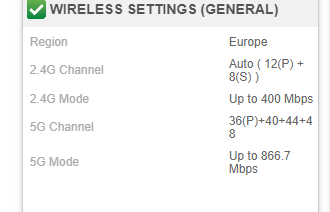
--2.4Ghz is on "Auto. 5Ghz is "48"...dunno what that means
--The "Other Networks" menu shows several other neworks but I can't imagine who they are. I mean, we're in a single family home on a block with only single families so I can't imagine we're picking up the whole block's networks.
That about covers it. The WiFi is still activesince I "APPLIED" the traffic meter disablement.
Back to you
ab
- FURRYe38Mar 31, 2021Guru - Experienced User
Ok, let try hoping for TM that if it's now disable, see if this helps with your problem first.