NETGEAR is aware of a growing number of phone and online scams. To learn how to stay safe click here.
Forum Discussion

SupahFox
Apr 20, 2019Tutor
Port Forwarding not working
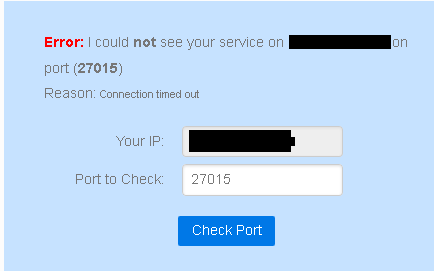
Hello. Recently I wanted to open a dedicated server for csgo, which port is 27015. But it doesn't works, I tried to make a port test and this happened. Any solution? (That's weird because I have the ...

FURRYe38
Apr 22, 2019Guru - Experienced User
Modem Combo Units:
This would be a double NAT condition which isn't recommended. https://kb.netgear.com/30186/What-is-Double-NAT
Couple of options,
1. Configure the modem for transparent bridge mode. Then use the Orbi router in router mode. You'll need to contact the ISP for help and information in regards to the modem being bridged correctly.
2. If you can't bridge the modem, disable ALL wifi radios on the modem, configure the modems DMZ or IP Pass-Through for the IP address the Orbi router gets from the modem. Then you can use the Orbi router in Router mode.
3. Or disable all wifi radios on the modem and connect the Orbi router to the modem, configure AP mode on the Orbi router. https://kb.netgear.com/31218/How-do-I-configure-my-Orbi-router-to-act-as-an-access-point and https://www.youtube.com/watch?v=H7LOcJ8GdDo&app=desktop

SupahFox
Apr 22, 2019Tutor
That's what I did. I contacted my ISP to configure the modem into transparent bridge mode and I have the same problem with the ports.
- FURRYe38Apr 22, 2019Guru - Experienced User
Is uPnP disabled on the Orbi if you configured any Port Forward configurations?
- SupahFoxApr 22, 2019TutoruPnP is disabled.
- FURRYe38Apr 22, 2019Guru - Experienced User
And you do have a device using the port while your checking to see if it's working correct? You need to be accessing the port before checking it's status.
What is the IP address the Orbi router is getting from the ISP modem? ##.##.###.### or is it something different like 192 or 10 or 172? Just checking to ensure the modem is fully bridged.