NETGEAR is aware of a growing number of phone and online scams. To learn how to stay safe click here.
Forum Discussion

engin33r_atl
Dec 03, 2016Guide
Trouble with WiFi quality
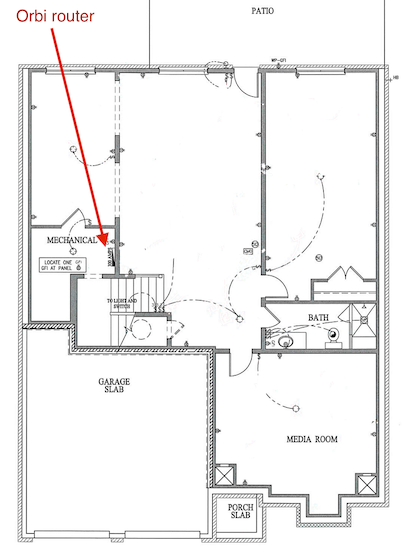
I just moved into a new house and promptly installed an Orbi. The router is installed in the basement, and the satellite is installed upstairs. The house is 2 floors with a basement. It's not a huge ...
engin33r_atl
Dec 03, 2016Guide
How do you feel about the general placement of the router and the satellite? Are they in OK locations? Not too close or too far apart? I could move the router into the basement bonus room (against the wall shared with the basement bedroom), which would be a more central location. I could also move the satellite to just about anywhere, including the 2nd floor.

peteytesting
Dec 03, 2016Hero
prob a good idea as long as the 5 gig backhaul will take the distance without too much loss
it really does sound like maybe a single big hunking router like an r8500 would have covered the lot if it where placed on the first floor and the orbi system might just be a case of too much wifi for what is by the sounds of it quite a small space to fill , eg it could be a case of too much of a good thing
- engin33r_atlDec 03, 2016Guide
I just ran a little test where I unplugged the satellite and ran a speed test from the breakfast area where I was getting spotty coverage. With the satellite powered off, I got 6.6 megabits down and 12 up. So, to me this tells me that earlier when I was getting 25 megabits down, I was connected to the satellite. This test also seems to indicate that a single router likely wouldn't give me whole house coverage, unless a single Orbi router isn't a good test case.
And now as I've been writing this reply, I powered the satellite back on, and went to the spot where I got such bad signal earlier. I ran another speed test and now I got 90 megabits down, which was my goal this whole time. I haven't changed anything besides power-cycling the units. So now I'm totally confused.
- peteytestingDec 03, 2016Hero
the only thing i would check is if the wireless adapter is connected to the 5 gig or 2.4 gig as this can make a big difference in throughput
 cyberprashantDec 04, 2016Luminary
you can log into the satellite's (IP) page i.e. 192.168.1.3 (find the IP in the router's page and what IP is attached to which satellite). Logging into the satellite will show what devices are connected (I can do this from the phone). Get another satellite perhaps...have the costco setup which gives u a router + 2satellites working great (approx 3000 sq ft one floor house). Great coverage into the yard