NETGEAR is aware of a growing number of phone and online scams. To learn how to stay safe click here.
Forum Discussion

danielschenk
Sep 14, 2022Guide
Orbi RBR350 in AP mode - not always getting DHCP IP when roaming
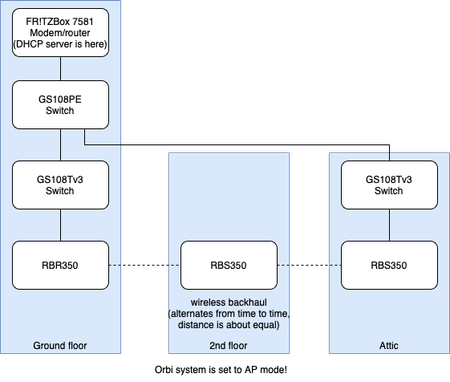
Hi folks, I have a frequent issue with my Orbi setup in AP mode which is quite annoying. When roaming around with my device throughout the house, I often find that I get no connectivity, while th...
danielschenk
Sep 18, 2022Guide
Garwoofoo wrote:This sounds a lot like the problem that's been reported in a few threads here where iPhones especially are losing connection when roaming between satellites.
I don't think the precise reason has been identified yet and it looks like an Orbi bug for sure but it does seem to occur more in setups that have a mixture of wired and wireless satellites. Since I moved both of my satellites to wireless I haven't seen the issue.
I see it happening the most on my iPhone indeed, however, my MacBook suffers from it too, from time to time. Additionally, my girlfriend's Samsung S22 Ultra also has some issues when at my house. It regularly disconnects, and when I go to the WiFi menu, it even briefly flashes "incorrect password" before reconnecting again, which is very weird. Maybe it just experiences the same missing IP address combined with some UI/translation bug.
When I wrote my opening post a few days ago I noticed that I wasn't actually on the latest Orbi FW. I updated first and let it run a few more days before changing anything else. The issue reproduced, so I can be sure FW changed anything with regards to the issue. I'm now testing with the 2nd floor satellite removed as described in my previous post.

ekhalil
Sep 18, 2022Master
Can you please try this procedure in the wired satellite:
1. Switch off the Satellite
2. Go to Attached Devices in the web GUI and click on the "Disconnect" button beside the Satellite in questions
3. Turn on the Satellite and use a paper clip to factory reset the Satellite
4. When the Satellite is up after factory reset, press the Sync button on the Satellite (while the Ethernet cable to the Router is connected) and then on the Router
5. When the Satellite is added it should behave correctly.
1. Switch off the Satellite
2. Go to Attached Devices in the web GUI and click on the "Disconnect" button beside the Satellite in questions
3. Turn on the Satellite and use a paper clip to factory reset the Satellite
4. When the Satellite is up after factory reset, press the Sync button on the Satellite (while the Ethernet cable to the Router is connected) and then on the Router
5. When the Satellite is added it should behave correctly.
- danielschenkSep 29, 2022Guide
I've encountered the issue several times now without the wireless satellite. This means that either the wireless satellite wasn't the cause, or it wasn't the only one.
ekhalil wrote:
Can you please try this procedure in the wired satellite:
1. Switch off the Satellite
2. Go to Attached Devices in the web GUI and click on the "Disconnect" button beside the Satellite in questions
3. Turn on the Satellite and use a paper clip to factory reset the Satellite
4. When the Satellite is up after factory reset, press the Sync button on the Satellite (while the Ethernet cable to the Router is connected) and then on the Router
5. When the Satellite is added it should behave correctly.I'm currently away from home for a little while but will try this as soon as I get back.