NETGEAR is aware of a growing number of phone and online scams. To learn how to stay safe click here.
Forum Discussion

Daveinkansas
Jan 04, 2025Aspirant
New router, download speeds are high with fiber. My upload speeds are very low.
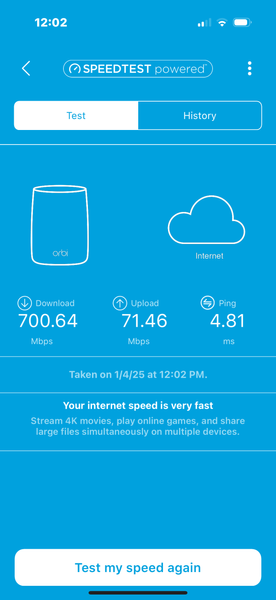
When you reset the router, I have high upload speeds and download speeds with fiber Internet after about 30 minutes. My upload speeds are low, and my download speeds remain high. Replace an old Orbi ...
Daveinkansas
Jan 04, 2025Aspirant
Orbi RBE771 and it has the lastest firmware available our Internet is fiber, one gig upload one gig download

FURRYe38
Jan 04, 2025Guru - Experienced User
What is the Mfr and model# of the Internet Service Providers modem/ONT the NG router is connected too?
Speed testing with ethernet PC connected directly to the back of the ISP ONT to compare results?
What mobile devices are you using?
Be sure to disable any MAC Address randomizers on phones and pads while at home:
https://community.netgear.com/t5/Orbi-App/NETGEAR-Mobile-Applications-and-Apple-Devices-FAQ/td-p/2220016/jump-to/first-unread-message
- DaveinkansasFeb 16, 2025AspirantTest upload and download speed with my iMac at the isp orb. Speed was perfect. Exactly what I pay for 950+ on both uploaded download..
Called NETGEAR and they are a joke. You have high speed 778 download and 74 up is fast and they don’t understand Fiber isp. My old Orbi got over 950 each way before the satellite died.
I should show on the Orbi app 950 each way. I only get that for about 30 minutes after rebooting the router. The the drops to under 75- CrimpOnFeb 16, 2025Guru - Experienced User
So, the firmware on this RBE711 is v10.5.13.1. (released Nov 20, 2024)
I happen to agree with Netgear that a download speed of over 700Mbps and an upload speed of over 70Mbps is "very fast". (My Spectrum cable speed is 480Mbps down and 10Mbps. My cable connection could still stream almost 20 4K video streams at the same time and have download capacity left over.)
In order to focus attention on the question, it would help to have evidence that the ISP definitely does not throttle upload speed after 30 minutes of activity. i.e. connect some device directly to the fiber ONT Ethernet connector and perform speed tests for more than 30 minutes to collect proof that the upload speed never drops. Then provide the same evidence that speed measured by (or through) the RBE771 remains high for only about 30 minutes and then drops and remains low (for how long?)
One of the things I find really annoying about Netgear's implementation of Ookla Speed Test on the Orbi product is that there is no choice of which Ookla server to use (and no record of which Ookla server was used). I would prefer to run the experiment with a device wired to the 771 router in order to control those features.
From posts I see on the forum, my impression is that Netgear engineering is dealing with a number of serious issues with the WiFi7 products (770, 870 970) Netgear does not publish lists of issues being investigated or status reports. My guess is the best outcome would be to convince Netgear support that the issue exists and get a promise to refer the issue to "Level 2" (or engineering, or whatever they call it).
- FURRYe38Feb 16, 2025Guru - Experienced User
What is the Mfr and model# of the Internet Service Providers modem/ONT the NG router is connected too?
There has been one other not seeing sync up and downspeeds with the BE series. That was on the 970 Series. They contacted NG support and I beleive was able to this this resolved. I think it was an interoperability issue between the ISP and FW on Orbi.
I'd ask NG support about review on this and check to see about if maybe there is a beta FW available.
Daveinkansas wrote:
Test upload and download speed with my iMac at the isp orb. Speed was perfect. Exactly what I pay for 950+ on both uploaded download..
Called NETGEAR and they are a joke. You have high speed 778 download and 74 up is fast and they don’t understand Fiber isp. My old Orbi got over 950 each way before the satellite died.
I should show on the Orbi app 950 each way. I only get that for about 30 minutes after rebooting the router. The the drops to under 75
