NETGEAR is aware of a growing number of phone and online scams. To learn how to stay safe click here.
Forum Discussion

ekhalil
Jul 11, 2019Master
New Firmware 2.3.5.30
Just updated my Orbi to 2.3.5.30. Seems stable so far. I see few "ads" for the Orbi app and links for app download in the web GUI. Otherwise I could not see much more new things. I'm keeping to loo...

ekhalil
Jul 28, 2019Master
ekhalil wrote:Christian_R I notice that there is an issue in the latest software packages that show wrongly the connection type for the attached devices to the Satellite, especially when using wired backhaul.
Attached Devices in the web GUI will randomly show the status of wireless devices as wired. I used to see this in previous softwares, but then the status used to change back to the correct status quickly. In the latest packages, the status will stay wrong for long times, and together with this I see wifi disconnects.
My theory, is that the Router -for some reason- looses contact with the Satellite's parameters and -by default- sets the connection status of the device to wired (probably using the wired status of the satellite). It seems that then the Router will push this status to the Satellite and there the wifi disconnections will start? Just a theory!
Facory resetting the Satellite used to solve such issue for some time until the same issue starts again.
Is it possible to get developers to look into this please?
Thank you
I made further investigation, and found a way to get rid of the wireless devices showing as wired in Orbi. This in turn seems to improve the stability of Orbi and stopped the wifi disconnects, so far!
I have wired backhaul, to sync my Satellite I used to first sync it using wireless backhaul and when that is done I plug in the Ethernet cable from the Router to the Satellite and sync using wired backhaul. This seems to be confusing for Orbi in 2.3.5.30, and probably earlier packages as well!
Now, I factory reset the Satellite and removed the Satellite in the Router's configuration, after that I synced the Satellite only using the wired backhaul.
Everything seemed to be working as it should after that.
I'll keep an eye on the system the coming days and see how things will go.
Christian_R Appreciate it if you can look into this please.
ekhalil
Jul 29, 2019Master
3 days now and my Orbi network is more stable than any other time.
- Devices are roaming much better and more consistent in 2.3.3.50
- Most importantly, my speakers are connected all the time and I don't see any dropouts.
- No more wireless devices showing as wired in Attached Devices.
- Logs in Orbi are consistent (no missing log types), and not getting full very quickly as when I had the wifi disconnects.
All what I needed to do after upgrading to 2.3.5.30 to get the system stable is the following:
- If you use wired backhaul, make sure that you sync the Satellite ONLY when the Satellite is wired to the Router to avoid having two different links between the Satellite and the Router.
- If -after the upgrade- you see some devices that show as wired (in Attached Devices) while they're actually wireless, then disconnect those devices from Orbi (forget wifi in the devices, and -if possible- reset those devices) and attach again.
- ekhalilAug 05, 2019Master
ekhalil wrote:3 days now and my Orbi network is more stable than any other time.
- Devices are roaming much better and more consistent in 2.3.3.50
- Most importantly, my speakers are connected all the time and I don't see any dropouts.
- No more wireless devices showing as wired in Attached Devices.
- Logs in Orbi are consistent (no missing log types), and not getting full very quickly as when I had the wifi disconnects.
All what I needed to do after upgrading to 2.3.5.30 to get the system stable is the following:
- If you use wired backhaul, make sure that you sync the Satellite ONLY when the Satellite is wired to the Router to avoid having two different links between the Satellite and the Router.
- If -after the upgrade- you see some devices that show as wired (in Attached Devices) while they're actually wireless, then disconnect those devices from Orbi (forget wifi in the devices, and -if possible- reset those devices) and attach again.
Almost 9 days now -since I fixed the backhaul issue- with a very stable network like never before.
Looks to me that Netgear made improvements and fune tuning with the radio parameters:
- I see that Band Steering is working now more effectively. Devices that have 5 GHz capability are -mostly- being moved to 5 GHz.
- Devices are moving between the bands and between the Router and Satellite with no disconnections.
- At the same time I see less DHCP events in the Logs which -for me- means that only needed "roamings" are happening, specially for the stationary IoT devices.
 gr8shoAug 05, 2019Virtuoso
ekhalil wrote:3 days now and my Orbi network is more stable than any other time.
- Devices are roaming much better and more consistent in 2.3.3.50
- Most importantly, my speakers are connected all the time and I don't see any dropouts.
- No more wireless devices showing as wired in Attached Devices.
- Logs in Orbi are consistent (no missing log types), and not getting full very quickly as when I had the wifi disconnects.
All what I needed to do after upgrading to 2.3.5.30 to get the system stable is the following:
- If you use wired backhaul, make sure that you sync the Satellite ONLY when the Satellite is wired to the Router to avoid having two different links between the Satellite and the Router.
- If -after the upgrade- you see some devices that show as wired (in Attached Devices) while they're actually wireless, then disconnect those devices from Orbi (forget wifi in the devices, and -if possible- reset those devices) and attach again.
Did you factory reset? I'm thinking about trying the update without the reset this time.
- pablohoneyAug 08, 2019LuminaryI'm noticing a connection drop with the Orbi satellite of a few seconds then it reconnects but what this causes is my “legacy” devices i.e. Ring Floodlight Cam, Ring Spotlight Cam Mount and Bowers and Wilkins A7 wireless speaker, LG E8 OLED to connect to the main Orbi router in a different room.
Anyone else noticing this temporary connection drop with the Orbi satellite since the latest firmware update? If so can you please report it to Netgear so it’s taken seriously and fixed.
Thanks  BBQNOOBAug 08, 2019Guide
Did you factory reset your satelite or just regular reset?
- gr8shoAug 10, 2019Virtuoso
Took the plunge today updating from 2.3.1 ro 2.3.5. Procedure done without factory reset.
Quiesced entire home network except for PC desktop conneected to RBR50.
Used manual method via Chrome browser management console.
Applied update to satellite first and then base router. Rebooted both devices for good measure.
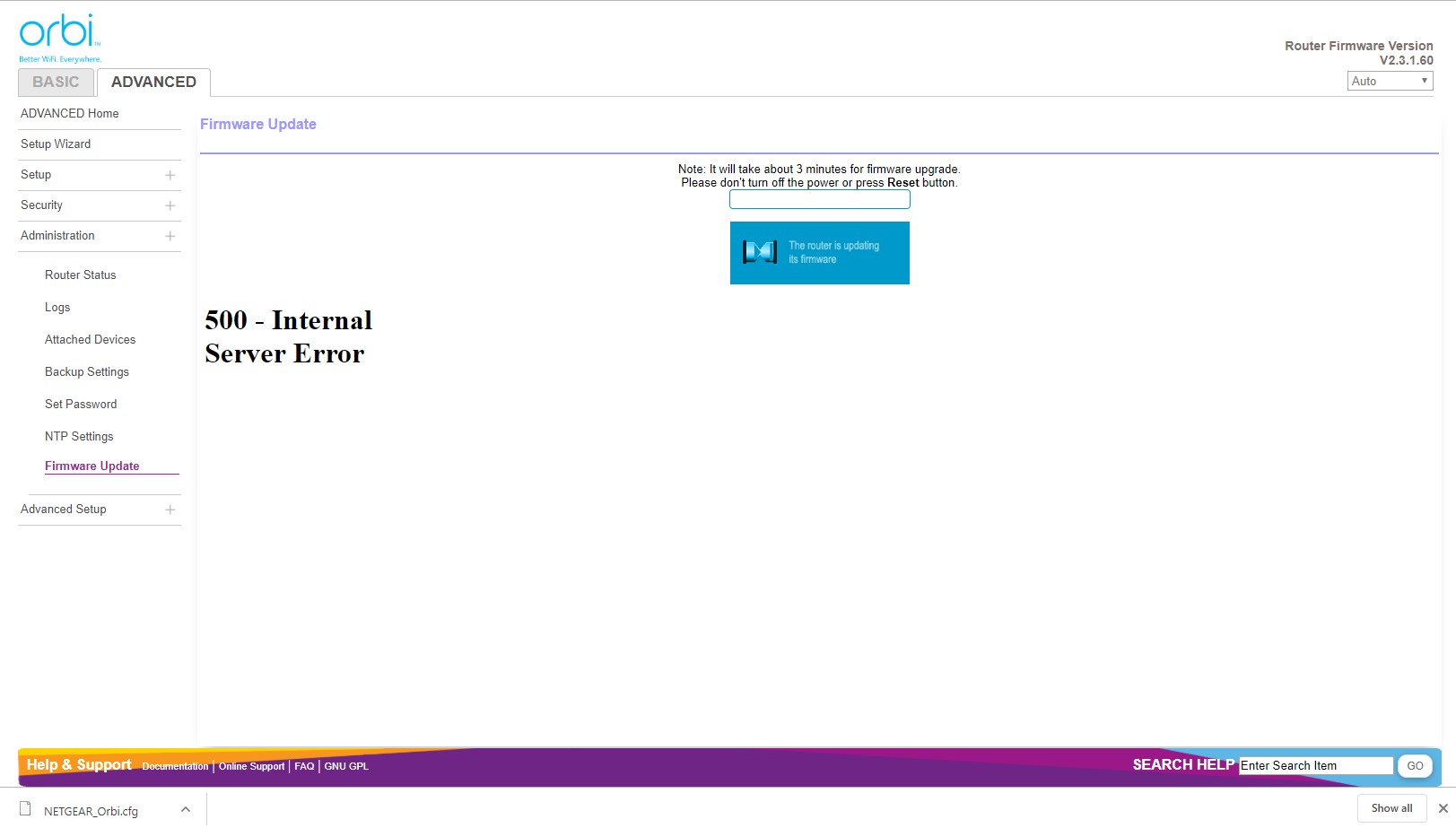
The router update took longer than the 3 minutes stated. Included screenshot a bit unsettling and probably should be looked into by Netgear.
Results so far show no discernable performance differences. iPhones one room away still don't hold a 5G connection to satellite. This appears worse on the past few releases.
Still to test for WiFi calling reliability.
- ekhalilAug 18, 2019Master
ekhalil wrote:Almost 9 days now -since I fixed the backhaul issue- with a very stable network like never before.
Looks to me that Netgear made improvements and fune tuning with the radio parameters:
- I see that Band Steering is working now more effectively. Devices that have 5 GHz capability are -mostly- being moved to 5 GHz.
- Devices are moving between the bands and between the Router and Satellite with no disconnections.
- At the same time I see less DHCP events in the Logs which -for me- means that only needed "roamings" are happening, specially for the stationary IoT devices.
3 weeks have passed and all looks good. More stable than any time before, indeed!
During the 3 weeks, I saw only once the ISP lease time issue where I needed to reboot the Router to fix, otherwise no other issue was seen!