NETGEAR is aware of a growing number of phone and online scams. To learn how to stay safe click here.
Forum Discussion

pstoev
May 09, 2018Tutor
Default route on ReadyNAS 4220
Hello there, I am trying to set a default route using statically configured eth1 interface. I am in Networks - Routes menu and I enter 0.0.0.0 for IP and 0.0.0.0 for subnet mask. Subnet mask does not...
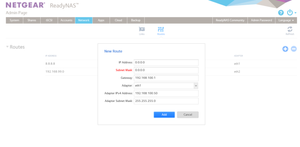
- May 10, 2018
until I have physical access to the box, this is my temprary solution. Apperatnly though it will not work if the ReadyNAS is rebooted
root@Netgear:/# route delete default gw 0.0.0.0 eth0
root@Netgear:/# route add default gw 192.168.100.1 eth1

TeknoJnky
May 10, 2018Hero
Typically the only reason to use a static route is to access a different LOCAL subnet that is DIFFERENT than the subnet of the assigned ip.
example;
nas ip 192.168.1.22/24 (255.255.255.0)
default gateway 192.168.1.1
dns 192.168.1.1
static route 10.10.10.0/24 (the other local network you are trying to reach)
gateway 192.168.1.9 (the other ROUTER that is connected to both networks- 192.168.1.x and 10.10.10.x)
default route does not really have anything to do wit name resolution.
In order for your nas to resolve dns names, it needs a working dns server in the ethernet settings (not the default route settings).
pstoev
May 10, 2018Tutor
TeknoJnky - thanks for your response and I understand what you are saying...but how would the NAS get to 8.8.8.8 DNS or say 4.2.2.1 DNS without a default route ? Also how would it get to Netgear site for automated fimrware download/update without default route ? Also how may it connect to the Netgear specified NTP servcers without default route ? Default Route is needed for any internet-bound traffic from Netgear and that is what I am trying to set. When I try to set 0.0.0.0/0.0.0.0 - the ReadyNAS WebUI does not accept 0.0.0.0 as a subnet mask.
- TeknoJnkyMay 10, 2018Hero
Ok, I have my nas NIC's bonded, so I can't currently see if each ETH has its own DNS server and/or gateway, but I would expect this;
go to network settings, find settings for ETH1
--- eth1 - 192.168.100.50 is connected the network to backup VMs on 192.168.100/24 network AND 192.168.100.1 is the gateway out to internet ---
ETH1 should have the gateway set to 192.168.100.1, and it should have a DNS server IP entered in the dns section.
The DNS server can either be a public (ie 8.8.8.8 or 1.1.1.1 etc) or it can be a private dns that can still resolve public ips (ie typcially the gateway can act as a dns resolver- 192.168.100.1).
hope that helps.
Also- you can have multiple dns servers, so if the gateway acts only as LOCAL dns resolver, you can add a 2nd dns for the public ip resolution.
also2- googles dns server 8.8.8.8 is neither a gateway or static route or local ip, so you will want to remove that from any other settings other than DNS on ETH1.
- TeknoJnkyMay 10, 2018Hero
I think your confusion stems from misunderstanding the difference between Default GATEWAY and static routes.
The default gateway (as defined in the applicable ETH settings) *is* the default route for that subnet.
There can be no internet access without a default gateway.
a static route is used for secondary gateways (ie routers) that route between multiple local subnets (that the default gateway does not know about).
- pstoevMay 10, 2018Tutor
Here is the definition of Default Route:
In computer networking, the default route is a setting on a computer that defines the packet forwarding rule to use when no specific route can be determined for a given Internet Protocol (IP) destination address. All packets for destinations not established in the routing table are sent via the default route.
Given this...how do you set default route in ReadyNAS to connect to, for example, Amazon Cloud Storage server with IP of 54.122.77.83
- TeknoJnkyMay 10, 2018Hero
pstoev wrote:
Given this...how do you set default route in ReadyNAS to connect to, for example, Amazon Cloud Storage server with IP of 54.122.77.83
I think your also confusing a default route with a VPN.
The answer to your question directly is to set your ETH1 DEFAULT GATEWAY to 192.168.100.1
192.168.100.1 you stated as being the gateway out to the internet.
Related Content
NETGEAR Academy

Boost your skills with the Netgear Academy - Get trained, certified and stay ahead with the latest Netgear technology!
Join Us!
