NETGEAR is aware of a growing number of phone and online scams. To learn how to stay safe click here.
Forum Discussion

pstoev
May 09, 2018Tutor
Default route on ReadyNAS 4220
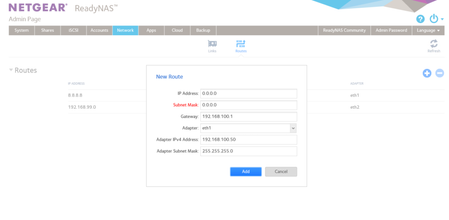
Hello there, I am trying to set a default route using statically configured eth1 interface. I am in Networks - Routes menu and I enter 0.0.0.0 for IP and 0.0.0.0 for subnet mask. Subnet mask does not...
- May 10, 2018
until I have physical access to the box, this is my temprary solution. Apperatnly though it will not work if the ReadyNAS is rebooted
root@Netgear:/# route delete default gw 0.0.0.0 eth0
root@Netgear:/# route add default gw 192.168.100.1 eth1
pstoev
May 10, 2018Tutor
Ok here is the background:
eth0 - 172.30.1.5 IP is connected to the network to backup VMs on 172.30.1/24 network
eth1 - 192.168.100.50 is connected the network to backup VMs on 192.168.100/24 network AND 192.168.100.1 is the gateway out to internet
eth2 - 192.168.199.47 is connected the network to backup VMs on 192.168.199.24 network and 192.168.199.1 is the gateway to 192.168.99/24 network BUT NOT to internet
do you have a reference for ssh commands to set routes ? here is the current routing table
root@Netgear:/home/admin# netstat -nr
Kernel IP routing table
Destination Gateway Genmask Flags MSS Window irtt Iface
0.0.0.0 172.30.1.1 0.0.0.0 UG 0 0 0 eth0
8.8.8.8 172.30.1.1 255.255.255.255 UGH 0 0 0 eth0
172.30.1.0 0.0.0.0 255.255.255.0 U 0 0 0 eth0
172.30.1.1 0.0.0.0 255.255.255.255 UH 0 0 0 eth0
192.168.99.0 192.168.199.1 255.255.255.0 UG 0 0 0 eth2
192.168.100.0 0.0.0.0 255.255.255.0 U 0 0 0 eth1
192.168.100.1 0.0.0.0 255.255.255.255 UH 0 0 0 eth1
192.168.199.0 0.0.0.0 255.255.255.0 U 0 0 0 eth2

StephenB
May 10, 2018Guru - Experienced User
pstoev wrote:
Ok here is the background:
eth0 - 172.30.1.5 IP is connected to the network to backup VMs on 172.30.1/24 network
eth1 - 192.168.100.50 is connected the network to backup VMs on 192.168.100/24 network AND 192.168.100.1 is the gateway out to internet
eth2 - 192.168.199.47 is connected the network to backup VMs on 192.168.199.24 network and 192.168.199.1 is the gateway to 192.168.99/24 network BUT NOT to internet
Try deleting all your static routes, and then let us know what is broken.
I think all your local addressing should just work. It's conceivable that internet addressing will fail, but if it works correctly then there's no reason to set up any of these.
Related Content
NETGEAR Academy

Boost your skills with the Netgear Academy - Get trained, certified and stay ahead with the latest Netgear technology!
Join Us!
