NETGEAR is aware of a growing number of phone and online scams. To learn how to stay safe click here.
Forum Discussion

Creyno
Jun 03, 2017Aspirant
VPN quit working FVS318n
My netgear FVS318n VPN just quit working has worked fine for years now it just will not connect here is the log from my shrewsoft client 17/06/01 09:56:31 ## : IKE Daemon, ver 2.2.2 17/06/01 ...

DaneA
Jun 06, 2017NETGEAR Employee Retired
Hi Creyno,
Welcome to the community! :)
On the web-GUI of the FVS318N, kindly try to delete existing the IKE / VPN policies then re-create them using the VPN Wizard on the FVS318N. Use the articles below as reference guide:
ProSAFE VPN Client: Client to Box Configuration
How To NETGEAR: Shrew Soft VPN Client
Regards,
DaneA
NETGEAR Community Team
Creyno
Jun 06, 2017Aspirant
deleted polices and recreated them not connecting still here is the log from neatgear vpn client
20170606 18:00:25:858 Reading configuration...
20170606 18:00:25:878 IKEv1 configuration detected
20170606 18:00:25:878 No IKEv2 configuration
20170606 18:00:25:878 No SSL configuration
20170606 18:00:26:255 [VPNCONF] TGBIKE_STARTED received
20170606 18:00:47:854 Upgrading configuration...
20170606 18:00:47:854 Reading configuration...
20170606 18:00:47:864 IKEv1 configuration detected
20170606 18:00:47:864 No IKEv2 configuration
20170606 18:00:47:864 Default IKE daemon is removing SAs...
20170606 18:00:47:864 No SSL configuration
20170606 18:00:47:864 Default reinitializing daemon
20170606 18:00:48:149 Default (SA Ikev1Gateway(1)-Ikev1Tunnel(1)-P2) is opening.
20170606 18:00:49:205 Default (SA Ikev1Gateway(1)-P1) SEND phase 1 Aggressive Mode [SA] [KEY_EXCH] [NONCE] [ID] [VID] [VID] [VID] [VID] [VID]
20170606 18:00:54:215 Default (SA Ikev1Gateway(1)-P1) SEND phase 1 Aggressive Mode [SA] [KEY_EXCH] [NONCE] [ID] [VID] [VID] [VID] [VID] [VID]
20170606 18:00:59:225 Default (SA Ikev1Gateway(1)-P1) SEND phase 1 Aggressive Mode [SA] [KEY_EXCH] [NONCE] [ID] [VID] [VID] [VID] [VID] [VID]
20170606 18:01:04:237 Default (SA Ikev1Gateway(1)-P1) SEND phase 1 Aggressive Mode [SA] [KEY_EXCH] [NONCE] [ID] [VID] [VID] [VID] [VID] [VID]
20170606 18:01:09:247 Default (SA Ikev1Gateway(1)-P1) SEND phase 1 Aggressive Mode [SA] [KEY_EXCH] [NONCE] [ID] [VID] [VID] [VID] [VID] [VID]
20170606 18:01:14:252 Default (SA Ikev1Gateway(1)-P1) SEND phase 1 Aggressive Mode [SA] [KEY_EXCH] [NONCE] [ID] [VID] [VID] [VID] [VID] [VID]
20170606 18:01:14:252 Default transport_send_messages: giving up on message 014E06F8
Here is the VPN log from Router
Tue Jun 06 18:01:46 2017 (GMT -0400): [FVS318N] [IKE] INFO: Adding IKE configuration with identifier "Warren"
Tue Jun 06 18:01:46 2017 (GMT -0400): [FVS318N] [IKE] INFO: Adding IPSec configuration with identifier "Warren"
Tue Jun 06 18:00:52 2017 (GMT -0400): [FVS318N] [IKE] INFO: IPSec configuration with identifier "modeConfig0" deleted sucessfully
Tue Jun 06 18:00:52 2017 (GMT -0400): [FVS318N] [IKE] WARNING: no phase2 found for "modeConfig0"
Tue Jun 06 18:00:52 2017 (GMT -0400): [FVS318N] [IKE] ERROR: Failed to Delete the IPSec configuration with identifier "modeConfig"
Tue Jun 06 18:00:52 2017 (GMT -0400): [FVS318N] [IKE] ERROR: sainfo identifier not found ("modeConfig")
Tue Jun 06 18:00:52 2017 (GMT -0400): [FVS318N] [IKE] INFO: ModeCfg configuration with identifier "modeConfig" deleted sucessfully
Tue Jun 06 18:00:52 2017 (GMT -0400): [FVS318N] [IKE] INFO: IKE configuration with identifier "vpnclient" deleted sucessfully
Tue Jun 06 18:00:52 2017 (GMT -0400): [FVS318N] [IKE] WARNING: no phase1 found for "vpnclient"
Tue Jun 06 18:00:42 2017 (GMT -0400): [FVS318N] [IKE] INFO: IKE configuration with identifier "Warren" deleted sucessfully
Tue Jun 06 18:00:42 2017 (GMT -0400): [FVS318N] [IKE] WARNING: no phase1 found for "Warren"
Tue Jun 06 18:00:42 2017 (GMT -0400): [FVS318N] [IKE] INFO: IPSec configuration with identifier "Warren" deleted sucessfully
Tue Jun 06 18:00:42 2017 (GMT -0400): [FVS318N] [IKE] WARNING: no phase2 found for "Warren"
- DaneAJun 07, 2017NETGEAR Employee Retired
Since you have deleted the existing the IKE / VPN policies then re-create them using the VPN Wizard on the FVS318N and since you mentioned that you are using a NETGEAR VPN Client, did you also use the VPN Wizard on the NETGEAR VPN Client as per instructions indicated on this article?
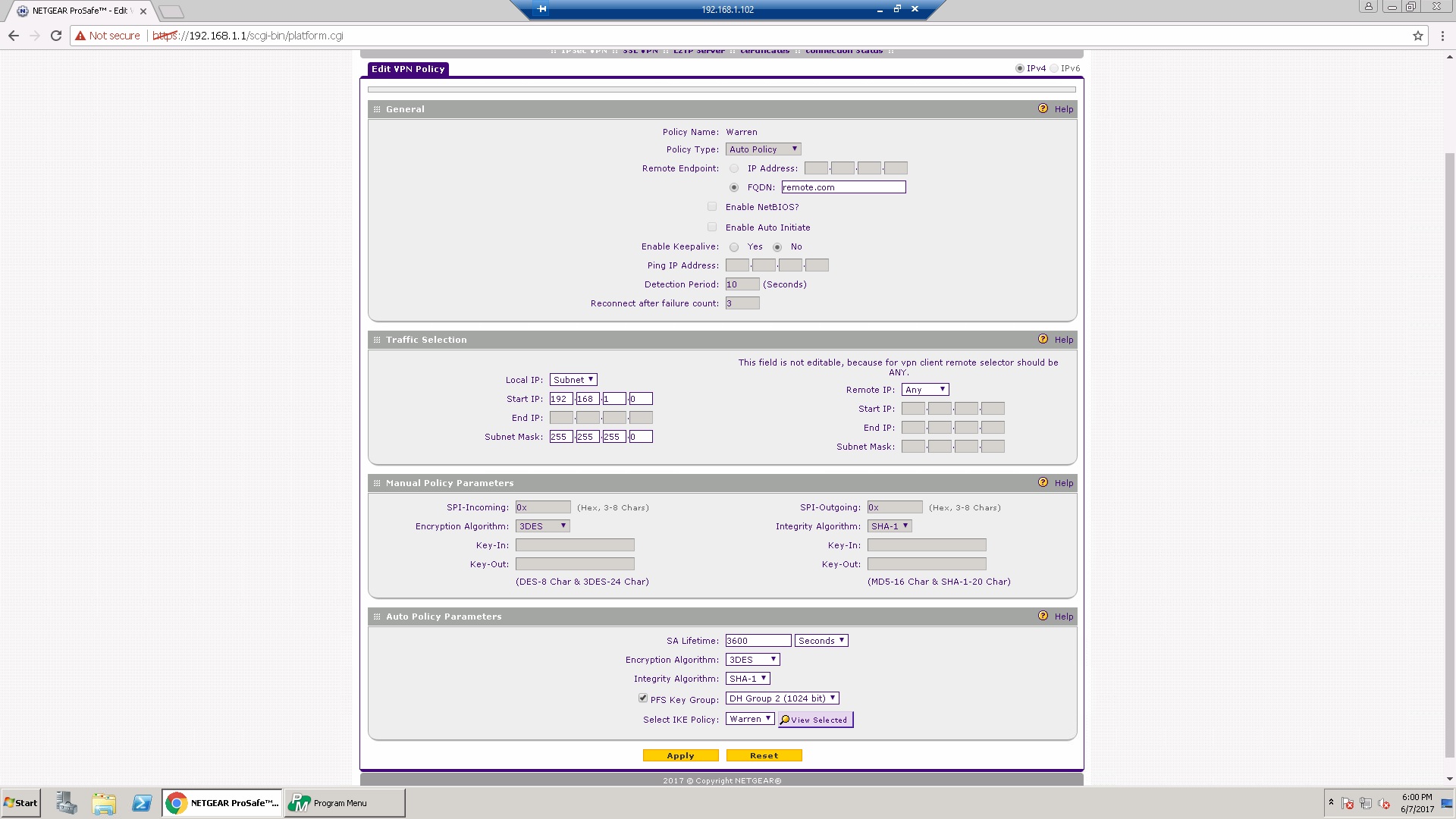
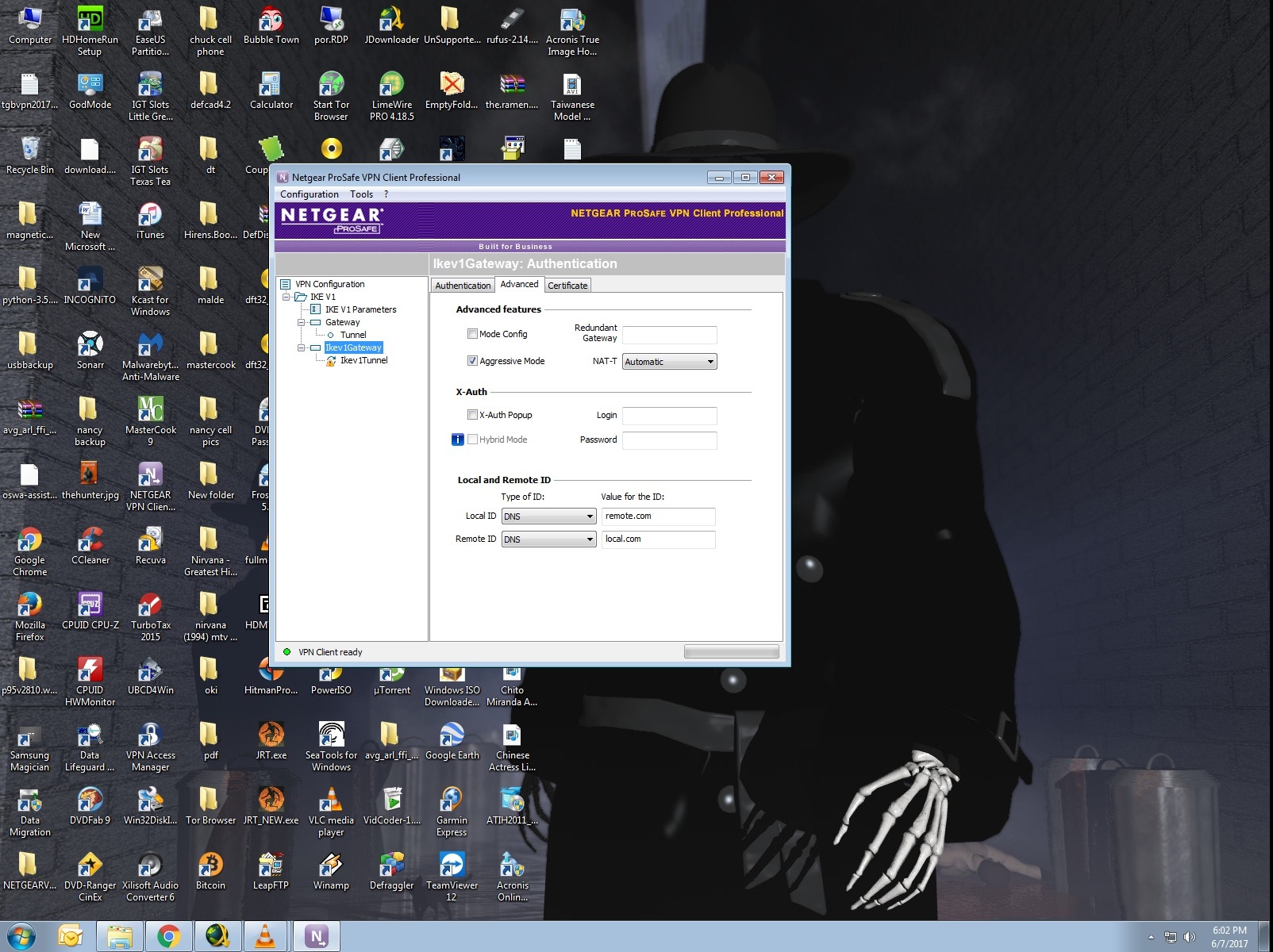
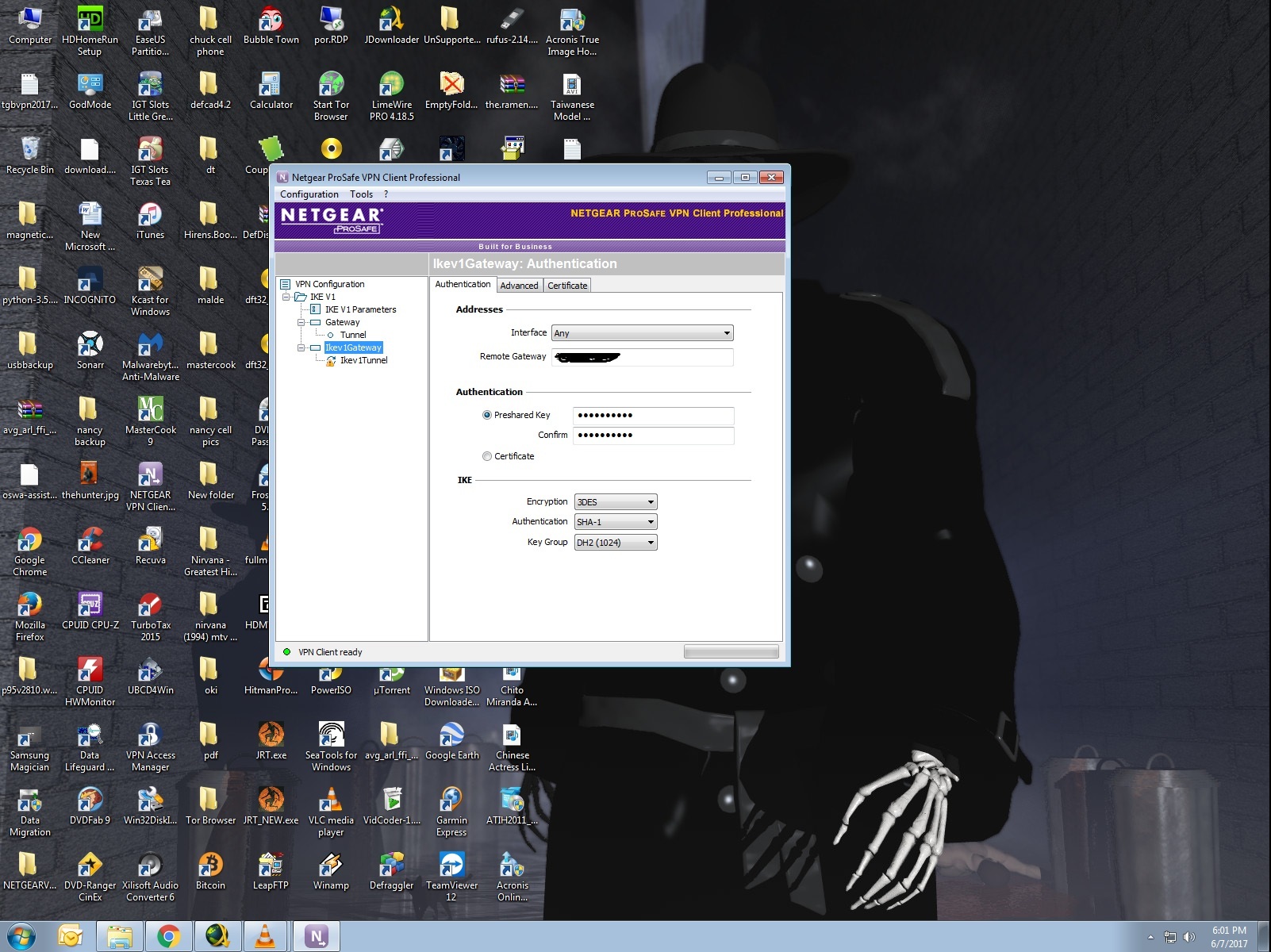
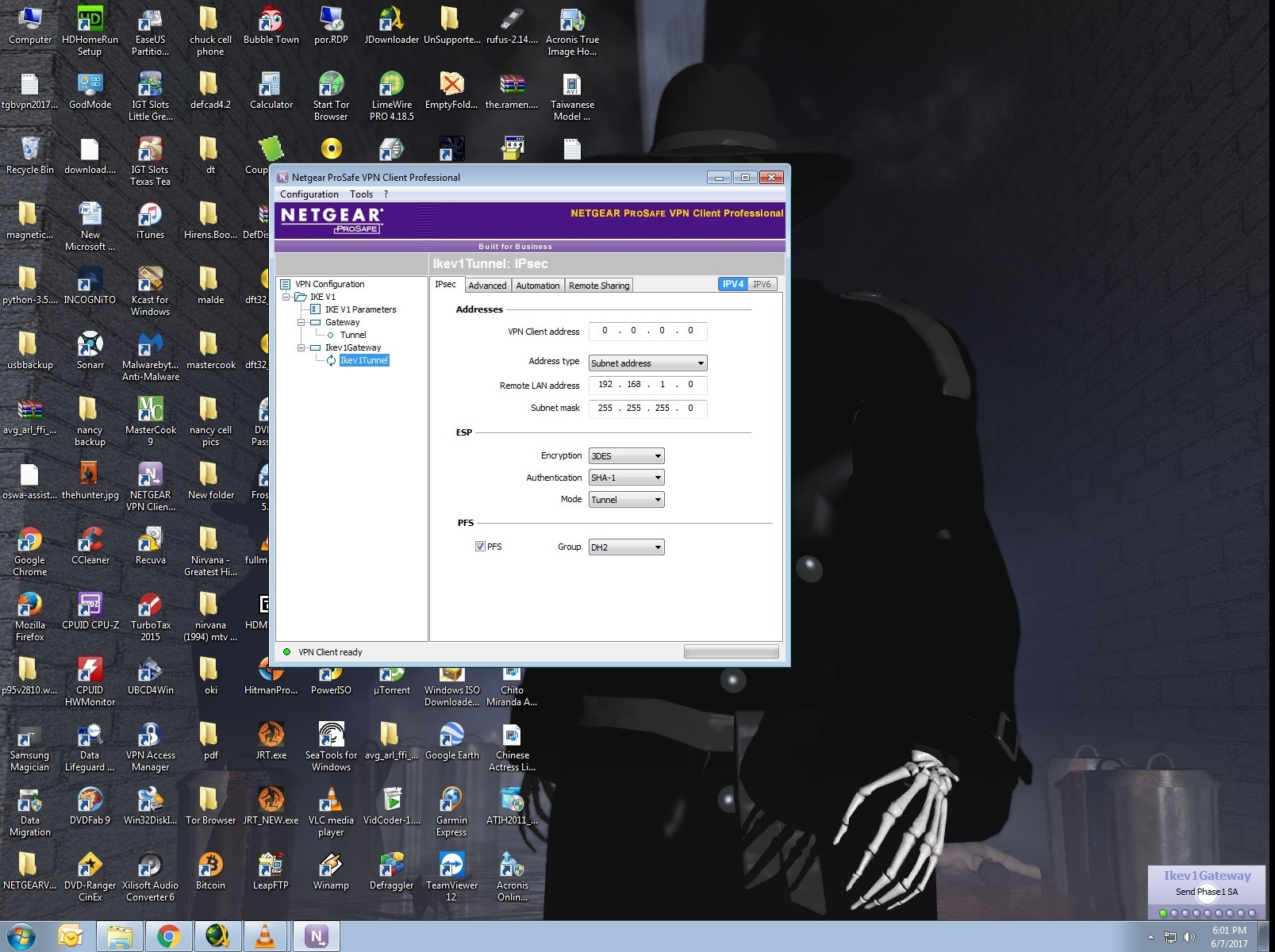
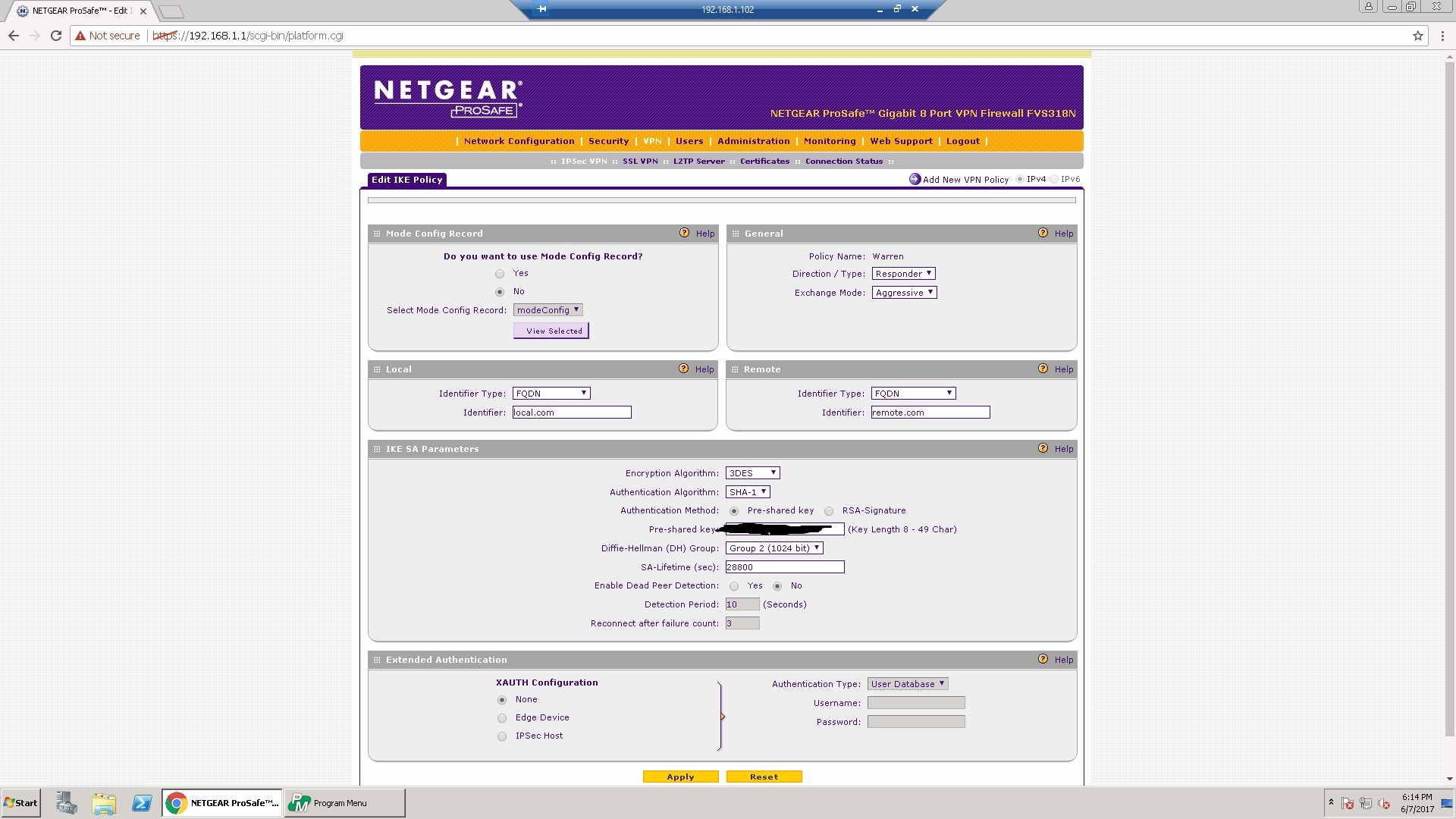
Kindly post screenshots of the IKE and VPN policies from the FVS318N as well as the parameters set on the NETGEAR VPN Client to further isolate the problem.
Regards,
DaneA
NETGEAR Community Team
- CreynoJun 07, 2017Aspirant
- DaneAJun 08, 2017NETGEAR Employee Retired
Based on the images you have posted, it seems that everything was configured properly but it does not pass Phase 1. Here are my suggestions below:
a. Make sure that the WAN IP Address registered on the FVS318N is a Public IP Address.
b. Since the LAN IP Address of the FVS318N is 192.168.1.0, make sure that the LAN IP Address of the PC/laptop where the NETGEAR VPN Client software is installed should be on a different subnet such as 10.10.10.0 or 192.168.18.0.
c. If ever there is an anti-virus or software firewall installed in the PC/laptop where the NETGEAR VPN Client software is installed, try to disable it for the meantime or uninstall it. Then, check if you will be able to establish a VPN tunnel.
Regards,
DaneA
NETGEAR Community Team
Related Content
NETGEAR Academy

Boost your skills with the Netgear Academy - Get trained, certified and stay ahead with the latest Netgear technology!
Join Us!
