Forum Discussion

vasileiosg
Jan 22, 2017Aspirant
Multiple port tagging
Hello, I have a complicated question so please bare with me for a moment. I have an ESXi 6.5 host that is running a virtual Sophos UTM 9.4 appliance. I also have a Netgear GS108Ev3 managed sw...
- Feb 07, 2017
Since you have confirmed that the PC where the ESXi 6.5 host which runs a virtual Sophos UTM 9.4 appliance is a VLAN-aware device, have you checked if tagging is enabled on the physical LAN adapter of the PC? Kindly check this link as a guide on how to check it on your PC.
Also, kindly post images of your actual network setup that especially shows the PC where the ESXi 6.5 host which runs a virtual Sophos UTM 9.4 appliance is connected to the GS108Ev3.
Regards,
DaneA
NETGEAR Community Team
vasileiosg
Jan 24, 2017Aspirant
Alright, so i decided to make my life a bit simpler so it is easier.
I connected two physical devices A and B on port 1 and 2 on the switch.
A got 192.168.0.1 (static)
B got 192.168.0.2 (static)
then i went to the switch and did the following:
VLAN > 802.1Q > Advanced > Port PVID
And i changed ports 1 and 2 to PVID 2.
Then i went to VLAN > 802.1Q > Advanced > VLAN Membership and removed any VLAN on those ports except tagging VLAN2.
I then tried to ping the two devices and i could not.

DaneA
Jan 30, 2017NETGEAR Employee Retired
If ever the 2 physical devices are not VLAN-aware, ports 1 and 2 should be set as untagged ports on VLAN 2 with a PVID = 2.
Let me share this VLAN set-up example using a GS108Ev2 switch that I found online, click here and use it as a guide. Hope it helps.
Regards,
DaneA
NETGEAR Community Team
- vasileiosgJan 30, 2017Aspirant
Now i understand! OK i am going to test it over the weekend and come back to you, thanks a lot!
- vasileiosgJan 31, 2017Aspirant
Hi DaneA,
I did this:
I changed the VLAN for Port 1 and 2 to VLAN2 and then i changed the PVID to the same number. Interestingly enough, it completely broke the rest of the ports on the switch as well. I still haven't understood why but the whole switch stopped working and allowing any communication between any ports.
So i reset the switch.
Now i did this:
PVID for all ports is 1
VLAN1 is untagged to every port
Port 1: Tagged on 1,2,3 = ESXi host. i think this is the best option as the firewall is running there which is VLAN aware.
Port 2: Untagged on 2 = NAS running there which is not VLAN aware
Port 3: Untagged on 2 = NAS running there which is not VLAN aware
Port 4: Untagged on 2
Port 5: Untagged on 3 = Airport which is not VLAN aware
Port 6,7: unused on VLAN1
Port 8: Untagged on VLAN1: ISP router
So what is happening now, is that all devices are able to communicate with each other, which is not what i want.
I am assuming the next logical action is to turn the VLAN1 to "tagged" on the ports that i want VLAN2?
I am also assuming that i should not touch PVID but leave it as 1?
- vasileiosgFeb 04, 2017Aspirant
I did as you told me and i said to my last comment:
VLAN Port 1 Port 2 Port 3 Port 4 Port 5 Port 6 Port 7 Port 8 1 U T T T T U U U 2 T U U U 3 T U and i did it like this because on port 1 i have my esxi host which is VLAN aware and needs to communicate with port 8. I would expect that the physical devices on Port 2,3,4 will be able to communicate with each other after changing the PVID as well to 2 and that was the case indeed.
The question now is, how do i make these ports (2,3,4) to communicate with the virtual UTM9 running on the ESXi on port 1?
1) Should I leave the Port 1 untagged on VLAN1, tagged on VLAN2 and PVID1?
2) Should i add the VLAN on the port group in ESXi?
3) Should i add the VLAN on the UTM9 adapter that is looking on the port group on ESXi?
4) Should i do (2) and (3) or just (2) or (3)?
I know that now it is not so much about the switch rather than for the ESXi and the UTM9 but i hope you may know the basics behind this.
Thanks!
- DaneAFeb 05, 2017NETGEAR Employee Retired
The VLAN 2 configured on the ESXi should be within the same IP range of devices connected to VLAN 2 configured on your GS108Ev3 in order for them to communicate.
It would be best if you could post images or screenshots on how you have configured the PC where the ESXi 6.5 host runs a virtual Sophos UTM 9.4 appliance as well as the configuration you've done on the GS108Ev3 switch. In this way, other community members that has experience with this kind of setup would be able to share on this forum thread.
Regards,
DaneA
NETGEAR Community Team- vasileiosgFeb 05, 2017Aspirant
DaneA sure,
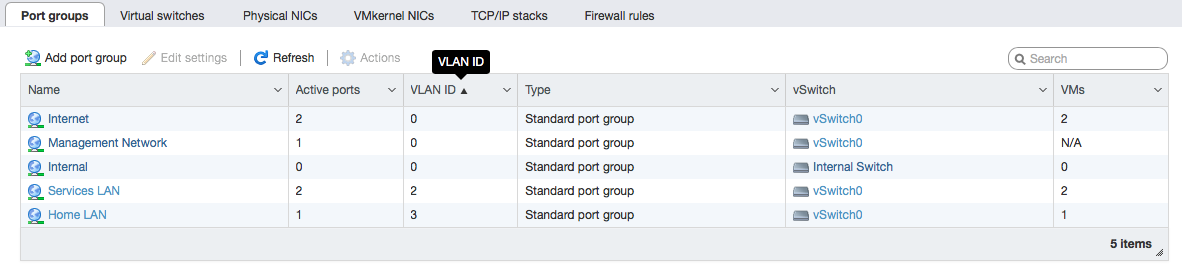
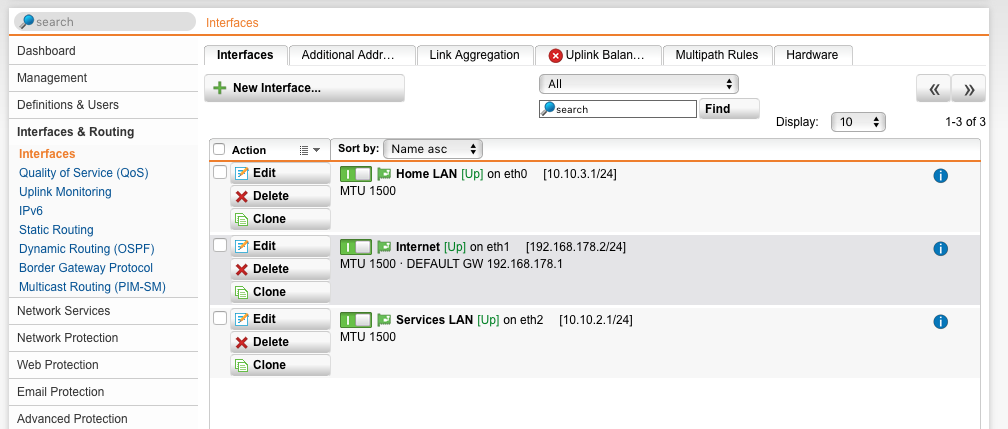
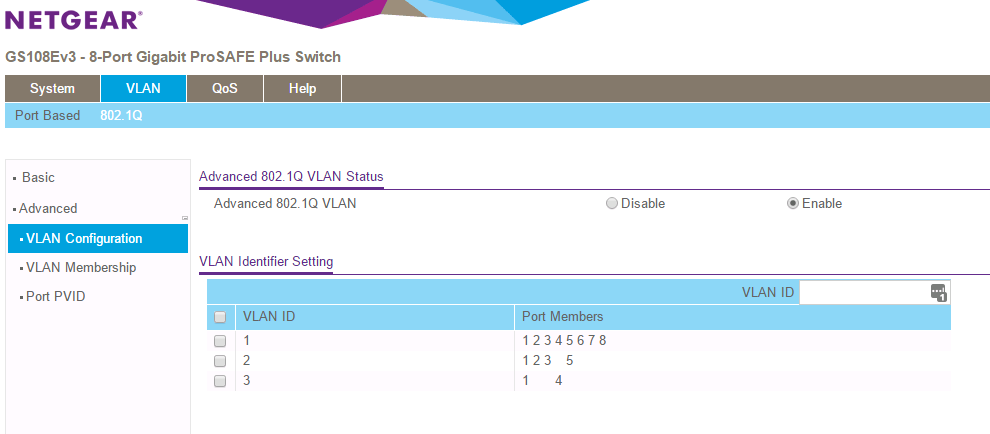
here you go.
ESXi:
UTM9:
Netgear:
Please note that the configuration is NOT as we discussed. That is because people in the house want to use it and i am working on it only in the nights when i don't have to keep the baby. When it is not working exactly as it should, i reverse the configuration until the next moment i will have an hour in my hands to work on it.
In practice i want to have 3 networks:
1) where the internet from my router is coming in and it can be picked up only by the UTM running on the ESXi. Therefore, port 1 (ESXi) and port 8 (Router) i am planning to leave them on VLAN1/PVID1.
2) my nas boxes (physical boxes), a media player (physical boxes) and other services that i am running on ESXi can all communicate on VLAN2/PVID2. They all need to have the UTM9 as their gateway.
3) Wi-fi users where they will get a DHCP from the UTM9 and have the UTM9 as their gateway. They will be VLAN3/PVID3.
- DaneAFeb 07, 2017NETGEAR Employee Retired
Since you have confirmed that the PC where the ESXi 6.5 host which runs a virtual Sophos UTM 9.4 appliance is a VLAN-aware device, have you checked if tagging is enabled on the physical LAN adapter of the PC? Kindly check this link as a guide on how to check it on your PC.
Also, kindly post images of your actual network setup that especially shows the PC where the ESXi 6.5 host which runs a virtual Sophos UTM 9.4 appliance is connected to the GS108Ev3.
Regards,
DaneA
NETGEAR Community Team

Related Content
NETGEAR Academy

Boost your skills with the Netgear Academy - Get trained, certified and stay ahead with the latest Netgear technology!
Join Us!
