NETGEAR is aware of a growing number of phone and online scams. To learn how to stay safe click here.
Forum Discussion

vasyam
Oct 10, 2020Tutor
Deleting Redundant Time Machine Backup v2
Hello, After recovering failed btrfs due to a hard reset (many thanks again to StephenB!) I ran into issues with TimeMachine backups. I am looking to remove the old backups (this was very helpful ht...

StephenB
Oct 12, 2020Guru - Experienced User
You're not supposed to enter the hash.
What happens if you simply do an ls -al /data
Do you still see an Input/output error?
vasyam
Oct 13, 2020Tutor
StephenB wrote:You're not supposed to enter the hash.
What happens if you simply do an ls -al /data
Do you still see an Input/output error?
Here is what I am getting:
root@NASHNAS:~# ls -al /data
ls: cannot access '/data/.timemachine': Input/output error
total 64
drwxr-xr-x 1 root root 188 Oct 10 21:47 .
drwxr-xr-x 1 root root 198 Mar 16 2020 ..
drwxrwxr-x 1 root root 168 Oct 10 23:11 .apps
-rwxrwxr-x+ 1 admin admin 8196 Oct 4 00:51 .DS_Store
drwxr-xr-x 1 admin admin 28 Oct 4 00:28 home
drwxrwxrwx+ 1 guest guest 4722 Mar 22 2020 Photos
drwxr-xr-x 1 root root 0 May 20 10:54 .purge
drwxr-xr-x 1 root root 78 May 20 10:56 ._share
d?????????? ? ? ? ? ? .timemachine
drwxrwxrwx+ 1 guest guest 88 Oct 3 20:01 Transmission
drwxr-xr-x 1 root root 0 Feb 29 2020 .vault
drwxrwxrwx+ 1 guest guest 66 Oct 3 20:01 Videos
-rw-r--r-- 1 admin admin 1128 Oct 10 21:47 .volume_schedule.conf
- vasyamOct 13, 2020Tutor
Sorry, it came out poorly, attached a screenshot
- StephenBOct 14, 2020Guru - Experienced User
Thanks, the screenshot is much easier.
Something looks really wrong - the system isn't able to read the metadata for the .timemachine subvolume. So the file system has somehow gotten corrupted. Not a good sign.
If you don't have a current backup, you should make one before proceeding. Then I suggest trying a btrfs scrub (which you can do from the volume settings wheel). I don't think it's that likely to help, but it is worth a try. If it fails, I think a factory reset/restore data from backup is the next step.
- vasyamOct 14, 2020Tutor
Ouch - I tried volume scrub, twice, in vain. The file system was indeed corrupted and you helped me (many thanks!) restore it via ssh as follows:
btrfs device scan
btrfs fi show
btrfs-zero-log /dev/md127
mount -t btrfs -r ro,recovery /dev/md127 /data
The volume did come back save for the timemachine data and access. The volume is quite big, and backing it up would be a major challenge not to mention cost. Is there anything else you think I could try to restore or wipe clean the timemachine functionality?
- StephenBOct 14, 2020Guru - Experienced User
vasyam wrote:
Ouch - I tried volume scrub, twice, in vain. The file system was indeed corrupted and you helped me (many thanks!) restore it via ssh as follows:
btrfs device scan
btrfs fi show
btrfs-zero-log /dev/md127
mount -t btrfs -r ro,recovery /dev/md127 /data
The volume did come back save for the timemachine data and access. The volume is quite big, and backing it up would be a major challenge not to mention cost. Is there anything else you think I could try to restore or wipe clean the timemachine functionality?
It looks like the recovery didn't fully repair the volume. There is a btrfs check function you could try, but the btrfs community says it is high risk/last resort. You could also engage Netgear paid support: https://kb.netgear.com/69/ReadyNAS-Data-Recovery-Diagnostics-Scope-of-Service
As far as costs go, data recovery software and services have similar (or even more expensive) costs than backup, and of course data recovery often fails. Over the long run, you really should have a backup plan in place - otherwise, at some point you will lose all your data.
- vasyamOct 14, 2020Tutor
There is a btrfs check function you could try, but the btrfs community says it is high risk/last resort.
Do you happen to have a link to that check function?
- StephenBOct 14, 2020Guru - Experienced User
vasyam wrote:
Do you happen to have a link to that check function?
It's referenced here: https://btrfs.wiki.kernel.org/index.php/Btrfsck And of course it has it's own help page. https://btrfs.wiki.kernel.org/index.php/Manpage/btrfs-check
Note the warning: Warning: Do not use --repair unless you are advised to do so by a developer or an experienced user I've never used this function, and it could well do more damage. At the moment, timemachine is the only thing that appears to be broken. You could lose a lot more.
The process would be similar to what you did before:
btrfs device scan
btrfs fi show
btrfs check --repair /dev/md127
Though it would be more conservative to run btrfs check w/o the --repair option first, and see what it tells you. If it is limited to .timemachine, then I think the risk would be lower.
After the repair attempt, you can either reboot the NAS (and hope), or try mounting the volume manually first (and hope):
mount -t btrfs /dev/md127 /data
would mount it (not read-only), or you try the earlier mount command to mount it read-only without the recovery option.
- vasyamOct 14, 2020Tutor
Here is what I am getting - was not sure whether I should use --force before checking in with you)
root@NASHNAS:~# btrfs device scan
Scanning for Btrfs filesystems
root@NASHNAS:~# btrfs fi show
Label: '33ea29df:root' uuid: d2075c37-8181-4962-a9be-05ed860b1cf5
Total devices 1 FS bytes used 1.03GiB
devid 1 size 4.00GiB used 2.45GiB path /dev/md0
Label: '33ea29df:data' uuid: b7e1c21c-c4e7-4610-b04d-6681ebcea469
Total devices 1 FS bytes used 6.07TiB
devid 1 size 9.07TiB used 7.00TiB path /dev/md127
root@NASHNAS:~# btrfs check /dev/md127
ERROR: /dev/md127 is currently mounted, use --force if you really intend to check the filesystem
- StephenBOct 14, 2020Guru - Experienced User
You should be doing this in tech support mode (when the volume wouldn't be mounted). Running it on a mounted volume increases the risk.
If I were in your position, I'd wait until I had a backup plan in place, and live w/o the timemachine backups for now.
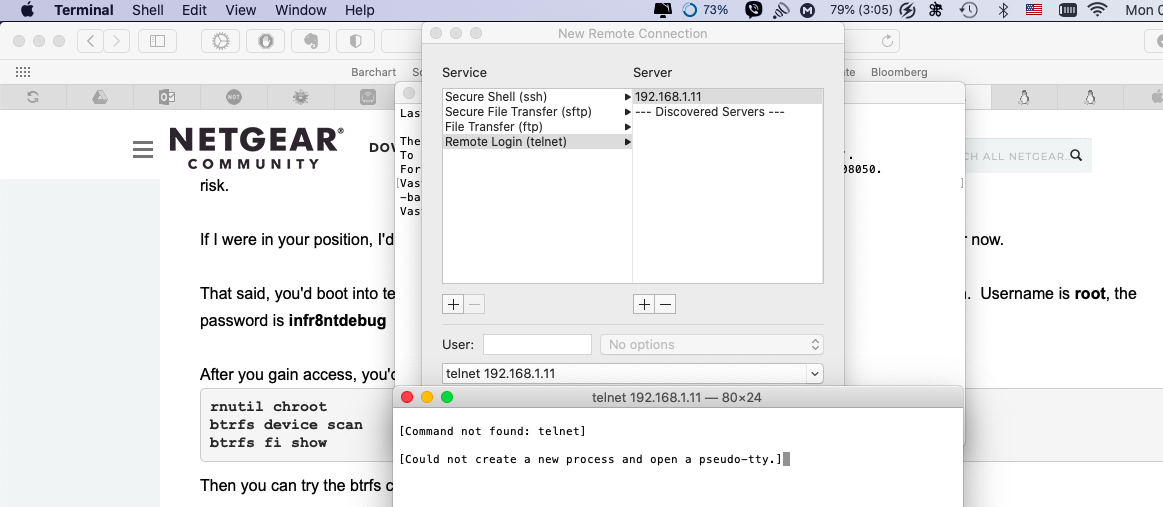
That said, you'd boot into tech support mode using the boot menu. Then you log in with telnet instead of ssh. Username is root, the password is infr8ntdebug
After you gain access, you'd type
rnutil chroot
btrfs device scan
btrfs fi show
Then you can try the btrfs check command
start with this first
btrfs check /dev/md127
and if it looks like it only finds issues with .timemachine you can run it again with the --repair.
- vasyamOct 18, 2020Tutor
StephenB wrote:You should be doing this in tech support mode (when the volume wouldn't be mounted). Running it on a mounted volume increases the risk.
If I were in your position, I'd wait until I had a backup plan in place, and live w/o the timemachine backups for now.
That said, you'd boot into tech support mode using the boot menu. Then you log in with telnet instead of ssh. Username is root, the password is infr8ntdebug
After you gain access, you'd type
rnutil chroot
btrfs device scan
btrfs fi show
Then you can try the btrfs check command
start with this first
btrfs check /dev/md127
and if it looks like it only finds issues with .timemachine you can run it again with the --repair.
For some reason I am unable to telnet into the NAS booted in the tech mode. I read conflicting reports that telnet was no longer included with the Catalina MacOS although this option can be found in the service launch menu in the Terminal (as in the attached screenshot) according to others, and I did find it there. I am stuck a bit, trying to figure our what I am doing incorrectly
- vasyamOct 21, 2020Tutor
StephenB wrote:You should be doing this in tech support mode (when the volume wouldn't be mounted). Running it on a mounted volume increases the risk.
If I were in your position, I'd wait until I had a backup plan in place, and live w/o the timemachine backups for now.
That said, you'd boot into tech support mode using the boot menu. Then you log in with telnet instead of ssh. Username is root, the password is infr8ntdebug
After you gain access, you'd type
rnutil chroot
btrfs device scan
btrfs fi show
Then you can try the btrfs check command
start with this first
btrfs check /dev/md127
and if it looks like it only finds issues with .timemachine you can run it again with the --repair.
There are errors, but I am not sure what they pertain too (I have attached a screenshot in case you have a second to take a look)
- StephenBOct 21, 2020Guru - Experienced User
vasyam wrote:There are errors, but I am not sure what they pertain too (I have attached a screenshot in case you have a second to take a look)
There aren't that many, and the inodes are sequential - which is a good thing. It is possible to map the inode numbers to btrfs paths, but you'd need to mount the volume to do that.
In your case, the relevant commands would be
mount /dev/md127 /data
btrfs inspect-internal inode-resolve 29475 /data
btrfs inspect-internal inode-resolve 29476 /data
btrfs inspect-internal inode-resolve 29477 /data
btrfs inspect-internal inode-resolve 29478 /data
btrfs inspect-internal inode-resolve 29479 /data
btrfs inspect-internal inode-resolve 29480 /data
btrfs inspect-internal inode-resolve 29481 /data
umount /data
I don't know what it will report, given the errors, but the commands usually return a file or folder name.
Not sure what the --repair would do, but you should assume that those folders/files would be deleted.
- vasyamOct 21, 2020Tutor
I am getting that there is no such file or directory
root@1YA293RR00327:/# mount /dev/md127 /data
root@1YA293RR00327:/# btrfs inspect-internal inode-resolve 29475 /data
ERROR: ino paths ioctl: No such file or directory
root@1YA293RR00327:/# btrfs inspect-internal inode-resolve 29476 /data
ERROR: ino paths ioctl: No such file or directory
root@1YA293RR00327:/# btrfs inspect-internal inode-resolve 29477 /data
ERROR: ino paths ioctl: No such file or directory
root@1YA293RR00327:/# btrfs inspect-internal inode-resolve 29478 /data
ERROR: ino paths ioctl: No such file or directory
root@1YA293RR00327:/# btrfs inspect-internal inode-resolve 29479 /data
ERROR: ino paths ioctl: No such file or directory
root@1YA293RR00327:/# btrfs inspect-internal inode-resolve 29480 /data
ERROR: ino paths ioctl: No such file or directory
root@1YA293RR00327:/# btrfs inspect-internal inode-resolve 29481 /data
ERROR: ino paths ioctl: No such file or directory
root@1YA293RR00327:/# umount /data
- vasyamOct 21, 2020Tutor
Should I try --repair you think? I do have backup of critical data, but would still hate to lose ~6Tb of media files
- StephenBOct 21, 2020Guru - Experienced User
vasyam wrote:
Should I try --repair you think? I do have backup of critical data, but would still hate to lose ~6Tb of media files
As you know, there is risk. I think the answer depends in part on how important Time Machine is to you.
As I've said a few times, personally I'd make a backup and then create a new volume. You can get an 8 TB USB drive for ~$150 USD. Also, you could take a middle ground - back up as many of the media files that you can with existing storage.
Another approach is to purchase cloud storage. Per month pricing would be about ~$30-40 per month, and if you use pay-as-you-go, you could drop it afterwards. The problem here is speed - cloud backup is generally quite slow. I use Crashplan myself, and it took several months to get my entire volume backed up. So cloud storage might end up being more expensive, depending on how long the backup takes.
- vasyamOct 21, 2020Tutor
Last dumb question - how do I reboot in the Tech mode? none of the buttons seems to work, I suppose I could telnet a reboot command of some sort, but I do not know its syntax. Thanks again
- vasyamNov 15, 2020Tutor
Hi, I have made a backup and then tried to repair the FS, here is what I am getting:
root@1YA293RR00327:/# btrfs check --repair /dev/md127
enabling repair mode
Checking filesystem on /dev/md127
UUID: b7e1c21c-c4e7-4610-b04d-6681ebcea469
Fixed 0 roots.
checking extents
incorrect offsets 14141 3411552161
items overlap, can't fix
check/main.c:3947: fix_item_offset: BUG_ON `ret` triggered, value -5
btrfs[0x441367]
btrfs[0x40bf62]
btrfs[0x4425e3]
btrfs[0x448bec]
btrfs[0x4498b1]
btrfs[0x44a2f5]
btrfs(cmd_check+0x1314)[0x44d58e]
btrfs(main+0x13d)[0x40c647]
/lib/x86_64-linux-gnu/libc.so.6(__libc_start_main+0xf5)[0x7f111e5c4b45]
btrfs[0x40c67b]
Aborted
Would appreciate a suggestion on what to do next as the repair seems to have failed. Since I have an old system, I suppose reinstalling the OS is not as straightforward as booting in this mode. TIA
- StephenBNov 15, 2020Guru - Experienced User
vasyam wrote:
Since I have an old system, I suppose reinstalling the OS is not as straightforward as booting in this mode. TIA
Reinstalling the OS won't solve your problem (which is file system corruption on the data volume).
vasyam wrote:
Hi, I have made a backup and then tried to repair the FS, here is what I am getting:
Would appreciate a suggestion on what to do next as the repair seems to have failed.
I think doing a factory default, and restoring files from backup is the next step (giving up on restoring the TM files).
- vasyamNov 15, 2020Tutor
Got it, thank you, will try to do that - from the boot menu I suppose. How do I reboot from here though? I am still in the repair mode I guess
root@1YA293RR00327:/# reboot
Running in chroot, ignoring request.
root@1YA293RR00327:/# shutdown -r now
Running in chroot, ignoring request.
root@1YA293RR00327:/#
- StephenBNov 15, 2020Guru - Experienced User
Odd. Try rnutil rn_shutdown
Related Content
NETGEAR Academy

Boost your skills with the Netgear Academy - Get trained, certified and stay ahead with the latest Netgear technology!
Join Us!