NETGEAR is aware of a growing number of phone and online scams. To learn how to stay safe click here.
Forum Discussion

NASguru
Dec 07, 2016Apprentice
Expanding volume on 626 - Raid 5 to Raid 6 not automatic
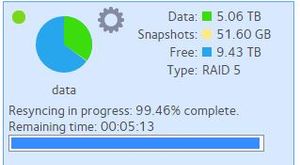
A quick note, the RN626X is not listed in the Model drop down when starting a new converstation. So I choose the 716X which is close enough. That said, I recently expanded the volume on my 626 from...
- Dec 08, 2016
You had to disable X-RAID and choose the next disk added to add parity, add that disk and then you could have re-enabled X-RAID again.
Now all the drive bays are full it's too late to convert the existing volume to RAID-6.


NASguru
Dec 08, 2016Apprentice
StephenB wrote:
NASguru wrote:I checked the software manual and it appears a factory reset would automatically select Raid-6 for me since I have all 6 bays filled. From the manual:
When you power on your system for the first time or if you reset your system to its factory default settings, the optimal RAID mode and level are automatically selected for you based on the number of disks that are installed. You can also configure the RAID settings manually (see Change RAID Mode on page 25).
For systems with at least two disks and up to five disks, X-RAID reserves the capacity of one disk for data protection. (If there are six or more disks, the default format is RAID 6, which reserves two disks.) The actual space reserved for data protection is distributed across all disks.
I think staying with single redundancy with 6 disks is probably the right call (unless the user requests something different). Either way, it is clear mismatch between the manual and the actual operation.
NASguru wrote:The manual process of flipping between Flex and X-Raid to see that option is not intiutive.
Agreed.
OS 4's ability to say "add the next disk for redundancy" is a bit better than what OS 6 does.
On the other hand, is you want dual redundancy from the beginning, OS 4 is much worse. You have to start the reset, then choose the dual-redundancy mode within 10 minutes.
NASguru wrote:
Just to confirm, could I upgrade disks 5 & 6 to larger drives and then get the option for Raid-6?
No.
Thanks for the confirmation! Right, I'm fine with Raid-5 as I have enough back ups of my data in different locations that it reduces my conern of having more than one disk failure on the NAS. The biggest pain in a failure is really restoring my data to the NAS which takes days when your into TBs of data.
StephenB
Dec 08, 2016Guru - Experienced User
NASguru wrote: The biggest pain in a failure is really restoring my data to the NAS which takes days when your into TBs of data.
That can take a while to be sure.
One benefit of 10GBaseT NAS is that they are a lot faster to restore. 526X->526X rsync moved about 8.5 TB for me in less than 12 hours (over 10 gbit). I think the 626X would have done it even faster.
The volume build time is still a bottleneck though, especially if you are using larger disks.
Related Content
NETGEAR Academy

Boost your skills with the Netgear Academy - Get trained, certified and stay ahead with the latest Netgear technology!
Join Us!
