NETGEAR is aware of a growing number of phone and online scams. To learn how to stay safe click here.
Forum Discussion

euhr
Jun 22, 2018Aspirant
Issue with expanding storage in Netgear Ready NAS 4312S
Hello,
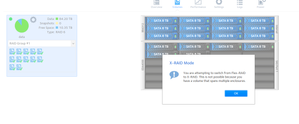
We have a Netgear ReadyNAS 4312s with 72T storage (12 * 8TB disks in RAID6). Six months back, we bought a 24-bay Netgear expansion chassis and populated it with 5 8TB disks. We had to create...

StephenB
Jun 25, 2018Guru - Experienced User
euhr wrote:
>> You should look at mdstat.log, volume.log, and perhaps rn_expand.log.
I don't see these logs in /var/log. Was looking around but couldn't find anything. Can you please let me know the location of these files?
Download the log zip file from the web ui, they are in there.
euhr wrote:
>> Have you formatted the new drive first?
Yes
Formatted them in the NAS or in a different device?
euhr
Jun 25, 2018Aspirant
>> Download the log zip file from the web ui, they are in there.
Okay, got it.. nothing interesting in the logs.
In rn_expand.log, I see this message to confirm the disk is formatted.
rn-expand[5685]: Formatting disk 3:10 (sdr)
>> Formatted them in the NAS or in a different device?
Formatted it in NAS.
- mdgm-ntgrJun 25, 2018NETGEAR Employee Retired
You can send the zip file into me if you like (see the Sending Logs link in my sig for where to send it to).
- euhrJun 25, 2018Aspirant
Hello,
I have sent an email with the logs. The issue is that nothing happens when I click on 'Expand' button. Let me know if I am missing something. Thanks
- mdgm-ntgrJun 26, 2018NETGEAR Employee Retired
You are running quite old firmware. Do you still see this on 6.9.3?
- euhrJun 26, 2018Aspirant
We haven't upgrade to it yet.. Is this a known bug in the older versions?
For me, it looks like this is a definite bug in the GUI as it does nothing while clicking Expand. Just curious, you found anything interesting in the log files?
- mdgm-ntgrJun 26, 2018NETGEAR Employee Retired
The disk looks fine and has no partition table on it as one would expect a new disk to have that is not yet added to the array.
- euhrJun 26, 2018Aspirant
Okay, so should I format it outside the NAS then? (I was under the impression the Format button in the GUI should do this, no?)
Also, just checking, you found any relevant message in the logs?
Thanks for the inputs :).
- euhrJun 26, 2018Aspirant
So, I did the formatting with the NAS.
We are running 6.8.0.
- StephenBJun 26, 2018Guru - Experienced User
euhr wrote:We are running 6.8.0.
Thx. The current options for flexraid were introduced in 6.7 (a couple of months before 6.8.0 came out).
I'd wait for mdgm-ntgr's guidance on whether you should try upgrading firmware now.
If you aren't desperately in need of space, you might consider waiting until after you get the backup NAS set up before you do a lot of troubleshooting.
- euhrJun 26, 2018Aspirant
Okay, I will wait for his guidance then.
The backup NAS is going to take some time to catch up, so we might not be able to wait for that to finish and also the backup NAS is not actually a drop in replacement for this primary NAS (we have internal limitations).
AFAICT, this should be a very straight forward thing that should work out of the box... The fact that it isn't working means that I am not doing something right or there is a software bug.
- StephenBJun 26, 2018Guru - Experienced User
euhr wrote:
AFAICT, this should be a very straight forward thing that should work out of the box... The fact that it isn't working means that I am not doing something right or there is a software bug.
I agree it should have worked out of the box - it could be an already-fixed bug that wasn’t listed in the release notes.
However, I don’t think it’s wise to have a single volume span both chassis. I’d have created two volumes, one for each.
- euhrJun 26, 2018Aspirant
>> I agree it should have worked out of the box - it could be an already-fixed bug that wasn’t listed in the release notes.
Agreed. I will check the feasablity of upgrading the firmware to the latest version (needs a bit of downtime and I will have to co-ordinate internally for the same).
In the meanwhile, is it possible to ask internally once if this is a known issue which is fixed in the newer firmware versions?>> However, I don’t think it’s wise to have a single volume span both chassis. I’d have created two volumes, one for each.
I can't recollect why we decided against it. Couple of things that I could think of are:- We thought separate RAID groups would give us a bit more high availablity (and I believe we didn't have a choice to expand RAID group 1 and hence we had to go for the RAID Group 2)
- Creating new volumes would mean creating new partitions and mount them on all machines (we are still using fstab...) and its an added overhead to manage.Any disadvantages of a single volume?
- StephenBJun 27, 2018Guru - Experienced User
euhr wrote:
Any disadvantages of a single volume?
Though your RAID groups don't span both chassis, concatenating them into one file system increases the chance of file system corruption - because the expansion raid group can get out of step with the main chassis raid group. Lost writes are more likely to affect multiple disks in the expansion chassis.
For instance, lost writes to the expansion disks could be the result of
- glitches on the SAS connection between the two chassis
- power loss that hits the expansion chassis first
- failure of the expansion unit but not the main chassis
- slower write speeds on the expansion chassis, due to bandwidth limitations on the SAS connection.
euhr wrote:
>> I agree it should have worked out of the box - it could be an already-fixed bug that wasn’t listed in the release notes.
Agreed. I will check the feasablity of upgrading the firmware to the latest version (needs a bit of downtime and I will have to co-ordinate internally for the same).I'd recommend waiting on mdgm-ntgr or another Netgear mod for advice on whether to do the firmware upgrade now, or whether it should wait until your expansion issue is resolved.
- euhrJun 29, 2018Aspirant
Noted on your points on having separate volumes.
>> I'd recommend waiting on mdgm-ntgr or another Netgear mod for advice on whether to do the firmware upgrade now, or whether it should wait until your expansion issue is resolved.
I am planning to do the upgrade tomorrow. We have to debug this further if that doesn't help. - euhrJul 02, 2018Aspirant
Over the weekend, upgraded to firmware 6.9.3 after which the Expand button worked.
The data sync is in progress and hopefully everything should be good once that is done.
Thanks everyone for your help.

Related Content
NETGEAR Academy

Boost your skills with the Netgear Academy - Get trained, certified and stay ahead with the latest Netgear technology!
Join Us!
