NETGEAR is aware of a growing number of phone and online scams. To learn how to stay safe click here.
Forum Discussion

schtroumpfmoi
Sep 22, 2023Aspirant
RN104 Remove inactive volumes Disk 3,4
Hi everyone, one of my 4 2TB drives (#2) failed in my RN104. I went ahead and bought a replacement, but after insertion it looks like i get the "remove inactive volumes disk 3,4"; with some of my dr...
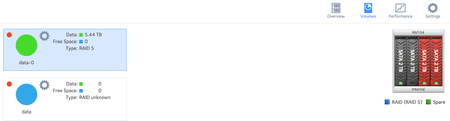
 Sep 23, 2023
schtroumpfmoi wrote:
Sep 22 13:17:49 NAS mdadm[2171]: Fail event detected on md device /dev/md0, component device /dev/sdc1
[Fri Sep 22 13:50:34 2023] sd 3:0:0:0: [sdd] tag#13 Add. Sense: Unrecovered read error - auto reallocate failed
So both sdc and sdd are detected as failed. Unfortunately not a good sign. It'd have been better if one of the disks was just out of sync.
I'm not sure if either of these is disk 1, you might want to double-check that by looking at disk-info.log.
schtroumpfmoi wrote:
I guess my main question now is: is there still a way i can force a rebuild / should i try to remove/readd the faulty disk ?
With single redundancy, you need three working disks to rebuild the fourth. You don't have that.
If the disks can be read at all, you could try cloning one or both. That might help with recovery.
RAID recovery software like ReclaiMe might be able to recover some data from the two remaining disks - not sure. You can download it and see before you pay for it. You would need a way to connect the disks to a PC (directly with SATA, or using a USB adapter/dock).
schtroumpfmoi
Oct 04, 2023Aspirant
Quick update to say that after scanning the drives with R-Studio (one by one linked with a USB to SATA adapter) i could not see the files i was looking for... So I am rebuilding the NAS clean and I fixed the email issue that had caused me not to be notified of the first signs back in July.
Thanks a lot for the insights anyways !
StephenB
Oct 04, 2023Guru - Experienced User
schtroumpfmoi wrote:
Quick update to say that after scanning the drives with R-Studio (one by one linked with a USB to SATA adapter) i could not see the files i was looking for...
You chose the wrong RAID recovery tool. OS-6 uses BTRFS for the data volume, and R-Studio doesn't support that file system.
ReclaiMe might have worked.
Related Content
NETGEAR Academy

Boost your skills with the Netgear Academy - Get trained, certified and stay ahead with the latest Netgear technology!
Join Us!
