NETGEAR is aware of a growing number of phone and online scams. To learn how to stay safe click here.
Forum Discussion

bizmate
Dec 13, 2024Tutor
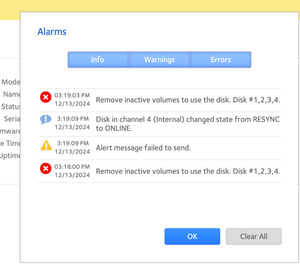
Remove inactive volumes to use the disk. Disk #1,2,3,4. troubleshooting
As per many other posts i am experiencing "Remove inactive volumes to use the disk. Disk #1,2,3,4." But i cannot find a post or a guide that gives better troubleshooting info. So far apart from thi...
bizmate
Dec 15, 2024Tutor
I am waiting for sometime to check a spare disk i used as extra backup before trying the resync also because i cannot find my docking station.
On my mac brew install telnet worked
----
$ which telnet
/usr/local/bin/telnet
----
About the RAID not re-assemblying is the command required to fix it only
mdadm --really-force
Is this the only command required? Anything else you can add please let me know.
Ie
1 - remove disk 1
2 - boot in tech support mode, is this something done at boot sequence? How can it get this done?
3 - any mdadm or other commands to execute here before the resync, ie "lsblk -o NAME,SIZE,FSTYPE,TYPE,MOUNTPOINT "
4 - what would the full resync command be?
About all the suggestions you gave i ll try to learn more. About replacing the drives with new ones this one https://fastclick.mu/toshiba-4tb-s300-surveillance-7200-rpm-128-mb-buffer/ i would say affordable one as Amazon or similar are not available here ...

StephenB
Dec 15, 2024Guru - Experienced User
bizmate wrote:
2 - boot in tech support mode, is this something done at boot sequence? How can it get this done?
See pages 28-29 in the hardware manual here:
bizmate wrote:
3 - any mdadm or other commands to execute here before the resync, ie "lsblk -o NAME,SIZE,FSTYPE,TYPE,MOUNTPOINT "
To be clear, you aren't resyncing - that cannot be done with one disk remove.
When you connect to the NAS with telnet, log in as root. The password is infr8ntdebug.
Enter these commands:
rnutil chroot
mdadm --assemble --really-force /dev/md127 /dev/sda3 /dev/sdb3 /dev/sdc3
btrfs device scan
mount /dev/md127 /data
ls /data
The ls command should include your shares if everything works.
If you see errors from any of these commands, stop at that point and let us know what they are.
Otherwise, power down the NAS, and reboot. The volume should then mount (but will be degraded due to the removed disk).
bizmate wrote:
4 - what would the full resync command be?
Again, you cannot resync with a missing disk. When you get the replacement you can hot-insert it into the empty slot (with the NAS running). The NAS will do a brief disk test, and should then add the disk to the array.
bizmate wrote:
About all the suggestions you gave i ll try to learn more. About replacing the drives with new ones this one https://fastclick.mu/toshiba-4tb-s300-surveillance-7200-rpm-128-mb-buffer/ i would say affordable one as Amazon or similar are not available here ...
The S300 is a surveillance drive - optimized for sustained write performance over read. It will work in a NAS, but I suggest the N300 instead.
- SandsharkDec 16, 2024Sensei
Before you add a new drive to re-sync, you should ponder these points:
Are your other drives just as old as the one that failed? It's always best to back up all your data before a re-sync, but it's more important the older the drives are. Re-sync puts a lot of stress on the old and the new. Are they so old that you should consider replacing them all, or do they have any SMART errors?
Is just a re-sync what you want to do? You are forcing the mdadm RAID assembly, which likely means there are errors on the "good" drives. Would a factory default and restore of your data from that backup be better (it usually is, but it does take time). If you do think all the drives should be replaced, then that's all the more reason to just start over with the new drives instead of swapping them one at a time.
- StephenBDec 16, 2024Guru - Experienced User
Sandshark wrote:
Are your other drives just as old as the one that failed?
The drives are all HGST Ultrastar. 10 years old, with about 56,000 power on hours (6.4 years). Disk 2 ( serial PK2334PBHED7KR) is showing a high spin retry count from last April, but nothing concerning after that.
It is quite possible that other disks will need to be replaced in the near future.
bizmate - Backing up the data before doing adding the new disk would be a good idea. If another disk does fail during the resync process, then you would lose all your data.
Sandshark wrote:
Is just a re-sync what you want to do? You are forcing the mdadm RAID assembly, which likely means there are errors on the "good" drives. Would a factory default and restore of your data from that backup be better (it usually is, but it does take time).
As I mentioned above, there will be some data corruption do to the lost writes, possibly of BTRFS metadata/structures. Rebuilding the volume from scratch and restoring the files from backup would give you a completely clean file system. But if you don't have that backup already, then there is no way to fix the corrupted files.

Related Content
NETGEAR Academy

Boost your skills with the Netgear Academy - Get trained, certified and stay ahead with the latest Netgear technology!
Join Us!
