NETGEAR is aware of a growing number of phone and online scams. To learn how to stay safe click here.
Forum Discussion

sigswi
Mar 15, 2017Aspirant
1 router 2 satellites from different kits!
Hi Sometime ago (before purchasing) i opened this topic, asking whether it would be possible to purchase 2 orbi kits in order to use the 2 satellites with 1 router. the response was positive htt...
sigswi
Mar 15, 2017Aspirant
yes, i pressed the synch button on the router, then ran downstairs and pressed the synch button on the satellite, if that's what you mean?
All of this after having reset to factory settings all units and before re-doing the remaining part of the set up .
didn't work. still magenta. what i am doing wrong?
PhoenixV
Mar 15, 2017Apprentice
Hi,
I have the same situation....
Install one Orbi "kit" and get it up and running so that you have the Base and the Satellite pair operating properly. I then use the ORBI app on the iPhone and select "Add Sattelite" option - go through the workflow and the third sattelite from the second kit is recognized and the settings are automatically downloaded and updated by the router from the first kit. Took me all of 2 minutes! (I'd assume that the same can be done through the web interface as well but I have not done that).
- sigswiMar 15, 2017Aspirant
to be honest before resetting to factory settings i looked everywhere on the web interface for an option to add a satellite. no luck
I'll see i i can install the app...
- PhoenixVMar 15, 2017Apprentice
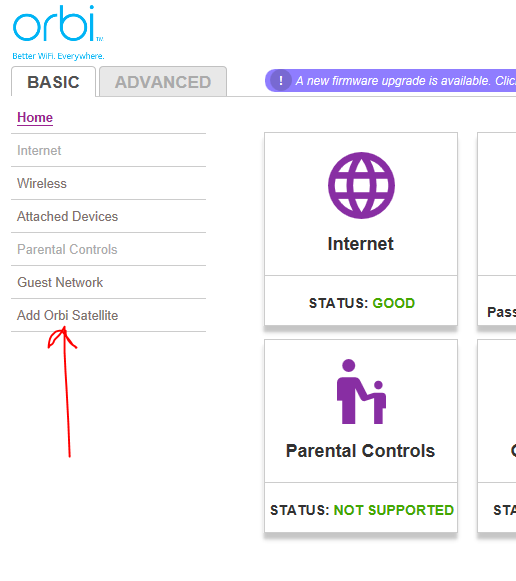
Log in to Orbi at 192.168.1.1 - Basic Tab - last option on the list in the left column.... ADD ORBI SATTELITE
- st_shawMar 15, 2017Master
sigswi wrote:to be honest before resetting to factory settings i looked everywhere on the web interface for an option to add a satellite. no luck
I'll see i i can install the app...
The add satellite option is right there on the main web interface page at the bottom left. Not sure how you could miss it. I find the app less than useless.
- sigswiMar 15, 2017Aspirant
well it's simple, the option is just not there on the web interface if router is on version v.1.3.0.26 (the factory setting version )
now that i updated the firmware version to 1.8 i can see it and extra option on the web interface basic tab