NETGEAR is aware of a growing number of phone and online scams. To learn how to stay safe click here.
Forum Discussion

TeamLevine
Aug 02, 2018Aspirant
AT&T Uverse Cable Not Working With Orbi RBK50 (AC3000)
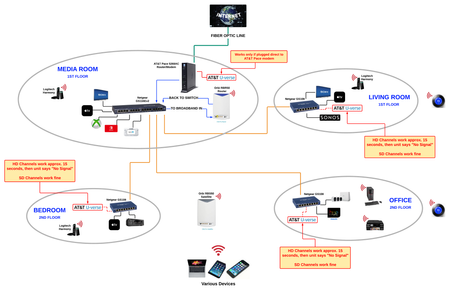
When connected through my Orbi RBK50, my AT&T Uverse cable is not working. Does anyone know how to get all Uverse receivers working properly with the Orbi router (NOT in AP mode) based on the setup b...

FURRYe38
Aug 02, 2018Guru - Experienced User
Can you try try this first?
Pace->Orbi router<GS108 Switch ->Uverse Receiver 1
<GS108 Switch ->Uverse Receiver 2
<GS108 Switch ->Uverse Receiver 3
Thus remove the GS116E switch entirely...
Is the modem in router mode or is it bridged?
The other test would be to try this:
Pace->Orbi router>GS116E Switch><GS108 Switch ->Uverse Receiver 1
GS116E Switch><GS108 Switch ->Uverse Receiver 2
GS116E Switch><GS108 Switch ->Uverse Receiver 3
TeamLevine
Aug 02, 2018Aspirant
Pace->Orbi router>GS116E Switch><GS108 Switch ->Uverse Receiver X is how I currently have it set up. Is there a change here you want me to try I'm not seeing?
I'm 99% sure I tried going from Pace->Orbi->GS108 Switches. I'll try that again tonight and report back!
The Pace modem doesn't allow for "bridging". When I configured the network for Orbi the Pace recognized I was attempting to establish a new router, and confirmed it was handing off router management to the Orbi. I've read some other posts about putting it in DMZ-Plus mode (supposedly best equivalent to bridge mode), but I've also seen some posts saying not to do that. Thoughts?
- FURRYe38Aug 02, 2018Guru - Experienced User
Please try the configuration with out the GS116 switch in the mix. I would do this, if you can, bring one of the GS108 switches and 1 of the Receivers in to the same room as the Orbi router. Connect them there if you can as this will be easier to test with to see if you can get the reciever working, then place back in remote location. If this is possible.
DMZ would be helpful in this case. 2. If you can't bridge the modem, disable ALL wifi radios on the modem, configure the modems DMZ for the IP address the Orbi router gets from the modem. Then you can use the Orbi router in Router mode.
Reason being is that your in a double NAT condition:
http://computer.howstuffworks.com/nat.htm
http://www.practicallynetworked.com/networking/fixing_double_nat.htm
 lbalAug 02, 2018Apprentice
I assume that all switches have been power cycled since changing the config on the PACE modem to work with Orbi? I only ask as there could be ARP entries within the switch that is trying to send traffic back to your old config. Are there also any static routing configs on the GS116 switch from your old config setup (assuming you are using the switch in managed mode)? Curious to see what we find here on this one as I used to have ATT and their bridge mode was hard to get working. May have to ask ATT as well if latest firmware is pushed out to the PACE modem. In trying to remember this one...there was an update coming on the PACE modems as there was a bug I believe. Just food for thought and hoping to help!
- waynealightAug 02, 2018Apprentice
a couple things.
your pace modem only has the ability to put a single client into dmz plus mode. assign the mac address to the orbi and it will directly forward all traffic to this router and assign it a proper wan address
second according to your drawing, you have 2 routers trying to assign dhcp on the same network. you need to hook the orbi directly to the modem, then to the switch. lastly ensure upnp is enabled on the orbi, and you may have to add a few port forwarding rules for uverse but it shouldnt be a big deal.