NETGEAR is aware of a growing number of phone and online scams. To learn how to stay safe click here.
Forum Discussion

TeamLevine
Aug 02, 2018Aspirant
AT&T Uverse Cable Not Working With Orbi RBK50 (AC3000)
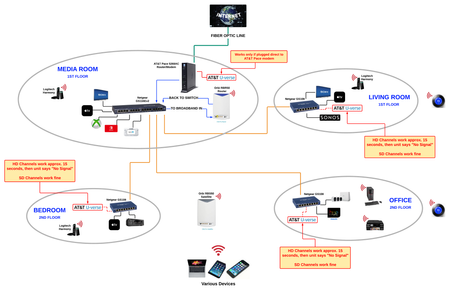
When connected through my Orbi RBK50, my AT&T Uverse cable is not working. Does anyone know how to get all Uverse receivers working properly with the Orbi router (NOT in AP mode) based on the setup b...

FURRYe38
Aug 06, 2018Guru - Experienced User
Yes it is...
So looking at what you sent me in a PM,
- Pace -->Orbi --> U-verse = NO GOOD
- Pace --> Orbi --> GS108 --> U-verse = NO GOOD
This is is bad. Either way these should be working thru the Orib.
You can try this:
Pace -->Orbi AP mode --> U-verse = ?
Take the Orbi routers IP address out fo the DMZ on the PACE. Save settings and reboot everything.
I presume if this still fails, you should make contact with NG support AND the mfr of this Uverse system your using. Ask them if they have encountered any problems or have any information on using there devices with a Orbi system in this kind of configuration. Show them your information you've posted here.
TeamLevine
Aug 06, 2018Aspirant
I'll try switching to AP mode. It'll be good info to know if it works, but I'm using the Circle Go parental controls so ultimately it needs to work as a router.
In AP mode the Pace wifi needs to be turned back on, right?
- FURRYe38Aug 06, 2018Guru - Experienced User
NO, do not turn on the wireless on the PACE.
Also wondering if this Circle app could be causing problems...:smileyfrustrated:
- TeamLevineAug 06, 2018Aspirant
Don't think so. I didn't activate Circle until couple weeks after initial setup, and been having this issue since initial...