NETGEAR is aware of a growing number of phone and online scams. To learn how to stay safe click here.
Forum Discussion

TeamLevine
Aug 02, 2018Aspirant
AT&T Uverse Cable Not Working With Orbi RBK50 (AC3000)
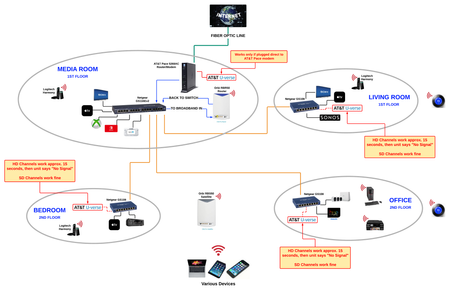
When connected through my Orbi RBK50, my AT&T Uverse cable is not working. Does anyone know how to get all Uverse receivers working properly with the Orbi router (NOT in AP mode) based on the setup b...

FURRYe38
Aug 07, 2018Guru - Experienced User
Possible that a double NAT condition is having an effect on your devices.
So if you re-configure the orbi for router mode, place it's IP address it gets from the ISP modem into the modems DMZ, this doesn't help make the Uverse devices work? No switches in the mix...With out having the Pace modem bridged, I believe you maybe stuck with AP mode with the Orbi in this configuration with your UVerse devices...
TeamLevine
Aug 07, 2018Aspirant
This issue is pushing a bit past my tech knowledge so apologies if any of this is nonsensical or redundant…
AP Mode Concerns:
I reconfigured for the Orbi to run as AP last night. As of this morning I’m seeing a few instances of WiFi disconnecting then slowly reconnecting from network - more than just a quick disconnection moment. Maybe the new Orbi as AP configurations need some time to settle down, but a bit concerned if this is going to be a problem. This in addition to the slower wifi speeds I’m seeing could be bad enough to be unacceptable (Circle parental control is, to be reasonable, “just” a feature issue vs these potential service issues).
Pace Configurations Review:
FURRYe38 - I’m sending DM various screenshots of my Pace configuration. These are the configurations when Pace was set to DMZ-Plus to the Orbi as a router. If you wouldn’t mind reviewing them to see if anything sticks out as possibly incorrectly/inefficiently configured?
FURRYe38’s Questions:
Q: “So if you re-configure the orbi for router mode, place it's IP address it gets from the ISP modem into the modems DMZ, this doesn't help make the U-verse devices work?”
A: Correct. Under this configuration the issue is clearly observed to be “via Pace = OK, via Orbi = NOT OK”.
Q: “No switches in the mix”
A: The two types of switches I use (Netgear GS108/GS116) are the only ones in the network. Orbi as router, when U-verse connected through Orbi, tested both with and without those switches came up with U-verse cable not working. When Orbi is router, U-verse cable only works if plugged directly into Pace.
Re NAT:
You mention double NAT… Want to make sure I understand you and you understand what I have on my end. In the testing I’ve done so far there has only been one active router at a time. It’s been either “Pace set to DMZ-Plus and Orbi as router” or “Pace set to router and Orbi as AP”. Wouldn’t a double NAT be if, for example, I set up a cascaded router via the Pace 5268? I haven’t touched that feature on the Pace yet. Below is screenshot of that Pace config screen. If something to consider I’ll need a bit of help doing that.
Different Modem/Router?:
What about using a different modem/router instead of the Pace 5268AC? No idea about any of these, but on dslreports I saw references to 2Wire/Pace 3800HGV-B, 3801HGV, 5268AC or Motorola/Arris NVG589/NVG599. These or another a potential option?
Different Provider?:
Lastly - at least I think! - in about 3 months my initial contract with AT&T will expire. I’ll have the option then to either stay with AT&T, or go with a different provider. Options in my area are Infinity, DirectTV and U-verse. When it comes to this issue I’m having is either Infinity or DirectTV a better/great choice?
Again…thanks a TON for the help on this! I know I’ve been asking a lot of you!
Cascading Router Config
- FURRYe38Aug 07, 2018Guru - Experienced User
TeamLevine wrote:
This issue is pushing a bit past my tech knowledge so apologies if any of this is nonsensical or redundant…
AP Mode Concerns:
I reconfigured for the Orbi to run as AP last night. As of this morning I’m seeing a few instances of WiFi disconnecting then slowly reconnecting from network - more than just a quick disconnection moment. Maybe the new Orbi as AP configurations need some time to settle down, but a bit concerned if this is going to be a problem. This in addition to the slower wifi speeds I’m seeing could be bad enough to be unacceptable (Circle parental control is, to be reasonable, “just” a feature issue vs these potential service issues).
Possible that there is and issue with Circle enabled and it's not getting disabled after changing to AP mode. Something to see if you can disable while in router mode, then change to AP mode.
Pace Configurations Review:
FURRYe38 - I’m sending DM various screenshots of my Pace configuration. These are the configurations when Pace was set to DMZ-Plus to the Orbi as a router. If you wouldn’t mind reviewing them to see if anything sticks out as possibly incorrectly/inefficiently configured?
Will check them out when the picture gets approved.
FURRYe38’s Questions:
Q: “So if you re-configure the orbi for router mode, place it's IP address it gets from the ISP modem into the modems DMZ, this doesn't help make the U-verse devices work?”
A: Correct. Under this configuration the issue is clearly observed to be “via Pace = OK, via Orbi = NOT OK”.
Q: “No switches in the mix”
A: The two types of switches I use (Netgear GS108/GS116) are the only ones in the network. Orbi as router, when U-verse connected through Orbi, tested both with and without those switches came up with U-verse cable not working. When Orbi is router, U-verse cable only works if plugged directly into Pace.Ok.
Re NAT:
You mention double NAT… Want to make sure I understand you and you understand what I have on my end. In the testing I’ve done so far there has only been one active router at a time. It’s been either “Pace set to DMZ-Plus and Orbi as router” or “Pace set to router and Orbi as AP”. Wouldn’t a double NAT be if, for example, I set up a cascaded router via the Pace 5268? I haven’t touched that feature on the Pace yet. Below is screenshot of that Pace config screen. If something to consider I’ll need a bit of help doing that.
Your in a double nat condition with the Pace and Orbi acting in router modes. Something to ask ATT about and see if they can give some info about connecting another router to there system.
Different Modem/Router?:
What about using a different modem/router instead of the Pace 5268AC? No idea about any of these, but on dslreports I saw references to 2Wire/Pace 3800HGV-B, 3801HGV, 5268AC or Motorola/Arris NVG589/NVG599. These or another a potential option?
Recommended to have a stand alone modem if possible, however if you have additional TV or Phone services with the ISP, it may not be possible. Are these UVerse devices appart of the ATTs media service or something you added?
Different Provider?:
Lastly - at least I think! - in about 3 months my initial contract with AT&T will expire. I’ll have the option then to either stay with AT&T, or go with a different provider. Options in my area are Infinity, DirectTV and U-verse. When it comes to this issue I’m having is either Infinity or DirectTV a better/great choice?
Cable would be preferred. With cable you can by your own modem, as long as it's on the ISPs supported modems list. Then you can get you a stand alone modem and will probably avoid all of this.
Again…thanks a TON for the help on this! I know I’ve been asking a lot of you!
Cascading Router Config