NETGEAR is aware of a growing number of phone and online scams. To learn how to stay safe click here.
Forum Discussion

zafkir
May 23, 2018Aspirant
Dropped packets on RBR40
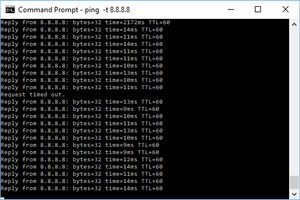
I have tried taking all satelites offline, changing the settings to Disable MIMO, Daisy Chain and Fast Roaming and IPv6. I've also tried firmware versions 2.0.0.56 and 2.1.4.10
Packets are regular...
budy
May 23, 2018Luminary
zafkir wrote:
I have tried taking all satelites offline, changing the settings to Disable MIMO, Daisy Chain and Fast Roaming and IPv6. I've also tried firmware versions 2.0.0.56 and 2.1.4.10
Packets are regularly delayed by > 2 seconds or time out entirely.
I have my device in AP mode, connected via lan to my fios quantum gateway, with all of the wifi networks turned off on the the verizon router.
Well… that picture does not provide a lot of information. What about the ping summary. Randomly dropped packets are not uncommon on the internet. In fact tcp has been designed to cope with exactly that.
Instead of trying to ping something outside your network, better try pinging some reliable host on your internal network, best doing it via a wired connection. Then move to a wireless connection and you will start seeing packet loss, since WiFi is inherently unreliable.
The next approriate "target" would be the edge router of your ISP. Since your Orbi runs in AP mode, you maybe able to lookup the default gateway of your internet router and try to ping that gateway, as it is the last host before your packets are entering the internet…
zafkir
May 23, 2018Aspirant
fair... here is one where i'm pinging my orbi router which should be the fastest (ping results are almost identical when i ping the verizon router). Several packets are in the 2900 range, which if i'm playing a game like overwatch is unacceptable. With my stock verizon router i wasn't getting any times over ~100ms which was working fine and i never had response times hitting that number. If this is to be expected with this system, then that's unacceptable for me, and i'll return it (not trying to be snarky, just honest)
- zafkirMay 23, 2018Aspirant
Another post on this forum describes how to create different 2.4ghz and 5ghz SSIDs. When i do this, I get no packet loss or latency over 100ms when connected to either ssid. I'd rather not do this, as it eliminates some of the features and isn't officially supported. Does this help troubleshoot or illustrate my issues?
- budyMay 24, 2018Luminary
Aside from not being able to see the picture you posted in your previous comment, the behaviour you're describing could actually be caused by the bandsteering protocol of the Orbi. However, this would mean, that your client would have to switch its WiFi connection while pinging - have you checked that?
When I'm pinging Google's 8.8.8.8, I am getting a pretty good result:
64 bytes from 8.8.8.8: icmp_seq=77 ttl=59 time=11.413 ms
64 bytes from 8.8.8.8: icmp_seq=78 ttl=59 time=12.679 ms
64 bytes from 8.8.8.8: icmp_seq=79 ttl=59 time=11.883 ms
64 bytes from 8.8.8.8: icmp_seq=80 ttl=59 time=10.256 ms
^C
--- 8.8.8.8 ping statistics ---
81 packets transmitted, 81 packets received, 0.0% packet loss
round-trip min/avg/max/stddev = 9.784/11.959/15.560/1.050 ms
And this is over the WiFi of my RBR40. Ping times over LAN will be some ms less…
- zafkirMay 24, 2018Aspirant
I reverted to a single ssid, and I ran netsh wlan show interfaces for a few minutes, around the ping spikes and this is what i got everytime (with the signal strength changing slightly)
C:\Users\Dave>netsh wlan show interfaces

There is 1 interface on the system:

    Name                   : Wi-Fi
    Description            : Realtek RTL8811AU Wireless LAN 802.11ac USB 2.0 Network Adapter
    GUID                   : 96ac869a-c0be-47ba-91ac-3aa51bcc4ac6
    Physical address       : e8:4e:06:51:e4:32
    State                  : connected
    SSID                   : GoHokies
    BSSID                  : 8c:3b:ad:fb:26:b7
    Network type           : Infrastructure
    Radio type             : 802.11ac
    Authentication         : WPA2-Personal
    Cipher                 : CCMP
    Connection mode        : Profile
    Channel                : 48
    Receive rate (Mbps)    : 54
    Transmit rate (Mbps)   : 390
    Signal                 : 88%
    Profile                : GoHokies

    Hosted network status  : Not available
It appears that since teh channel is 54 every time... it's always on 5ghz. So it doesn't appear to be switching.