NETGEAR is aware of a growing number of phone and online scams. To learn how to stay safe click here.
Forum Discussion

Iamnobody
Mar 15, 2017Aspirant
How to disable 2.4G in my Orbi
Hi,
I have a Orbi, but how can I disable the 2.4G, I don't want to use it.
Otherwise, What is the connection between Router and Satellite? Is it 5Ghz?
4 Replies
- schumakuGuru - Experienced User
Iamnobody wrote:What is the connection between Router and Satellite? Is it 5Ghz?
The Orbi wireless distribution mesh based on dedicated a AC1750 5 GHz band radio, independant of the 5 GHz access point radio.
If there is no control to enable/disable the 2.4 GHz radios ...
-Kurt
- IamnobodyAspirant
schumaku wrote:
Iamnobody wrote:What is the connection between Router and Satellite? Is it 5Ghz?
The Orbi wireless distribution mesh based on dedicated a AC1750 5 GHz band radio, independant of the 5 GHz access point radio.
If there is no control to enable/disable the 2.4 GHz radios ...
-Kurt
Hello Sir,
If my understanding is right, that means I won't get link rate over 866Mbps in 11ac even my client is 3x3, because the backhaul used it, right?
I can't find any button to disable 2.4GHz on GUI, there is only a button to hide 2.4G SSID boardcast, however, Orbi only allows one SSID for 2.4G & 5G, why is no way to enable/disable 2.4GHz.
- schumakuGuru - Experienced User
Iamnobody wrote:If my understanding is right, that means I won't get link rate over 866Mbps in 11ac even my client is 3x3, because the backhaul used it, right?
Correct. FIts to my observations, several test reports, and last but not least Netgear KB: At what speed and bandwidth can my Orbi system transmit data?
The math and the marketing aspect of "AC3000" was discussed before, ie. here https://community.netgear.com/t5/Orbi/Orbi-AC3000-or-really-AC1266/m-p/1172945#M1150
Iamnobody wrote:
I can't find any button to disable 2.4GHz on GUI, there is only a button to hide 2.4G SSID boardcast, however, Orbi only allows one SSID for 2.4G & 5G, why is no way to enable/disable 2.4GHz.
Answered above by TomMac Have no Orbi accessible as of writing..
-Kurt
Iamnobody wrote:
Hi,
I have a Orbi, but how can I disable the 2.4G, I don't want to use it.
Otherwise, What is the connection between Router and Satellite? Is it 5Ghz?
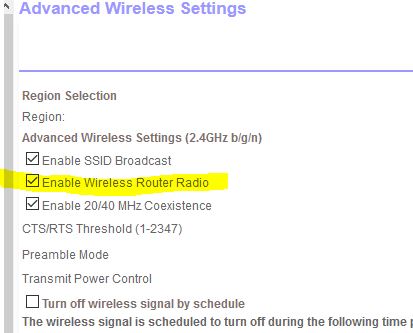
Go into main router , go to advanced >advance setup>wireless settings
toggle off 2.4 radio, save and exit