NETGEAR is aware of a growing number of phone and online scams. To learn how to stay safe click here.
Forum Discussion

Mooose
Jan 30, 2019Luminary
Massive packet loss over Ethernet backhaul
I believe I have read all the threads on this topic and tried the suggested solutions that are relevant to my particular network. My apologies if I have missed something!
My Orbi RBK50 (one rou...
- Feb 06, 2019
Mooose Good troubleshooting and interesting observations. It's clear that the packet loss is directly related to the wired backhaul.
I'm now running the ongoing beta software (2.3.0.23) and I can see that NG has done quite good improvements on wired device handling. Would you want to test this SW and see if you will see improvements? If yes, please PM to ChristineT and ask to get the SW download links.
Mooose
Feb 05, 2019Luminary
(Sorry about the multiple reposts, it seems the forum deletes my post when I attempt to add images.)
I basically tried the approach above, with the exception that the updated and reset virgin Orbi's startup wizard process wanted the satellite connected and laptop connected through wifi before proceeding.
Once the network was up in its default configuration I wired one laptop with wifi disabled to the router and one to the satellite.
After each of the following steps I performed a long and successful ping test:
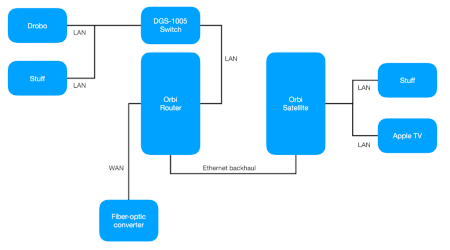
- Wire the Drobo to the satellite
- Add a short high quality Cat 6 between the router and satellite, and wait for the backhaul connection to stabilize
- Add the DGS-1005D switch between the satellite and the Drobo
- Add additional wired devices to the switch
- Move the satellite to the remote location and wait for the 5G backhaul connection to stabilize
- Wire the Nintendo Switch and the Apple TV to LAN ports of the satellite
- Wire the DGS-1005D with the Drobo and Ikea Gateway to the router
- Connect the WAN port to the fiber-optic converter
- Connect the long backhaul Ethernet cable and wait for the connection to stabilize
- Connect a third computer to the network through wifi
Every time I added a wired device I reserved the IP address, and when I added the wifi devices I reserved all their addresses as well.
At this point I let the ping test run all day, with almost perfect results, and I was about ready to proclaim myself a believer in voodoo.
Here is a typical run:
I changed the default wifi SSID to what it was previously allowing other devices already configured to rejoin.
Failure!
I realize now that what I failed to do in the very basic setup I tried first was to disable (or rename) the Orbi wifi, and that my wifi devices were still connected during the test.
I have tried loads and loads of things during the last week, including creating a guest network with the old SSID and password where the wifi devices could not see each other or the rest of the network, none of which produced different results.
My conclusions are that:
- If my wifi devices and the Ethernet backhaul are connected there is significant packet loss (typically about 15% but up to 80% in some tests)
- If I disconnect the Ethernet backhaul and wait for the 5G backhaul to establish the packet loss goes away
- If I rename the wifi so that all wifi devices are kicked off the network the packet loss goes away
- When there is packet loss, it typically happens to devices that are at the other end of the Ethernet backhaul, others are fine
- Keeping an eye on the ping stream the chunks of packet loss to different devices seem fairly synchronized i.e. 192.168.1.5 and 192.168.1.10 will drop pings at the same time
The reasonable thing to do would be to configure a new wifi network and add devices back one at a time. However, I've already lost a week of productivity to this and I do not have more time to spend. The devices include five wifi speakers, four Ring devices, two Z-wave gateways, three headless computers and a printer which all would require the wifi swapping configuration dance.
I guess my options now are to live with the high latency or throw the Orbi out and try something else, neither are good options.
I really don't want to live with the latency as it is so much higher than it needs to be for the wired devices.
Here's one of the tests with the Ethernet backhaul conducted on a wired computer:
And the same test with 5G backhaul:
The average ping for devices on the other end of the backhaul is typically about 0.3 ms versus 3.3 ms with 5G backhaul, which is really depressing.
(In the examples above 192.168.1.1 and 192.168.1.5 are wired devices at the other end of the backhaul and 192.168.1.3 and 192.168.1.8 are wired devices connected at the same end. The rest are wifi connected to either router or satellite.)

ekhalil
Feb 05, 2019Master
Mooose wrote:
............ The devices include five wifi speakers, four Ring devices, two Z-wave gateways, three headless computers and a printer which all would require the wifi swapping configuration dance.
............
What happens to you shows for sure that you have loops in your system:
- Can you please check again carefully that none of your devices can -by any means- have both wired and wireless connection to Orbi?
- I asked this before, please make sure Daisy Chain is disabled (unchecked in the advanced wireless settings).
- CrimpOnFeb 05, 2019Guru - Experienced User
You mention five wireless speaker systems. There are other threads in this forum describing various problems with Sonos speakers. I, myself, have only a single soundbar attached to my TV, so I have no expertise to offer. The impression I get, however, is that some speaker systems set up their own WiFi networks to "talk among themselves", perhaps to steam the same audio simultaneously in different rooms.
The implication (to me) is that these devices can be connected to two WiFi networks at the same time. IStreams from Orbi WiFi could go into one speaker and through the the speaker WiFi to another speaker. God knows what would happen if broadcast packets get into this stream.
It might be a fairly simple experiment to power off the five speaker systems and see if the packet loss goes away.
Thinking back to the original post, where wireless backhaul had "no problem", but wired backhaul showed dramatic Ping packet loss, how could which devices are connected have any bearing? However, I also seem to recall a post describing how packet loss went away until more devices were added.
Please forgive me if this suggestion is totally ridiculous.
