NETGEAR is aware of a growing number of phone and online scams. To learn how to stay safe click here.
Forum Discussion

TechToyTV
Dec 02, 2016Tutor
Orbi Guest Wifi Settings
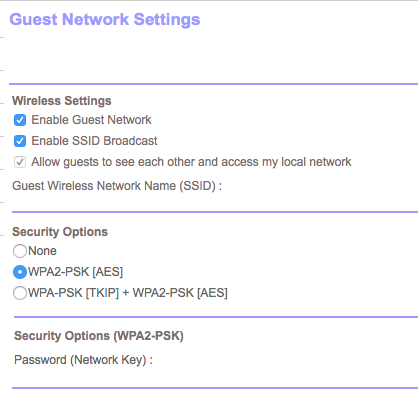
Anyone know why the option to allow guests access to network is greyed out? I would rather not have guest being able to access my local network (see photo below)
15 Replies
hi
is the orbi in router mode or AP mode
as here in router mode the allow guests access to network is selectable , i havnt tried it in ap mode but i dont think guest wifi is selectable in ap mode ether
- It's in AP mode since I have FIOS
hi
as far as i was led to believe guest wifi shouldnt work at all in ap mode as its the upstream device that would control this , the orbi in ap mode doesnt do vlan or anything else
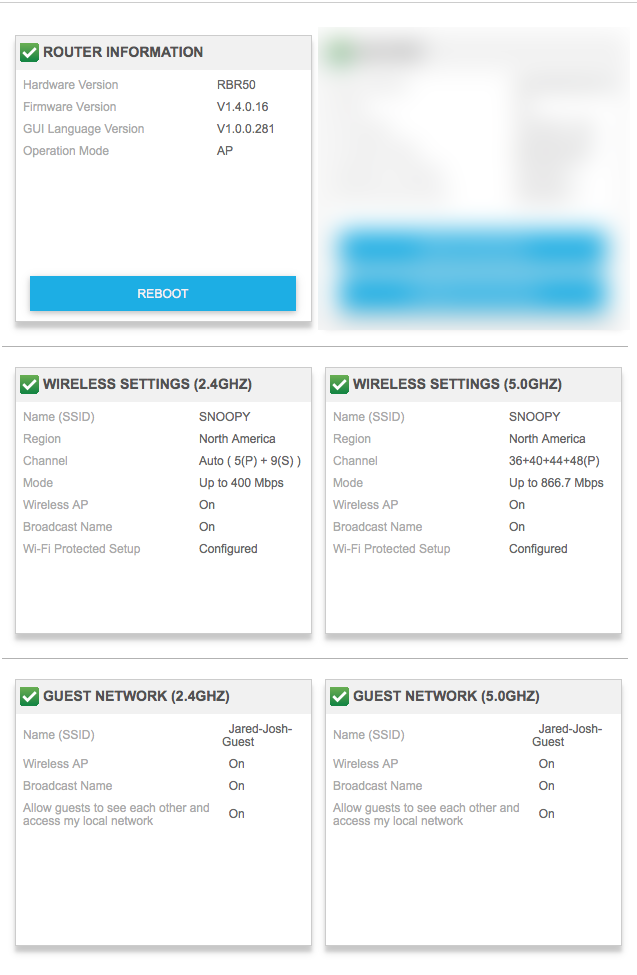
It does work in AP mode (as seen below)
- That's strange because the Netgear Nighthawk x6 I had been using previously let me control all of that. The FIOS router does not handle any of the wifi
- Flash008LuminaryYes,
Devices are treated the same using AP mode. Both guest and non-guest devices land on the same subnet giving guest devices full access to your non guest devices with no way to isolate and/or separate.
Hence my comment to Netgear...what was their point. This is not a guest network if guests have access to the non guest devices. - BeachBum65AspirantAgreed Flash. While pleased to see the Guest option, I also found that I could not "uncheck" the option that allows guest access to the rest of my network. Hopefully this is rectified soon - surely it is not a big deal to fix this. I never had a problem doing this with other routers.
- BeachBum65AspirantI should add that I tested while on guest network and verified that I could get to other parts of my network, media server, etc.