NETGEAR is aware of a growing number of phone and online scams. To learn how to stay safe click here.
Forum Discussion

jamesdecker24
Aug 18, 2018Aspirant
Orbi hardwired satellite issues - can't see satellite; browser admin panel won't connect
Very large house footprint and really, really want to get by with only base station and satellite. Living room (most used wifi - imainge a bunch of teenagers on their phones ignoring the world) and ...
jamesdecker24
Aug 18, 2018Aspirant
Fixed (sort of) - thanks FURRYe38
Option 1 apparently isn't an option, per AT&T
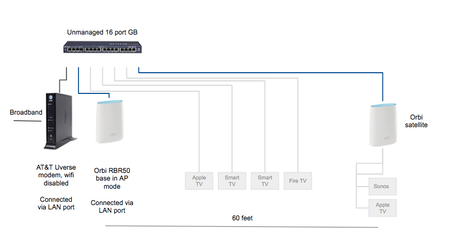
Option 3 is how I thought I had it set up, but I actually had it in the WAN port. Discovered that too late. :P
So I decided to go with #2, (followed directions here) but before hardwiring the satellite I decided to just hook it up completely wireless to at least baseline the performance. It's working very well in the main areas (big improvement over my old setup). New network looks like this:
I'm going to let this run for a bit to benchmark it (see if the teens complain) and then maybe take a shot at replacing the 8 port switch with the satellite and hardwiring it. I can try one other location to test the wired backhaul performance (curious if anyone has benchmarked improvements). Then maybe try it as a fully wired satellite to replace the 8 port switch.
The 16 port is a Netgear GS116 unmanaged. Trying to keep all the networking gear same manufacturer.

FURRYe38
Aug 18, 2018Guru - Experienced User
Ok, sounds good. Just making sure your switch isn't managed. Orbi doesn't like Managed switches for some reason. Hope the new configuration works better.