NETGEAR is aware of a growing number of phone and online scams. To learn how to stay safe click here.
Forum Discussion

peter_peterson
Jan 10, 2023Aspirant
Orbi RBR40 + RBW30s dropping connection - what is optimal layout?
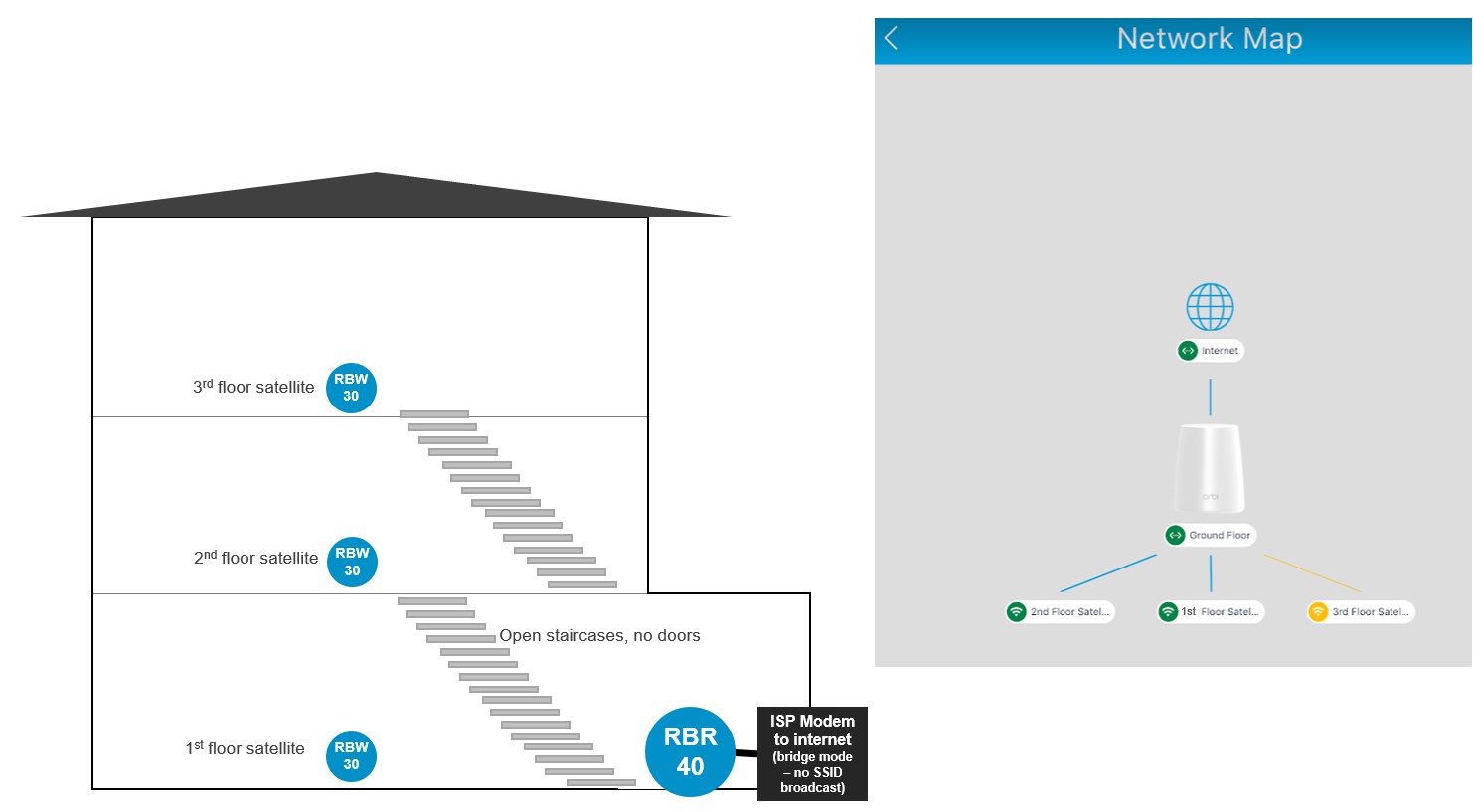
Hello friends! I am experiencing regular WiFi dropouts on my Netgear Orbi setup in a multistorey illustrated in the attached drawing. The RBW30s are directly vertical to each other on each floor with little obstruction between. Yet each RBW30 (firmware 2.6.2.2) satellite connects directly to the RBR40 (firmware 2.7.4.24) base unit, instead of daisy-chaining in a mesh, despite the top floor being a considerable distance from the RBR40. I believe this is causing the 5-6 devices in each floor to disconnect regularly. Sometimes a couple of the satellites daisy chain in the network map, and devices flip between satellites time to time. I often see the satellites with an orange ring light meaning disconnected. Speeds are generally also sluggish given I have a 500mbps connection coming into the main Orbi RBR40.
I believe this is the set I have though I could not find the tag in associated products: https://www.netgear.com/home/wifi/mesh/rbk33/
Does anyone have any recommendations on how to improve my setup?
3 Replies
- CrimpOnGuru - Experienced User
Thanks for the drawing. I am not at all surprised that the 1st and 2nd floor satellites both choose the router. "Good" is the best it gets. Orbi units have typical dipole antennas which radiate a "do nut" shaped pattern, so the weakest signal is directly above and below. Would it be possible to try the 3rd floor satellite in different locations? (The best thing about Orbi satellites is how easy it is to move them.)
- peter_petersonAspirant
Thanks very much for the help. I've moved my setup to something like the attached drawing now. The signals show as "good" on the network map but 1. devices like the one indicated on the ground floor have very low signal (yet it's attached to the 1st-floor satellite and is fairly close by). 2. The 2nd-floor satellite still connects to the main router, this may be fine that it is connected but I don't think this is passing the optimum signal up the house as its speeds are way slower at this distance. Should the satellites ideally be daisy-chained when in a tall house?
Can we better measure the link between the satellites beyond the Netgear color coding red/yellow/green?
When you say a donut, I understand you mean like a figure "8" but sideways, meaning directly above and below is the weakest.
- CrimpOnGuru - Experienced User
Very good questions.
peter_peterson wrote:
Should the satellites ideally be daisy-chained when in a tall house?
Daisy Chain is not 'preferred'. It is sometimes the only way a satellite can get a strong enough signal. (As in this case.)
peter_peterson wrote:
devices like the one indicated on the ground floor have very low signal (yet it's attached to the 1st-floor satellite and is fairly close by).
Define "fairly close by". WiFi is affected by distance and building materials. I once had an ideal location for a security camera, but then realized that the path to the WiFi access point went through about 10 2x4 studs. (The camera was up against one side of the wall and the access point was about 15 ft. away next to the other side of the same wall.) Going through a bunch of bricks would not be good for the WiFi signal.
peter_peterson wrote:
Can we better measure the link between the satellites beyond the Netgear color coding red/yellow/green?
Strange that you should ask. On the original Orbi, there is a telnet command that displays the exact signal level and transmittion rates between Orbi units. Netgear removed telnet from the product over a year ago (maybe longer?) There is a program on the internet that will enable telnet at https://github.com/bkerler/netgear_telnet (This is not a trivial exercise.) After logging in with "admin" and the admin password, type the command:
satelliteinfo wifi
peter_peterson wrote:
When you say a donut, I understand you mean like a figure "8" but sideways, meaning directly above and below is the weakest.
Like a do nut lying flat, yes: